New Launch | Build AI Agents on WhatsApp that qualify & convert 24/7 · Explore More

Login

WhatsApp AI Agent for Applications

Most applications don't get rejected - they get abandoned. Build the Application AI Agent in minutes & let it walk every applicant from half-finished form to submitted, on WhatsApp.

No coding needed!

olena-sergienko-dIMJWLx1YbE-unsplash.jpg

What Your Application AI Agent Handles

Every step between "I want to apply" and a submitted application, handled inside WhatsApp.

Tells Them Exactly What's Needed

Which documents, which format, what the deadline is. The list that's usually buried three clicks deep on your website, delivered in one message.

Answers the Doubt That Stops the Form

"Do I need the migration certificate?" "Is the photograph mandatory?" Answered in seconds, so a small question doesn't become an abandoned application.

Brings Back the Half-Finished Ones

Started but never submitted is where most applications die. An approved reminder reopens the chat & the agent picks up exactly where they left off.

Takes the Application Fee in Chat

Secure payment link, paid on WhatsApp, no redirect to a portal that asks them to log in again.

Answers "What's the Status?"

Connected to your system, the agent tells an applicant where things stand - instead of your office fielding the same call forty times a day.

Works in the Applicant's Language

English, Hindi, Hinglish or anything in between - the agent matches how the applicant writes.

How to Build Your Application AI Agent in Minutes

Here's how a real brand goes from zero to a live Admission AI Agent on WhatsApp.

Build Your Agent from Your Website

Click AI Agent, add your website, and AiSensy automatically builds an agent trained on your business.

  • Website (required)

  • Business type

  • Anything special it should know? (optional)

  • Business context (optional)

Then hit ✨ Create agent.
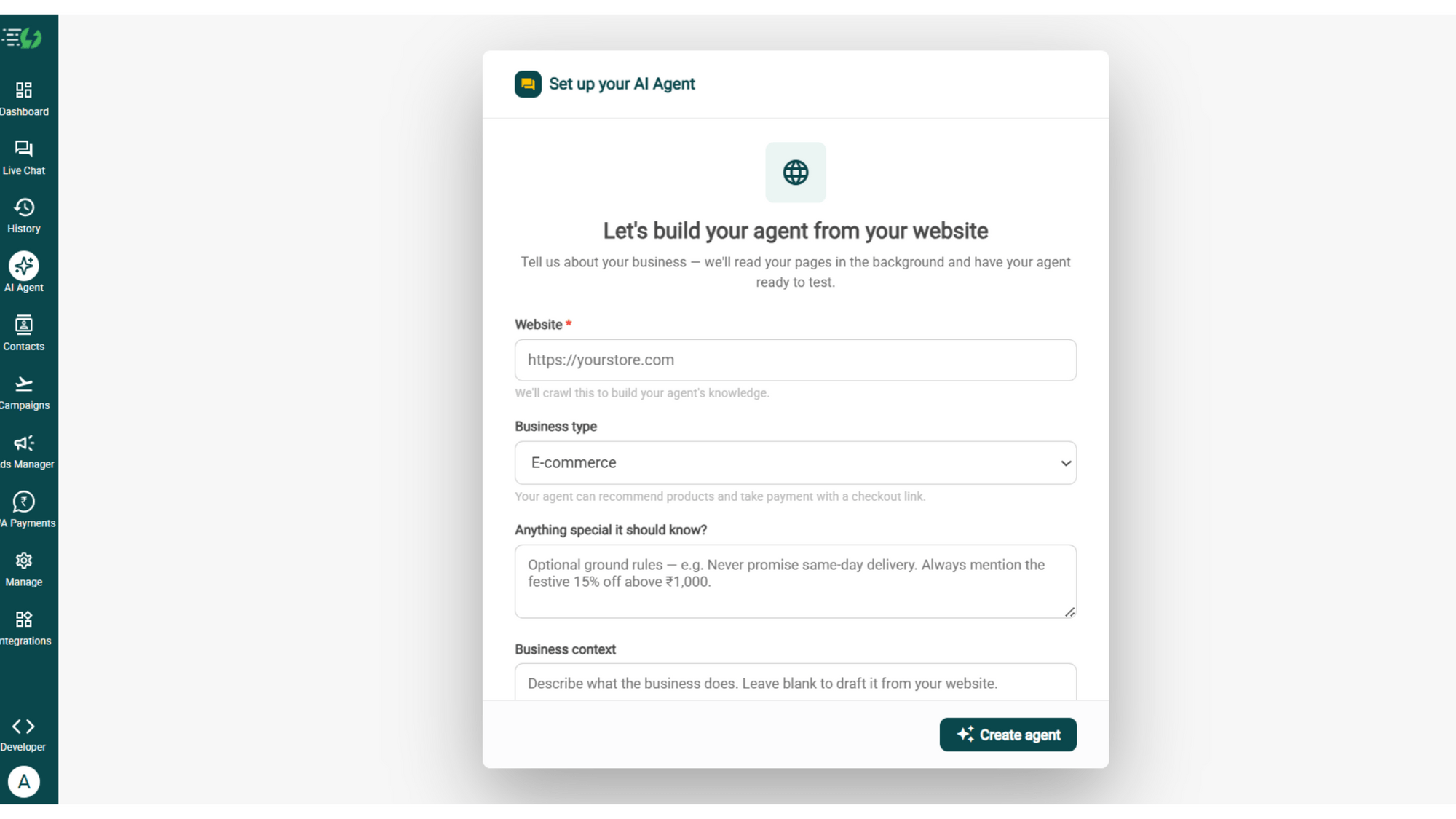
image (4).png

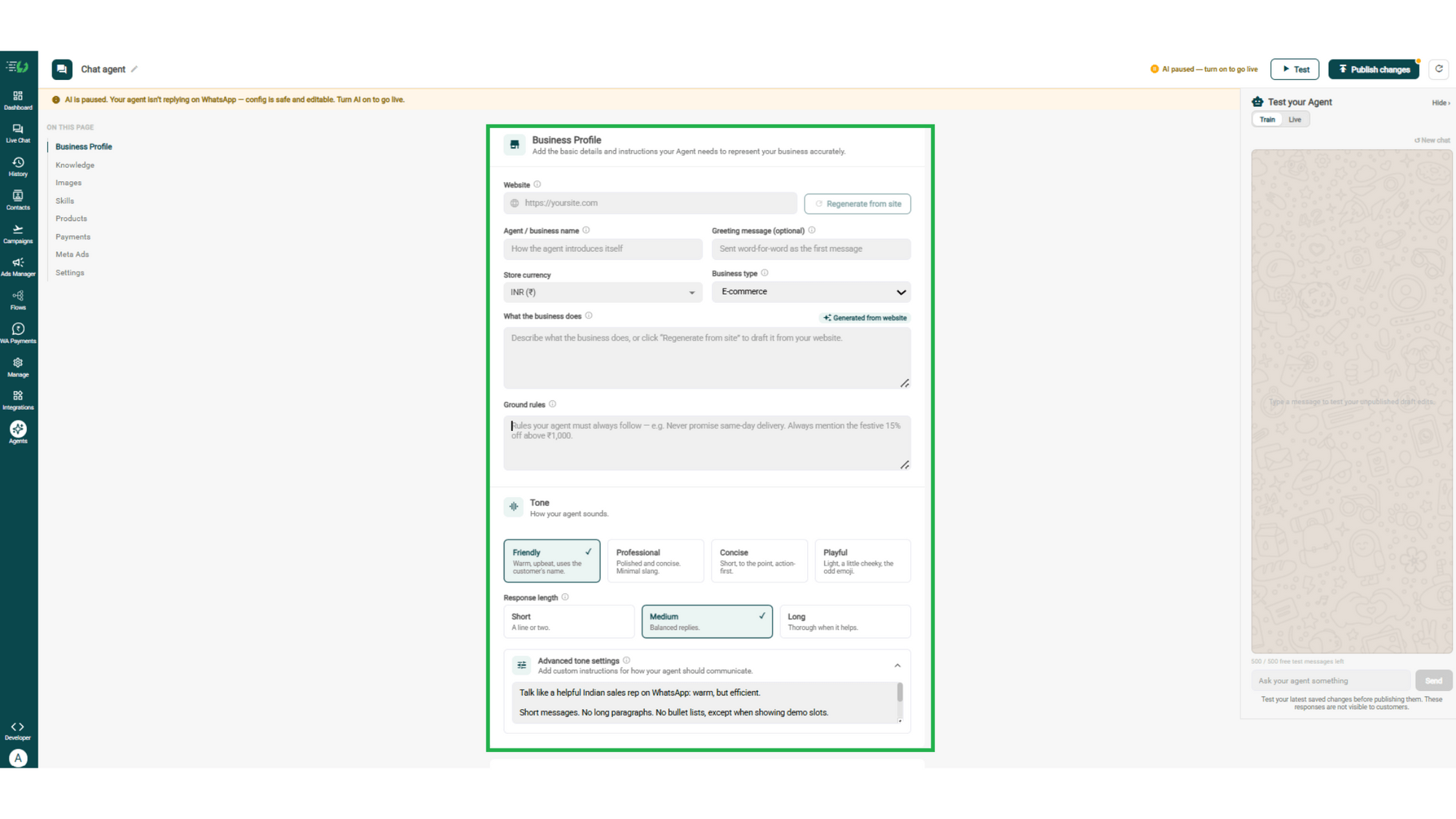
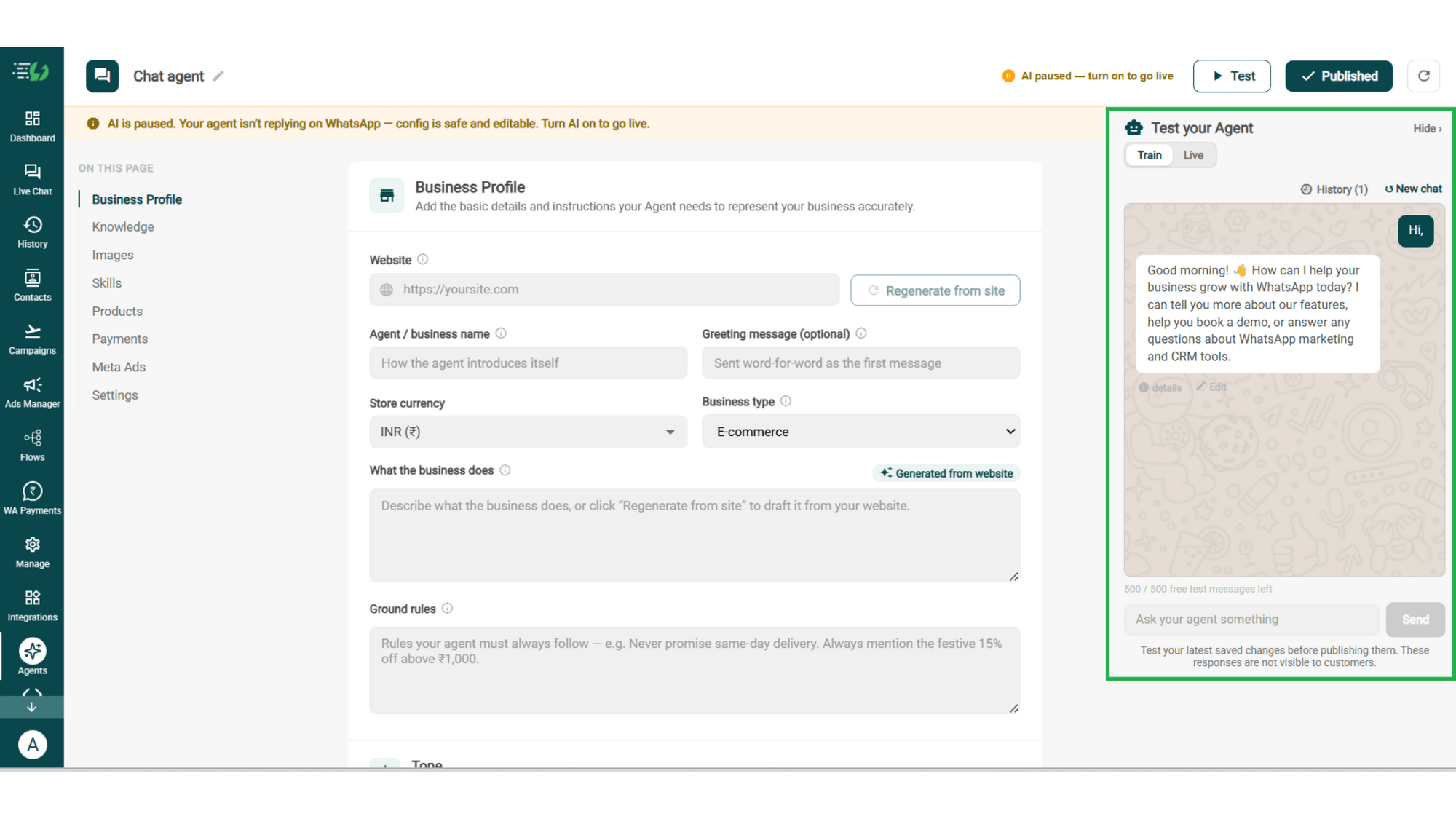
Add Your Business Profile

Add your website & AiSensy auto-generates your business description. Set your agent's name, greeting, and a few ground rules it must always follow.

  • Website

  • Agent/business name

  • Greeting message (optional)

  • Store currency

  • Business type

  • What the business does

  • Ground rules

business profile.png

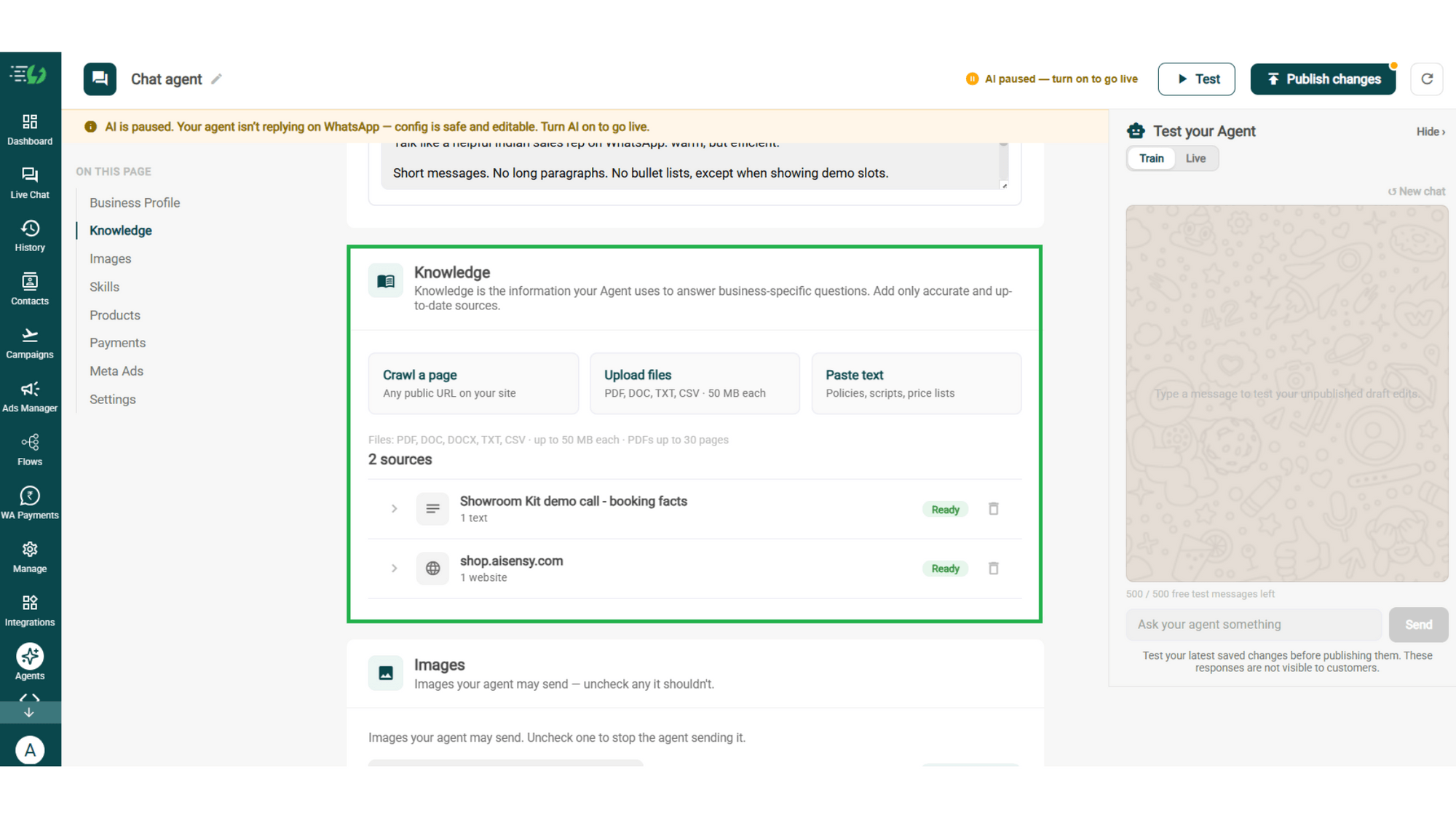
Train the Agent with Your Knowledge

Train the agent on your business - it answers from your information, not generic replies. Every source shows "Ready" once learned.

Details to be filled are:

  • Crawl a page (website URL)

  • Upload files (PDF, DOC, TXT, CSV - up to 50MB each)

  • Paste text (policies, scripts, price lists)
knowledge.png

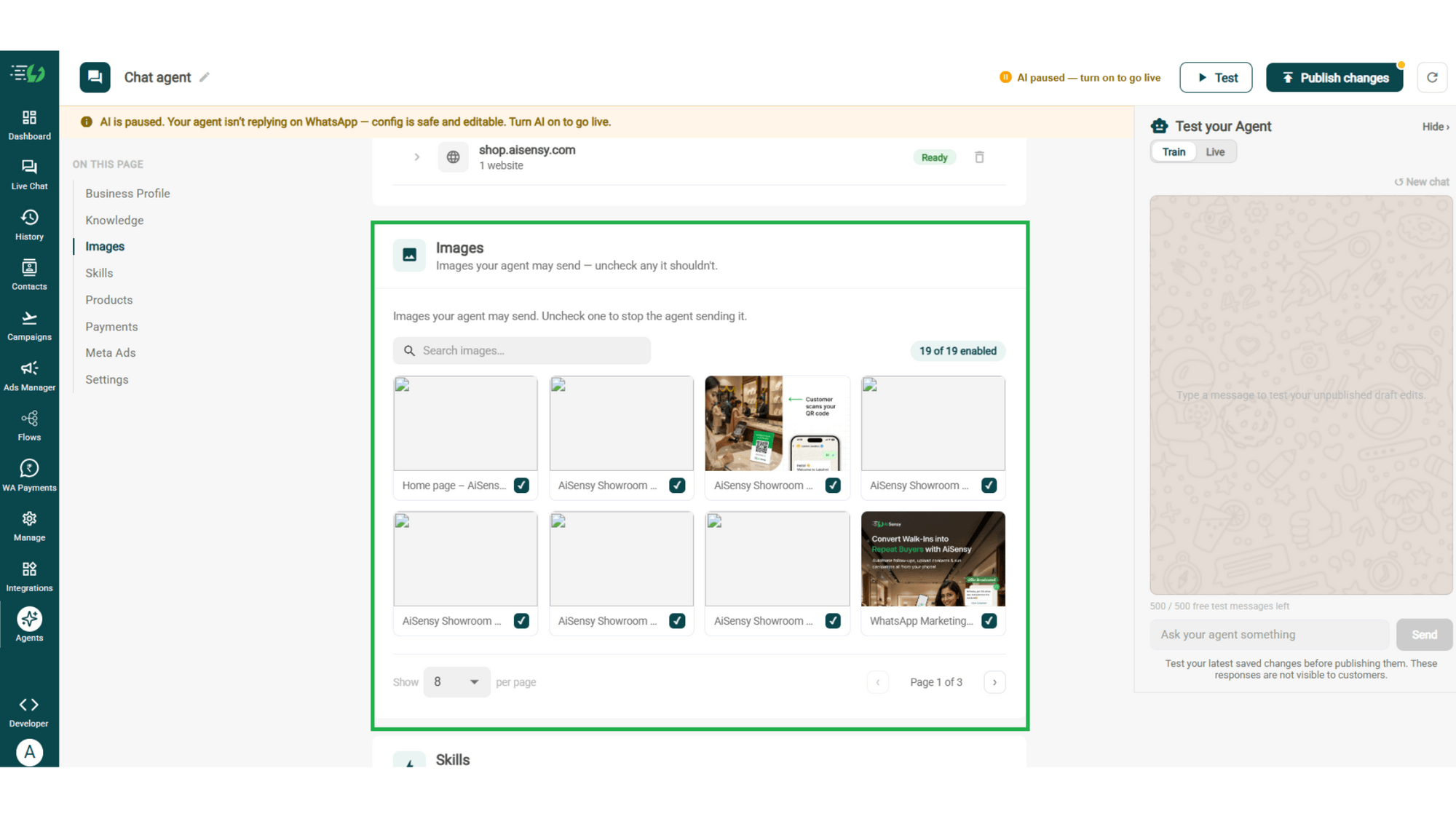
Choose the Images It Can Share

Control the visuals your agent can share in chat - product shots, catalogs, offers. Untick any image it shouldn't send.

  • Image library (enable/disable per image)

  • Search images

images.png

Create the Application Skill

Skills are the jobs your agent does. Open Add Skills and check the prebuilt list first - there's no Application skill there, so hit Create custom, name it Application, and pick Task skill as the type.

  • What kind of skill is this (Task skill)

  • Icon & name (Application)

  • When should the agent use it?

  • Instructions

  • Add skills

Enable It on Your Agent

Your new skill lands in the Skills list. Switch it on, expand it to set your qualifying questions, your cut-off and where a qualified applicant should go, then hit Done.

  • Skills list

  • Enable the Admissions skill

  • Qualification signals

  • Qualify threshold

  • Route a qualified applicant to (counsellor / CRM / booking / nurture)

  • Done

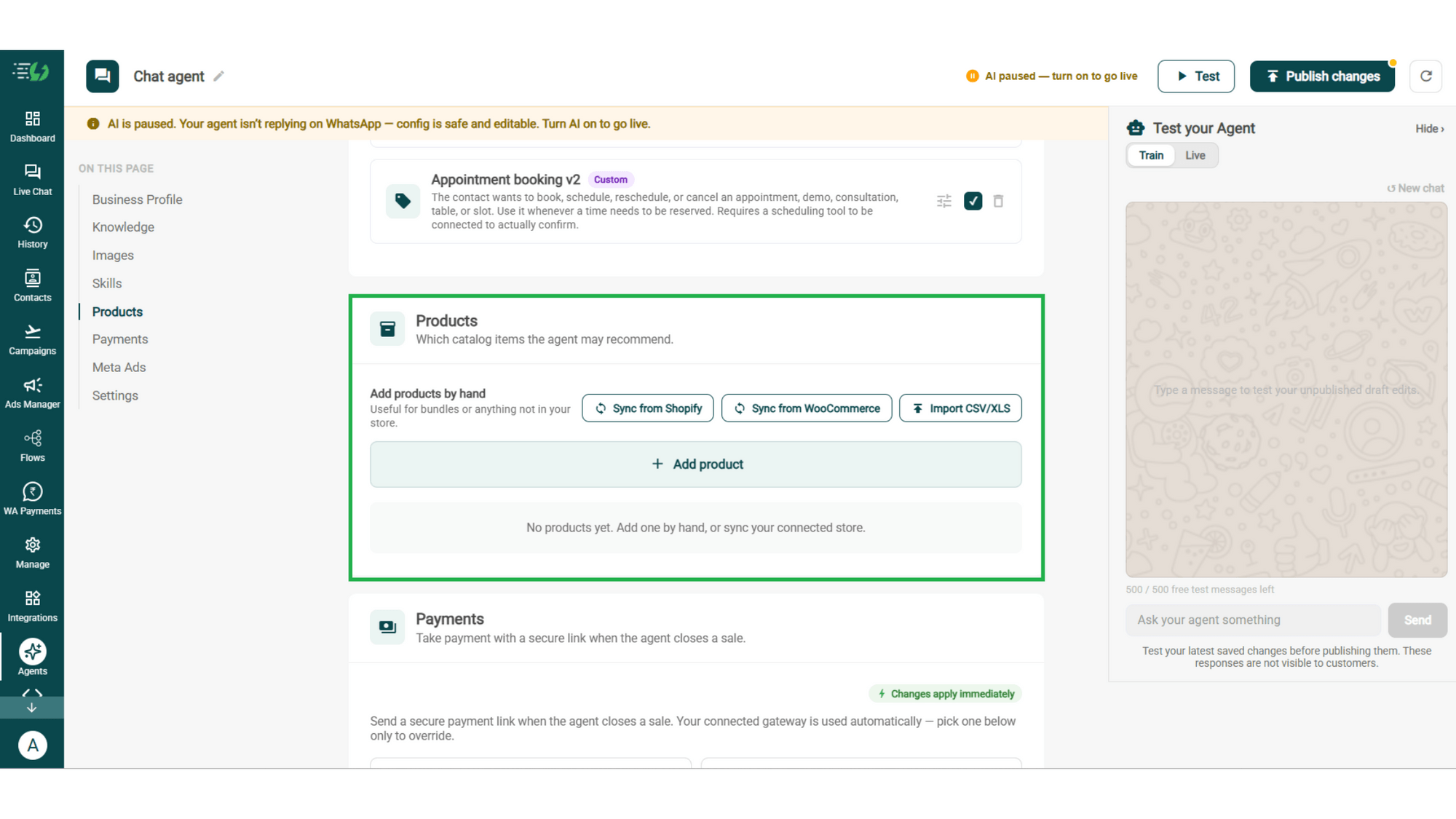
Add Your Products

Choose which catalog items the agent can recommend - so every suggestion comes from your actual range.

  • Catalog products (select what the agent may recommend)

  • Add products by hand (for bundles or items not in your store)
products.png

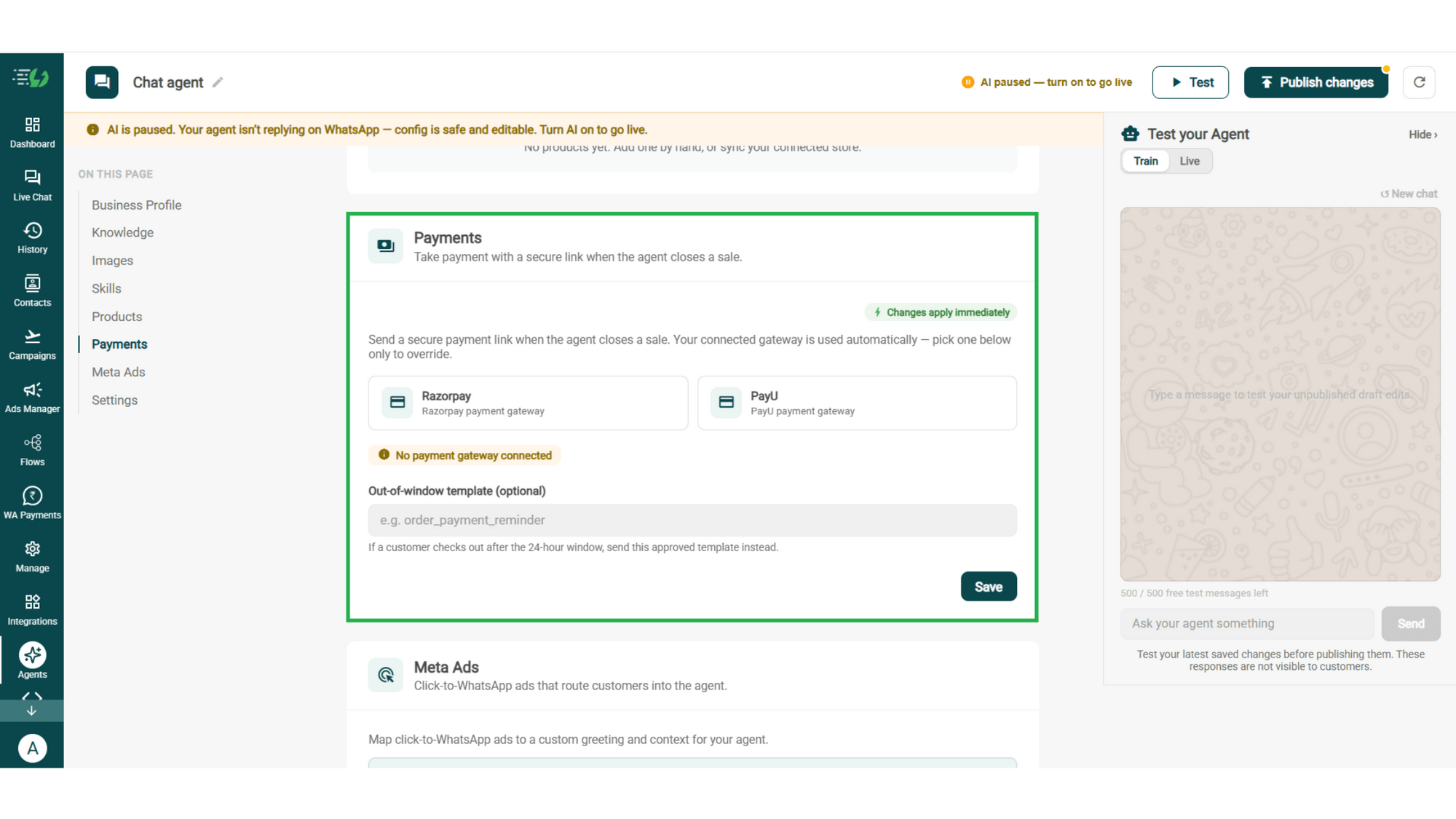
Connect Your Payment Gateway

Connect your payment gateway so the agent closes sales with a secure payment link, right inside the chat.

  • Payment gateway (Razorpay or PayU)

  • Out-of-window template (optional)

payments.png

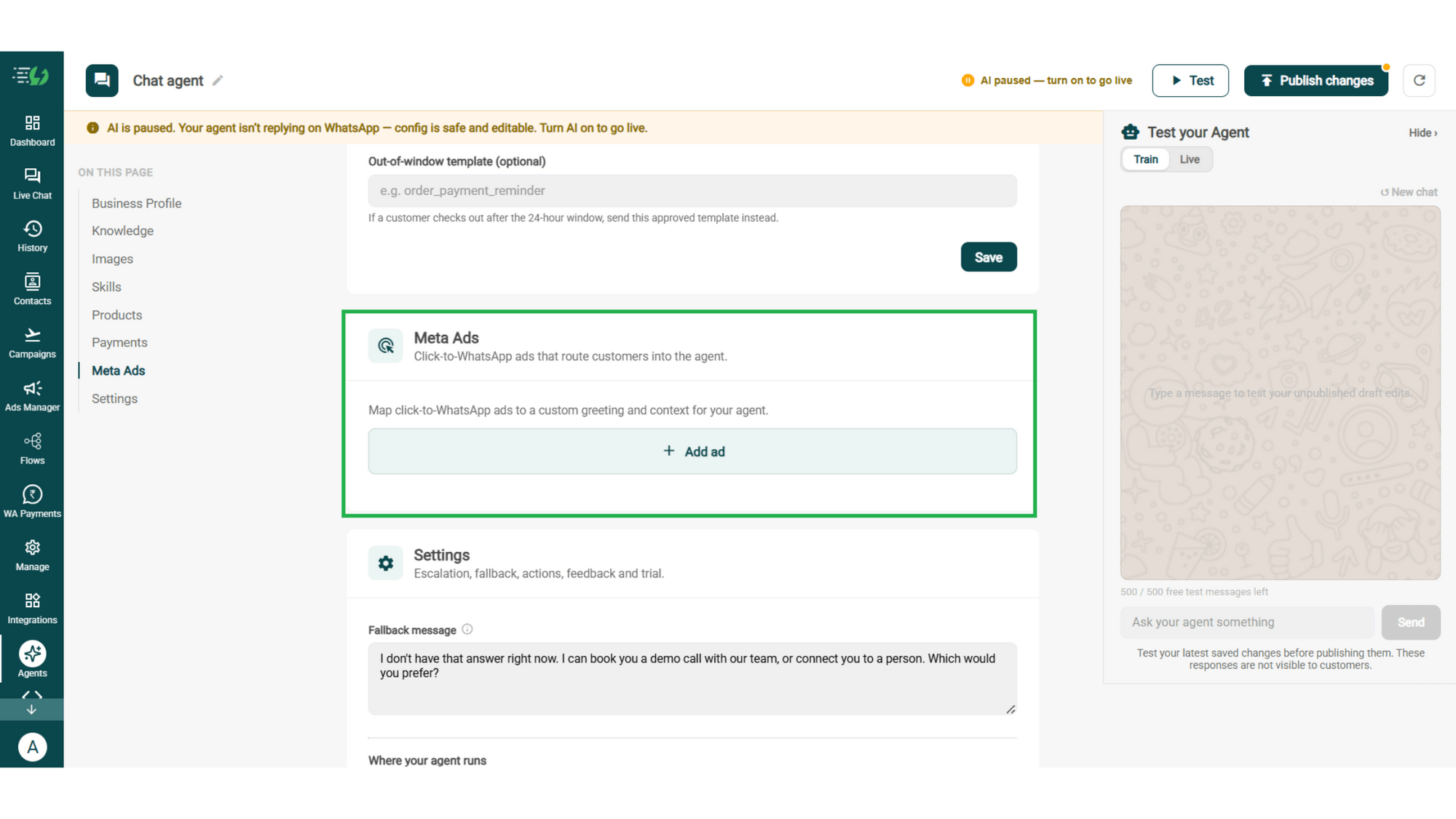
Link Your Meta Ads (Optional)

Running Click-to-WhatsApp ads?

Map each ad to a custom greeting & context, so the agent knows exactly which ad brought the customer in.

  • Add ad (map ad → custom greeting & context)
meta ads.png

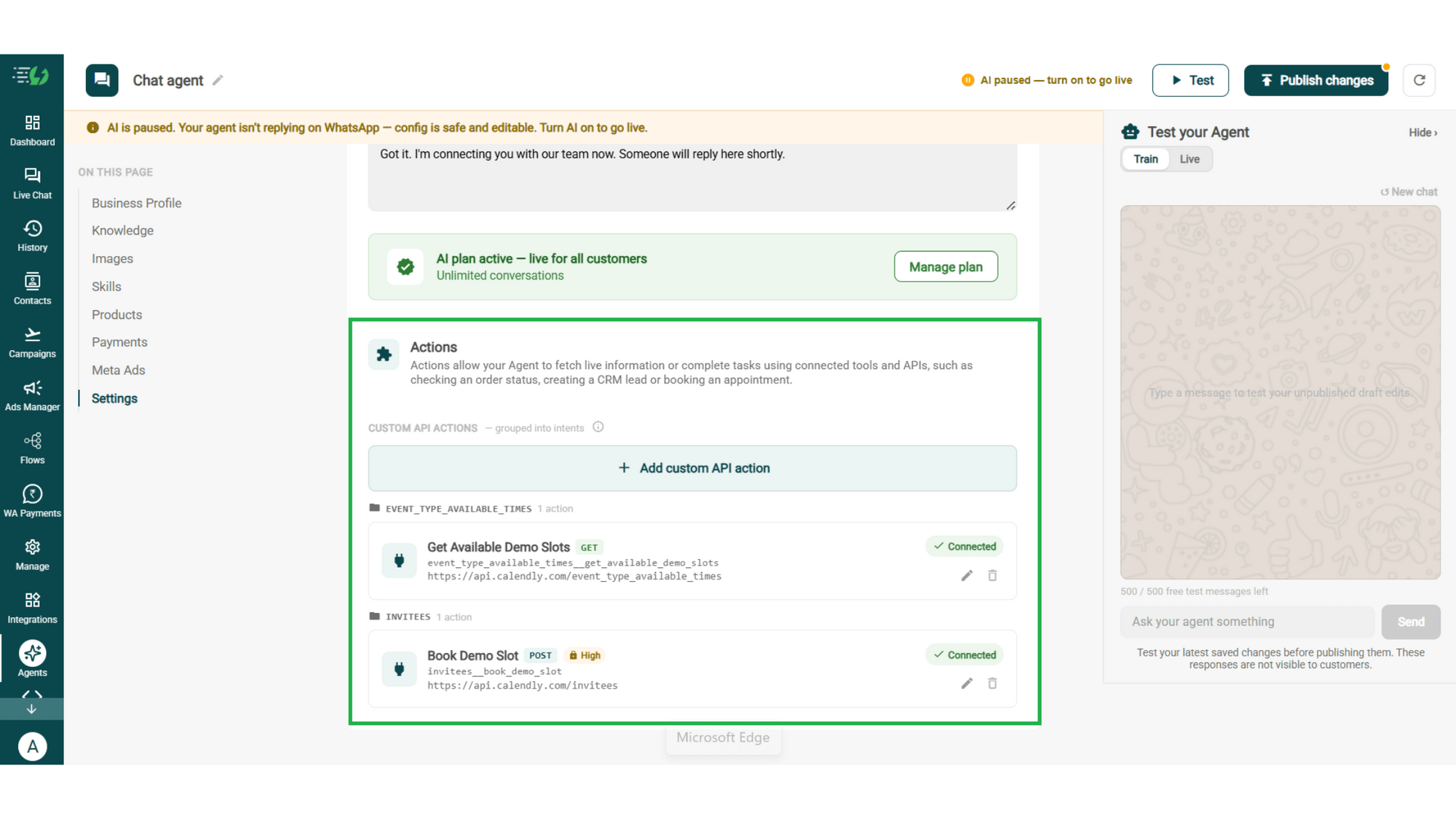
Connect Tools & APIs

Give your agent superpowers - connect tools & APIs so it can fetch live information or complete tasks like booking appointments.

  • Custom API actions (e.g. check order status, book a slot)

  • AI plan (manage your plan)

Action.png

Test, Publish & Go Live

Chat with your agent before your customers do - 500 free AI messages to trial it. Happy?

Publish, switch the AI on & you're live.

  • Test your Agent panel (Train/Live modes)

  • Publish

  • AI on/off toggle

testing.png

How an Application Gets Finished

A real conversation, step by step - the applications you'd otherwise have lost.

  • The Stall

    Three days after they started the form, your approved reminder goes out: "Your application is still incomplete - need a hand?"

  • The Blocker

    "I'm stuck on documents." The agent lists exactly what's outstanding, in the format you accept, and where to send it.

  • The Doubt

    "Do I need the migration certificate if I'm from the same state?" Answered from your own rules, instantly. No email, no waiting until Monday.

  • The Submission

    Everything's in. The agent shares the payment link, the fee is paid in chat, and the application is submitted. Two weeks later they ask for an update and the agent tells them - no call to your office.

  • olena-sergienko-dIMJWLx1YbE-unsplash.jpg

    The Application AI Agent Works Even Better With…

    One number, one team - agents for every stage of the admission cycle.

    Admissions AI Agent

    Comes first. It qualifies the enquiry and routes it to a counsellor - this agent takes over once they decide to apply.

    Appointment Booking AI Agent

    Interviews, document verification slots and campus visits, booked in the same chat.

    Customer Support AI Agent

    Handles the general questions - hostel, scholarships, transport - that aren't about the application itself.

    Simple Pricing. Every Agent Included.

    One plan unlocks the entire library - deploy any AI Agent, or build your own.

    ₹3,500

    Per Month
    Buy Now

    $99

    Per Month, Billed Annually
    Buy Now

    WhatsApp AI Agent Features

    Access every pre-built AI Agent in this library, plus the no-code builder to create your own - trained on your business and live on WhatsApp in minutes.

    • 3,500 AI messages every month

    • 500 FREE AI messages for testing

    • Knowledge Base Q&A - train it on your website & documents

    • Long-term customer memory

    • No-code builder to customize any agent

    • Tool calling, skills & API integrations

    FAQ

    Frequently asked questions answered

    What does the Application AI Agent do?

    It gets started applications finished. It tells applicants exactly what's outstanding, answers the questions that stall a form, takes the fee, and reports status afterwards - so fewer applications die halfway.

    How is this different from the Admissions AI Agent?

    Admissions works before the application - it qualifies an enquiry against your criteria and routes serious ones to a counsellor. This agent works after that, on people who've already decided to apply. Institutes usually run both, one after the other.

    Can it accept my applicants' documents?

    It tells them exactly which documents are needed, in what format, and where to submit them. Whether files come through the chat itself depends on how you've set up your submission process - talk to us about your flow.

    Can it chase incomplete applications?

    Yes, with an approved template. An AI agent replies rather than cold-messaging, so a reminder template reopens the conversation and the agent picks up from there.

    Can it take the application fee?

    Yes. Connect Razorpay or PayU and the agent sends a secure payment link in chat, so nobody has to log back into a portal to pay.

    Can it tell an applicant their status?

    Yes, once your system is connected under Tools & APIs. The agent looks up the application and reports where it stands, instead of your office answering the same call all day.

    What happens when it can't answer?

    You set a fallback message, and anything outside its scope goes to your team with the full conversation attached. Nobody ends up stuck mid-application with no reply.

    Does it work in Hindi and other languages?

    Yes. The agent replies in the language the applicant writes in, including Hinglish.

    Can I test it before applicants see it?

    Yes. You get 500 free AI messages to chat with your agent in Train mode, and up to 3 WhatsApp test numbers before going live. Nothing you test is visible to applicants.

    How much does the Application AI Agent cost?

    It's included in the AI Agent plan at ₹3,500 a month. That one plan unlocks every pre-built agent in the library plus the no-code builder to create your own - you're not paying per agent.