New Launch | Build AI Agents on WhatsApp that qualify & convert 24/7 · Explore More

Login

WhatsApp AI Agent for Appointment Booking

Fill your calendar without a single phone call.

Train the ready-made Appointment Booking AI Agent on your services & hours, and let it book, reschedule and cancel round the clock.

No coding needed!

olena-sergienko-dIMJWLx1YbE-unsplash.jpg

What Your Appointment Booking AI Agent Handles

Every step of booking a slot happens inside WhatsApp, taking the load off your front desk.

Shows Real Availability

Connected to your scheduling tool, the agent offers slots that are genuinely free - so nobody waits for someone to ring them back.

Books the Slot Inside the Chat

The customer picks a time & it's confirmed on the spot. No forms, no app download, no phone tag.

Reschedules & Cancels Too

Plans change. The agent moves or cancels the booking itself and frees the slot, instead of leaving it to sit empty.

Asks What You Need First

Service, branch, name, anything else you require - collected before the slot is held, so your team isn't chasing basics later.

Confirms in Writing, Every Time

Your own confirmation message goes out the moment a slot is booked, so the customer has the details in the chat they already use.

Books in Your Customer's Language

English, Hindi, Hinglish or anything in between - the agent matches how your customer talks.

How to Build Your WhatsApp Appointment Booking AI Agent in Minutes

Here's how a real brand goes from zero to a live Appointment Booking AI Agent on WhatsApp.

Build Your Agent from Your Website

Click AI Agent, add your website, and AiSensy automatically builds an agent trained on your business.

  • Website (required)

  • Business type

  • Anything special it should know? (optional)

  • Business context (optional)

Then hit ✨ Create agent.
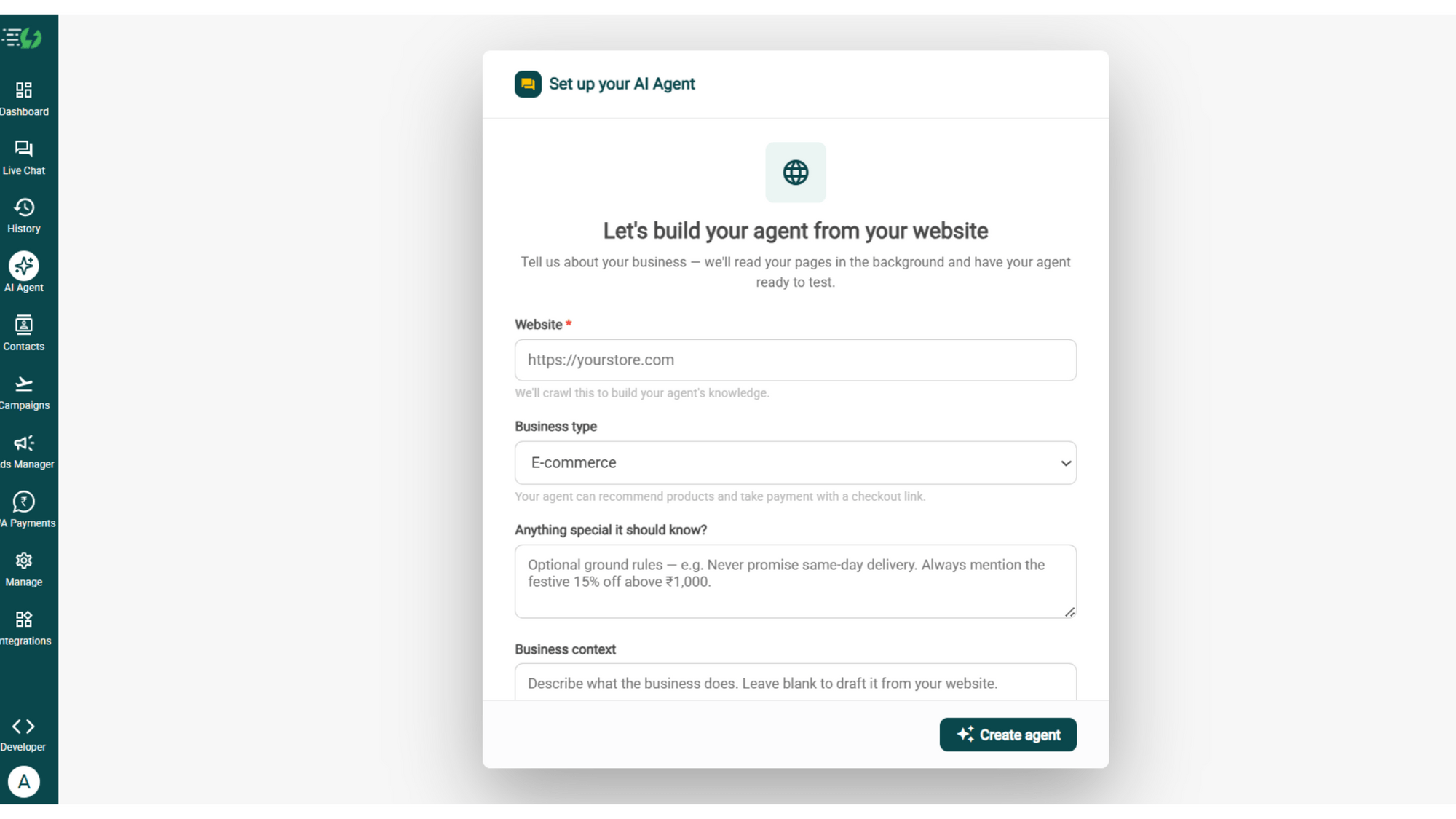
image (4).png

Add Your Business Profile

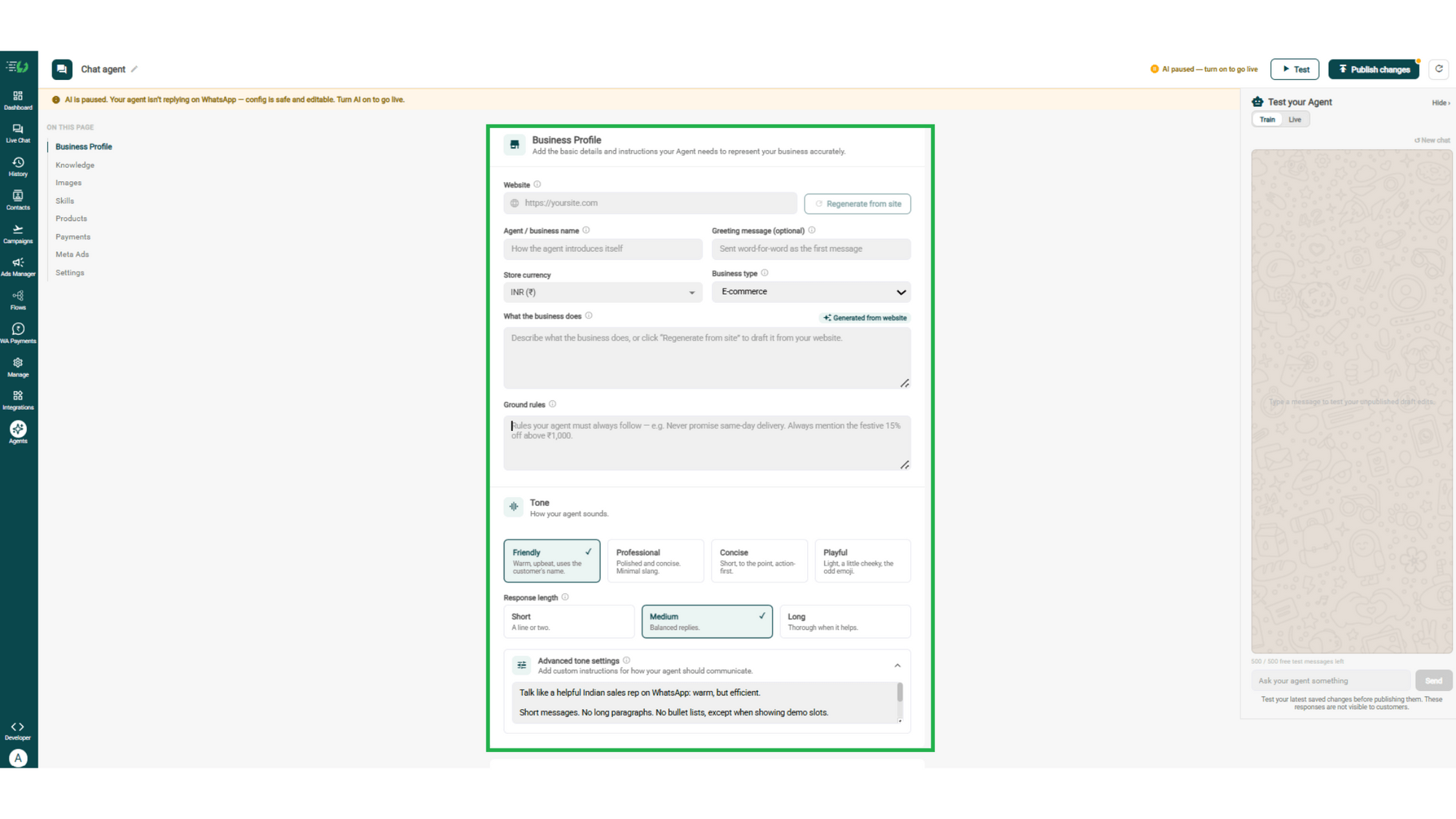
Add your website & AiSensy auto-generates your business description. Set your agent's name, greeting, and a few ground rules it must always follow.

  • Website

  • Agent/business name

  • Greeting message (optional)

  • Store currency

  • Business type

  • What the business does

  • Ground rules

business profile.png

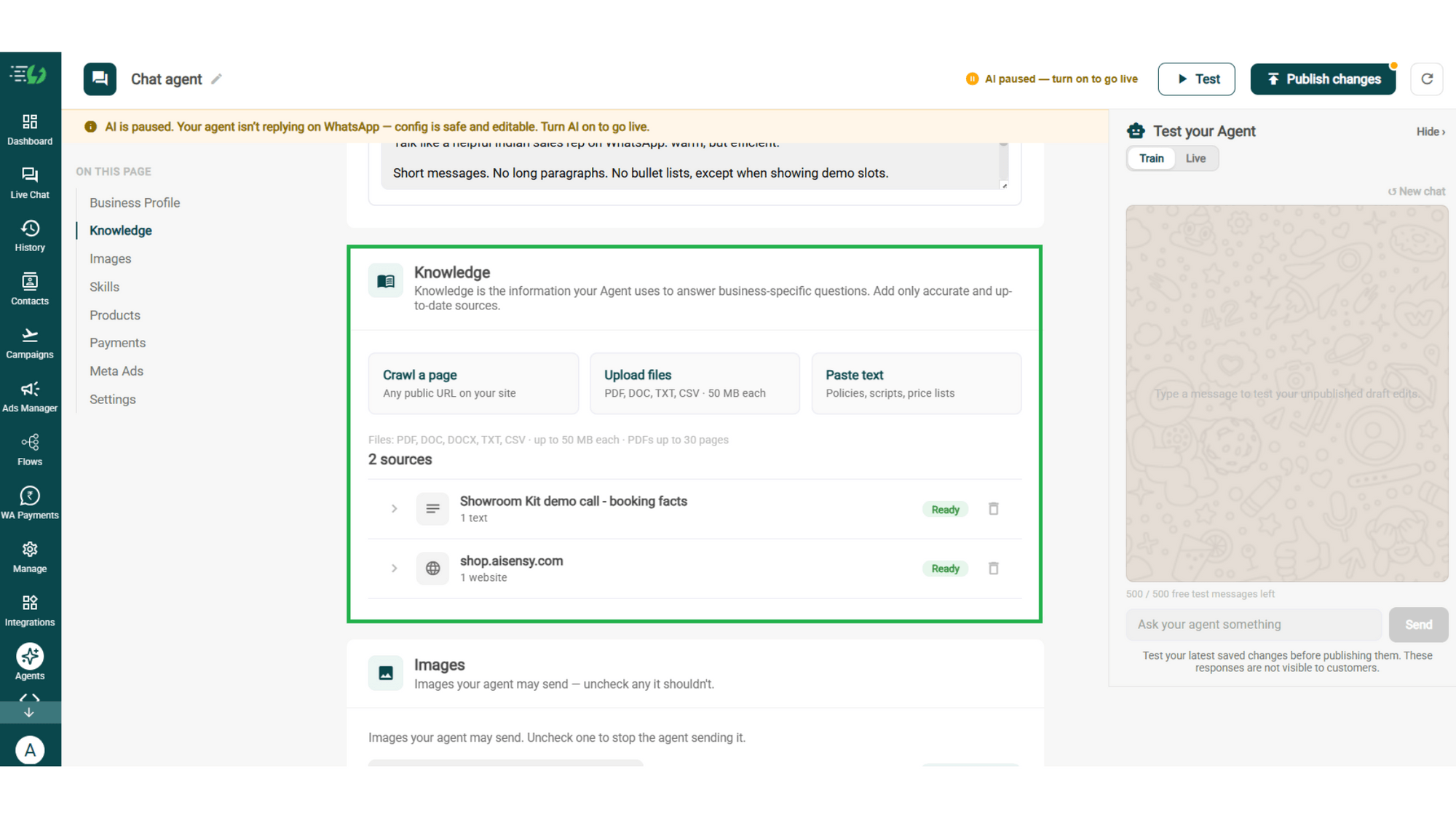
Train the Agent with Your Knowledge

Train the agent on your business - it answers from your information, not generic replies. Every source shows "Ready" once learned.

Details to be filled are:

  • Crawl a page (website URL)

  • Upload files (PDF, DOC, TXT, CSV - up to 50MB each)

  • Paste text (policies, scripts, price lists)
knowledge.png

Choose the Images It Can Share

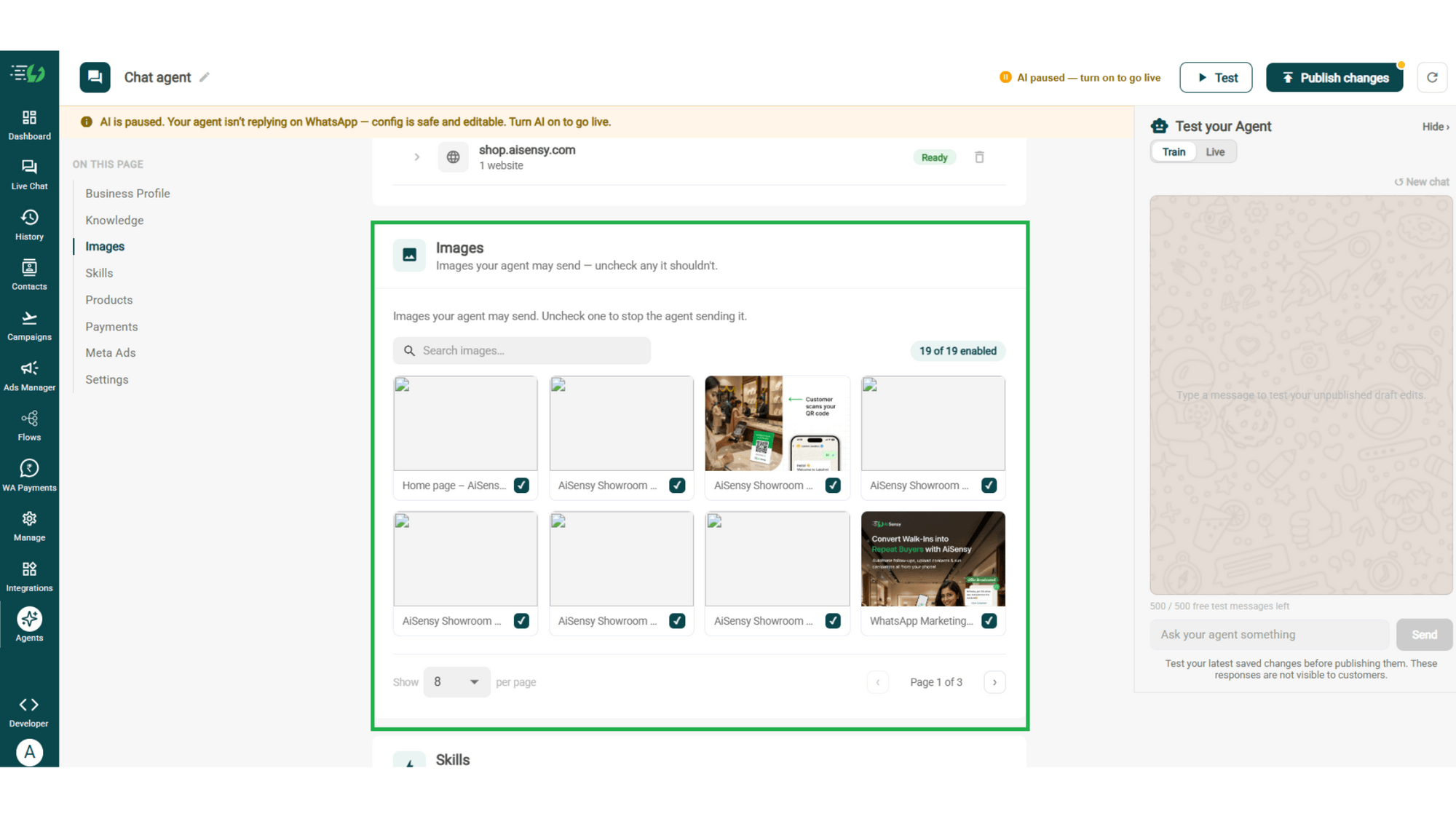
Control the visuals your agent can share in chat - product shots, catalogs, offers. Untick any image it shouldn't send.

  • Image library (enable/disable per image)

  • Search images

images.png

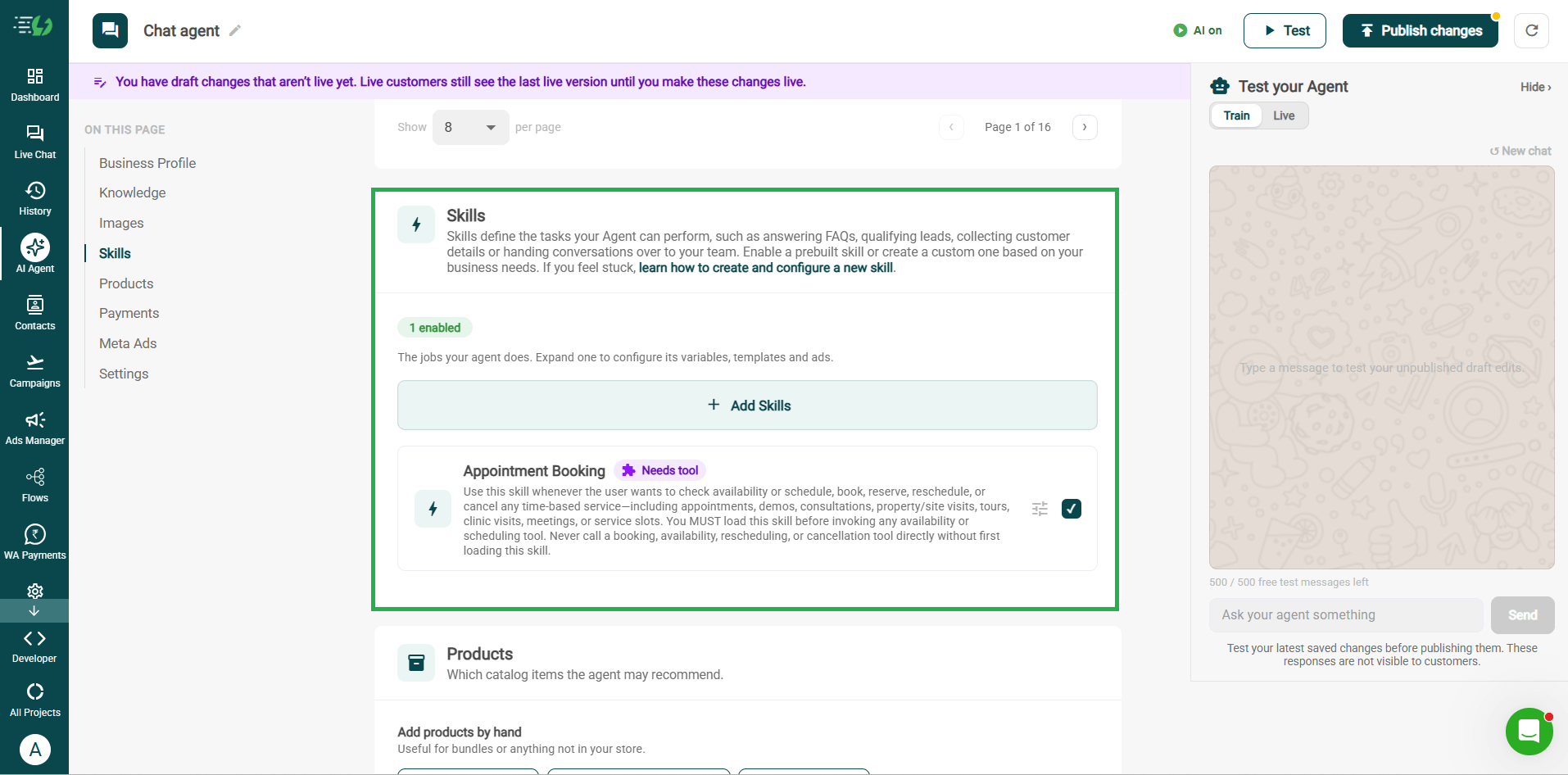
Enable the Appointment Booking Skill

Skills are the jobs your agent does. Switch on the prebuilt Appointment Booking skill, then set your scheduling tool, business hours, services and confirmation message.

  • Add Skills

  • Create custom skill (optional)

  • Per-skill configuration (variables, templates & ads)
skills.png

Add Your Products

Choose which catalog items the agent can recommend - so every suggestion comes from your actual range.

  • Catalog products (select what the agent may recommend)

  • Add products by hand (for bundles or items not in your store)
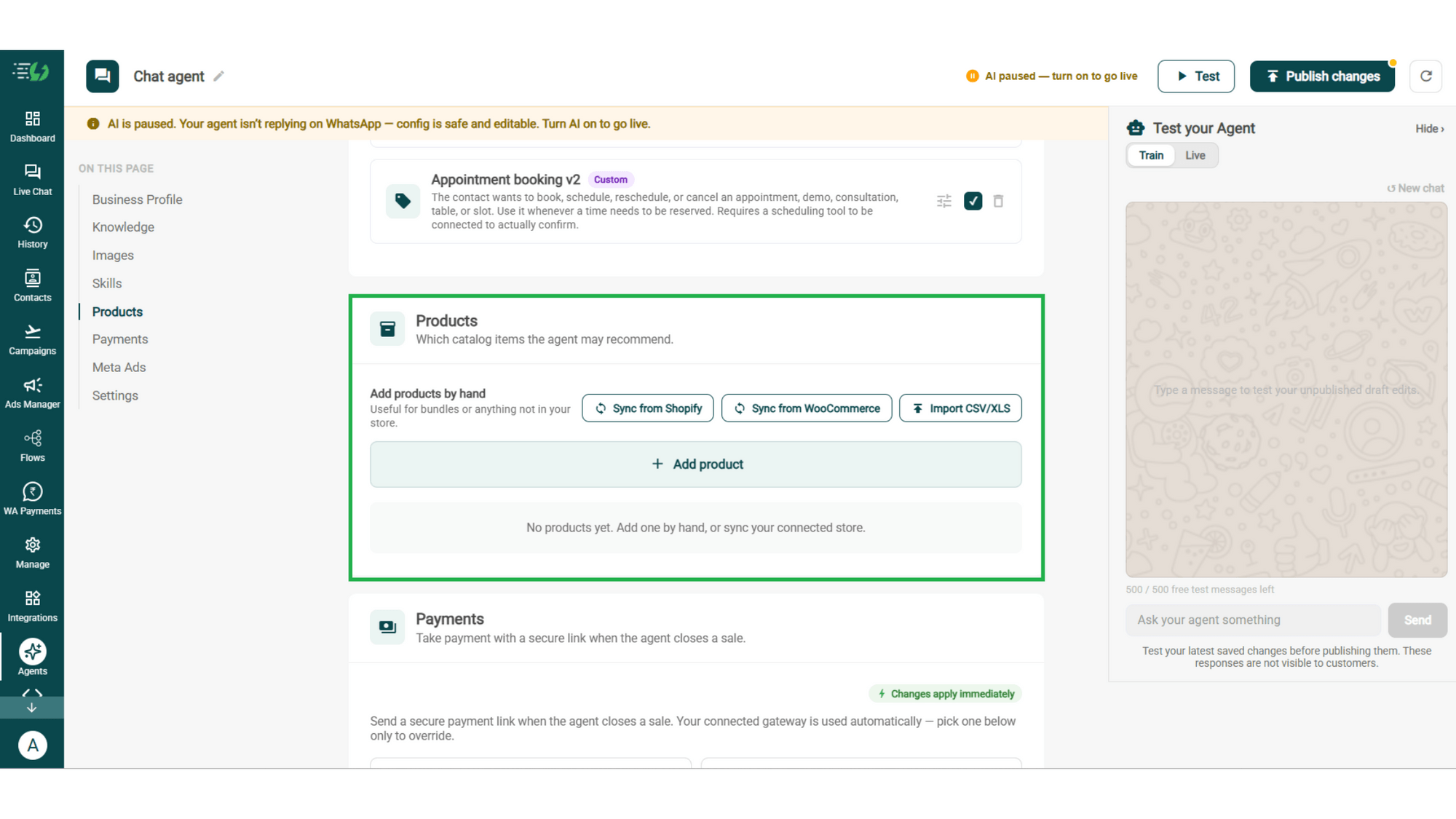
products.png

Connect Your Payment Gateway

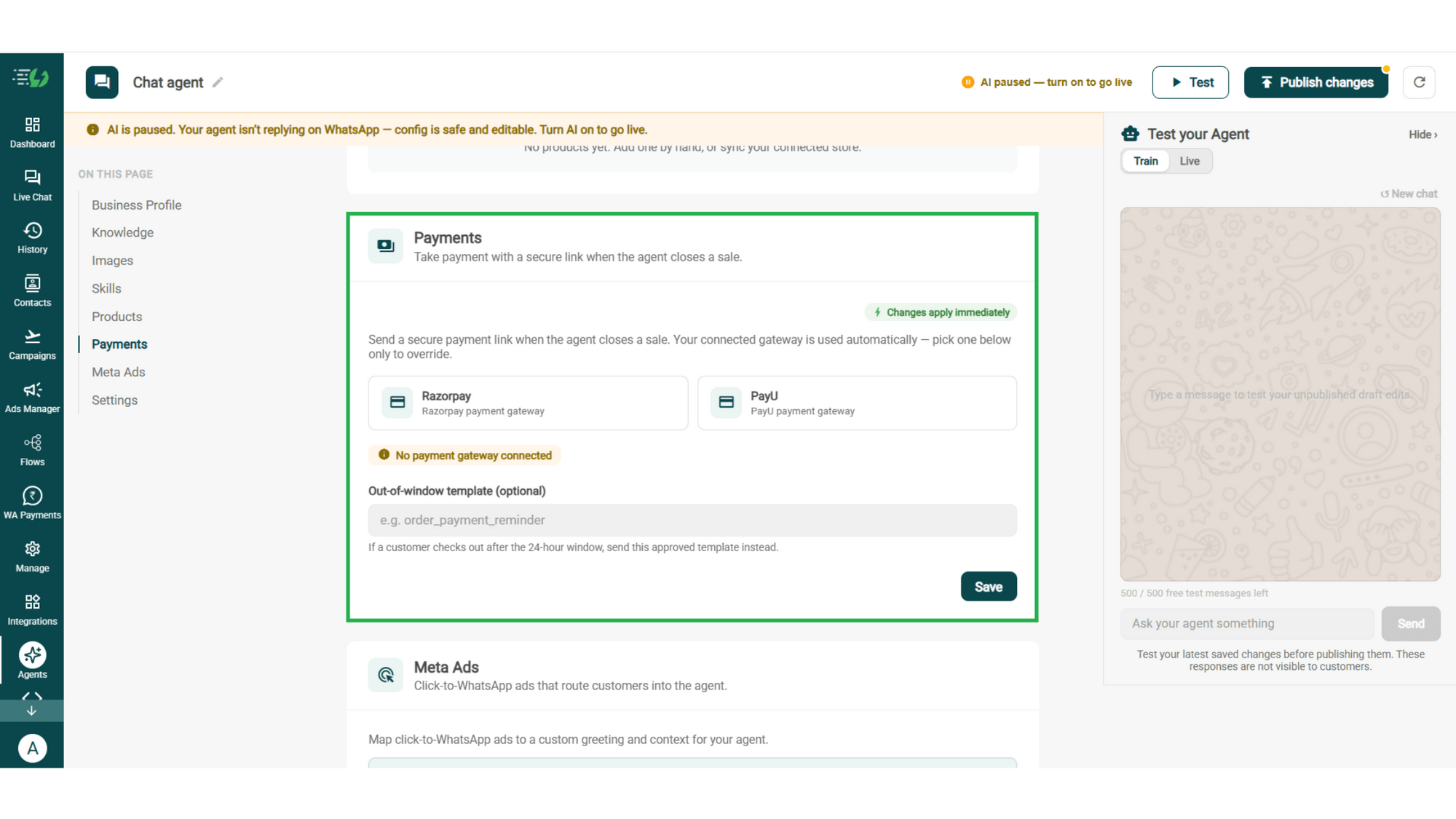
Connect your payment gateway so the agent closes sales with a secure payment link, right inside the chat.

  • Payment gateway (Razorpay or PayU)

  • Out-of-window template (optional)

payments.png

Link Your Meta Ads (Optional)

Running Click-to-WhatsApp ads?

Map each ad to a custom greeting & context, so the agent knows exactly which ad brought the customer in.

  • Add ad (map ad → custom greeting & context)
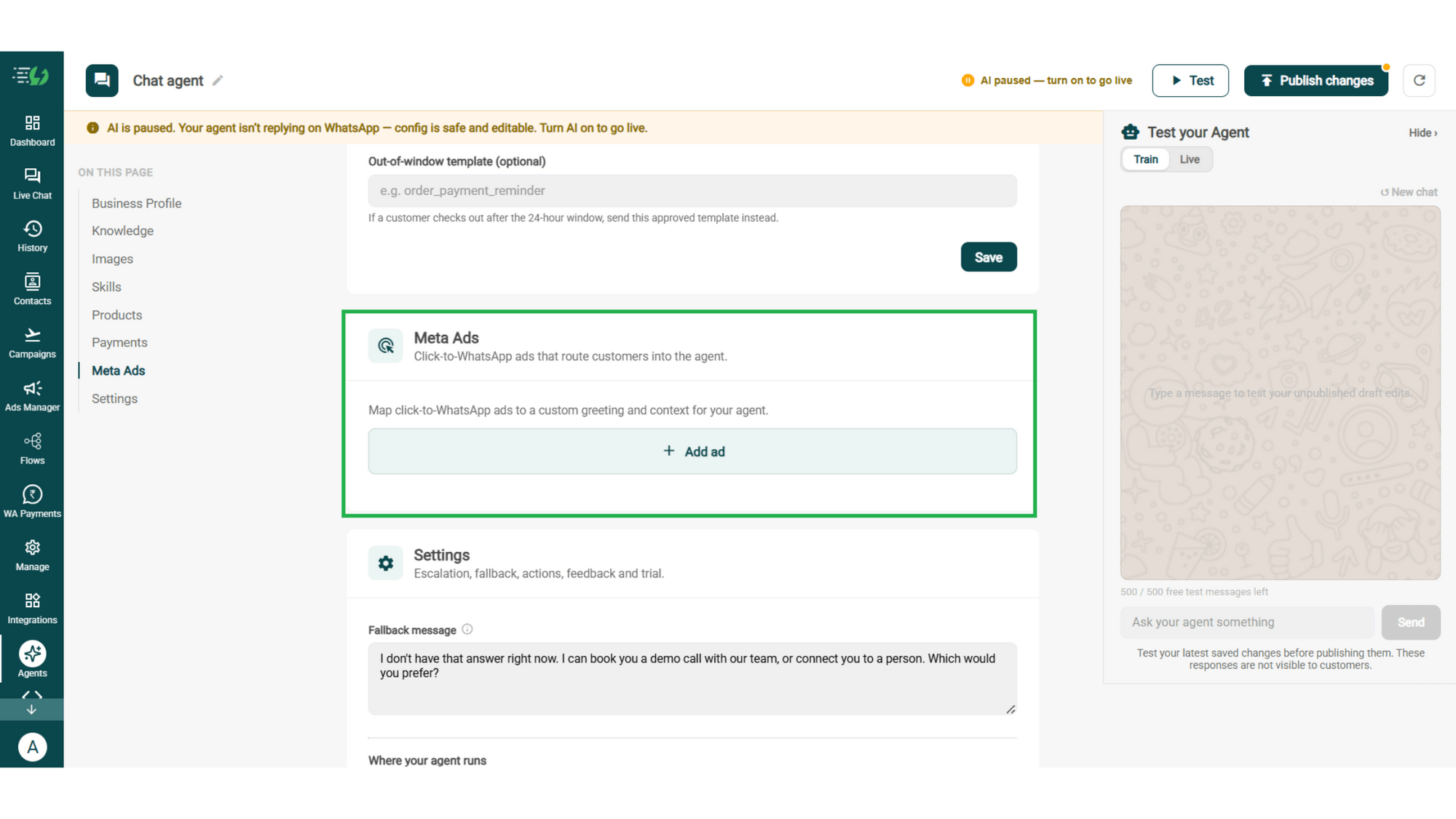
meta ads.png

Connect Tools & APIs

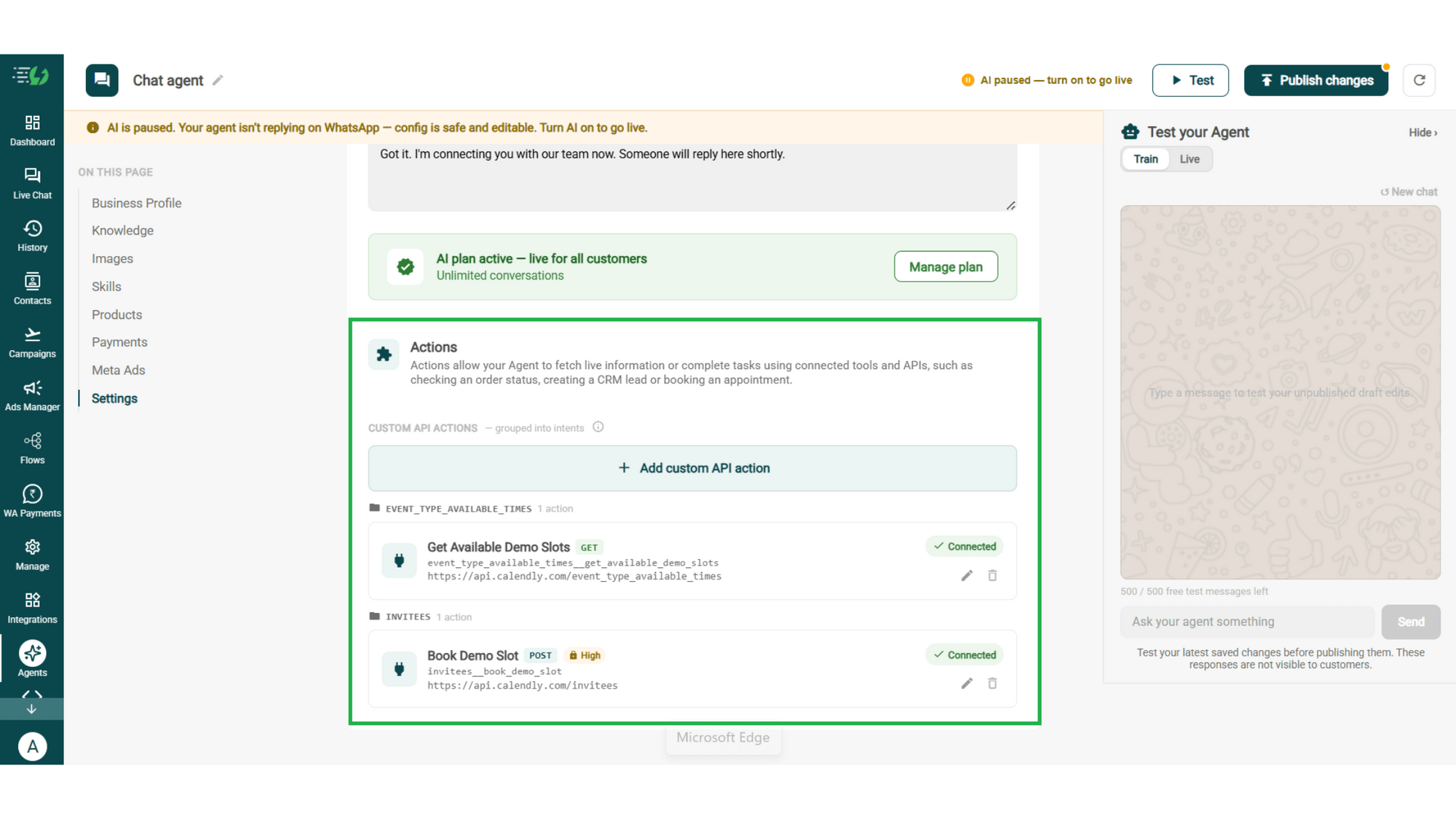
Give your agent superpowers - connect tools & APIs so it can fetch live information or complete tasks like booking appointments.

  • Custom API actions (e.g. check order status, book a slot)

  • AI plan (manage your plan)

Action.png

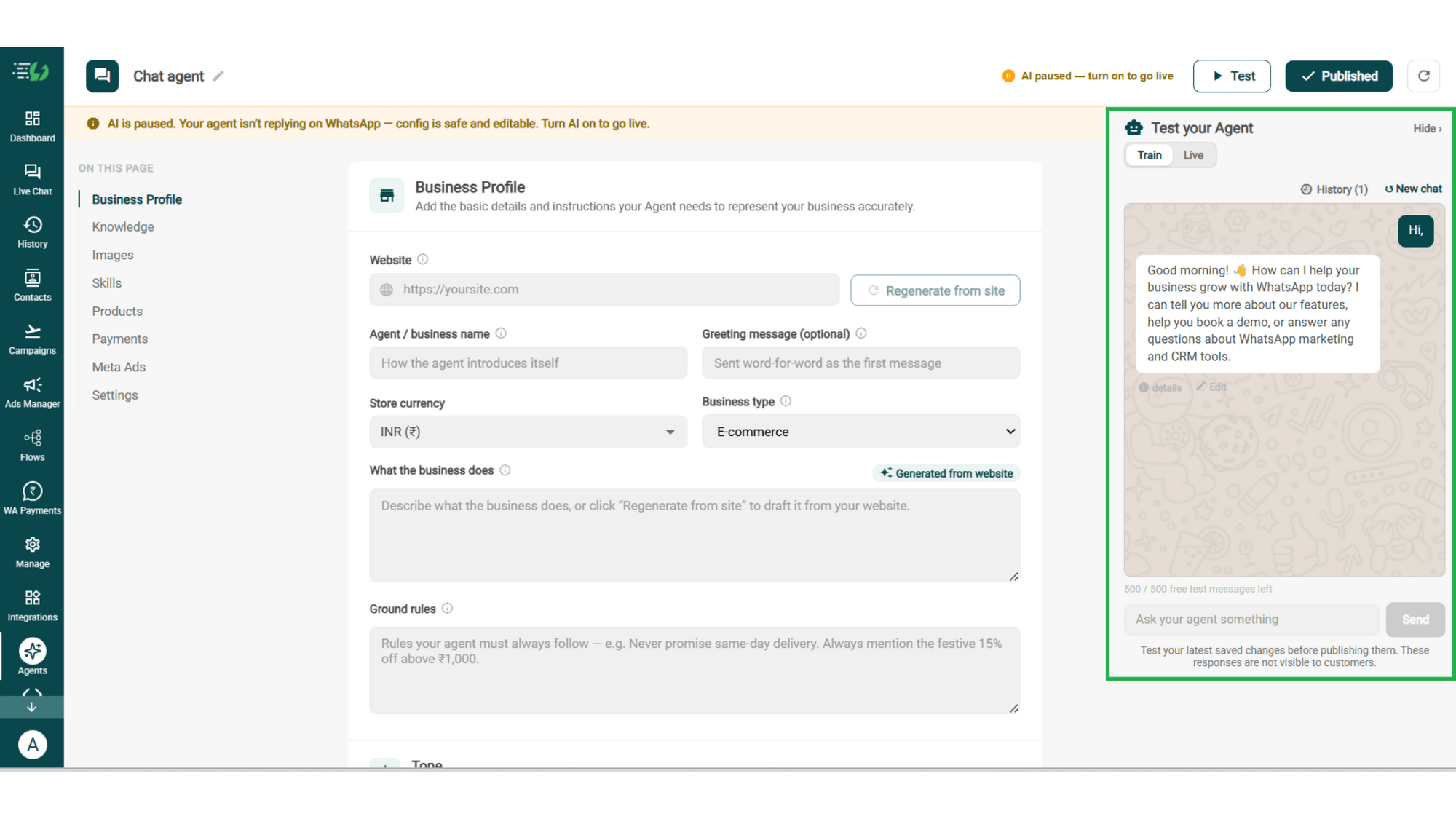
Test, Publish & Go Live

Chat with your agent before your customers do - 500 free AI messages to trial it. Happy?

Publish, switch the AI on & you're live.

  • Test your Agent panel (Train/Live modes)

  • Publish

  • AI on/off toggle

testing.png

How a Booking Happens

A real conversation, step by step - your front desk never touches it.

  • The Request

    Customer: "Anything free Saturday evening?"
    The agent checks your live calendar & replies with the slots that are actually open.

  • The Details

    Before holding the slot it asks what you need to know - which service, first visit or follow-up, and the name to book under.

  • The Booking

    The customer picks 6:30pm. Booked, confirmed in chat, written into your calendar. Nobody from your team was involved.

  • The Change

    Friday night: "Can we move it to Sunday?"

    The agent reschedules & frees the Saturday slot - which someone else can now take.

  • olena-sergienko-dIMJWLx1YbE-unsplash.jpg

    The Booking Agent Works Even Better With…

    One number, one team - agents for before, during & after the sale.

    Lead Qualification AI Agent

    Book the people worth your team's time. This agent checks who they are before a slot gets held.

    Customer Support AI Agent

    Answers the questions that come before a booking - pricing, location, what's included.

    Feedback AI Agent

    After the appointment, this agent asks how it went - so you hear about a bad visit before a review site does.

    Simple Pricing. Every Agent Included.

    One plan unlocks the entire library - deploy any AI Agent, or build your own.

    ₹3,500

    Per Month
    Start for FREE

    $99

    Per Month

    Buy Now

    WhatsApp AI Agent Features

    Access every pre-built AI Agent in this library, plus the no-code builder to create your own - trained on your business and live on WhatsApp in minutes.

    • 3,500 AI messages every month

    • 500 FREE AI messages for testing

    • Knowledge Base Q&A - train it on your website & documents

    • Long-term customer memory

    • No-code builder to customize any agenthing

    • Tool calling, skills & API integrations

    FAQ

    Frequently asked questions answered

    What can the Appointment Booking AI Agent book?

    Any time-based service - appointments, demos, consultations, site visits, tours, clinic visits, meetings or service slots. If it sits on a calendar, the agent can handle it.

    Does it need to connect to my calendar?

    Yes. This skill needs a connected scheduling tool to work - that's how it sees real availability instead of guessing. You connect it under Tools & APIs, then set your business hours and the services you offer.

    Can it reschedule or cancel bookings too?

    Yes, and that's where most of the value sits. The agent moves or cancels a booking on request and frees the slot, so a change of plan doesn't leave an empty chair.

    What does it ask before confirming a booking?

    Whatever you tell it to. Set the details it must collect - service, branch, name, anything you'd otherwise chase later - and mark which ones are required before the slot is held.

    Can I limit it to my business hours and services?

    Yes. Business hours and services offered are both fields on the skill, so the agent only ever offers slots you actually work and services you actually provide.

    Will customers get a confirmation?

    Yes. You write the confirmation message and it goes out the moment a slot is booked. You can also attach an approved template, which is what lets the agent reach a customer outside the 24-hour messaging window.

    When does a human take over the conversation?

    Whenever you decide. Anything outside the agent's scope, a customer who asks for a person, or a request your policy doesn't cover - handed to your team with the full conversation attached.

    Will it work with my Click-to-WhatsApp ads?

    Yes. Map each ad to its own greeting & context, and you can set the skill to fire only for contacts arriving from a specific ad - so a "book a free consultation" ad goes straight into booking.

    Can I test it before customers see it?

    Yes. You get 500 free AI messages to chat with your agent in Train mode, and up to 3 WhatsApp test numbers before going live. Nothing you test is visible to customers.

    How much does the Appointment Booking AI Agent cost?

    It's included in the AI Agent plan at ₹3,500 a month. That one plan unlocks every pre-built agent in the library plus the no-code builder to create your own - you're not paying per agent.