New Launch | Build AI Agents on WhatsApp that qualify & convert 24/7 · Explore More

Login

WhatsApp AI Agent for Courses

Turn course enquiries into enrolments, automatically. Train the ready-made Courses AI Agent on your batches & fees, and let it recommend, convince and enrol round the clock.

No coding needed!

olena-sergienko-dIMJWLx1YbE-unsplash.jpg

What Your Courses AI Agent Handles

Every step from "do you have a course on this?" to a paid seat, handled inside WhatsApp.

Recommends the Right Course

Asks what they want to learn and where they're starting from, then suggests the course that actually fits - not a list of everything you offer.

Answers What Stalls the Decision

Duration, fees, batch timings, certificate, placement support - answered in seconds from your own course pages.

Handles the Price Objection

Too expensive? The agent responds with the EMI option, the early-bird discount or a shorter alternative - whatever you've approved, and nothing you haven't.

Shares the Proof That Convinces

Syllabus, demo class link, past student results. The things that turn "sounds interesting" into "where do I pay".

Enrols Inside the Chat

Payment link shared in-chat, seat confirmed, joining details sent. No form, no callback, no drop-off between interest and payment.

Sells in Your Student's Language

English, Hindi, Hinglish or anything in between - the agent matches how your student writes.

How to Build Your WhatsApp Course AI Agent in Minutes

Here's how a real brand goes from zero to a live Course AI Agent on WhatsApp.

Build Your Agent from Your Website

Click AI Agent, add your website, and AiSensy automatically builds an agent trained on your business.

  • Website (required)

  • Business type

  • Anything special it should know? (optional)

  • Business context (optional)

Then hit ✨ Create agent.
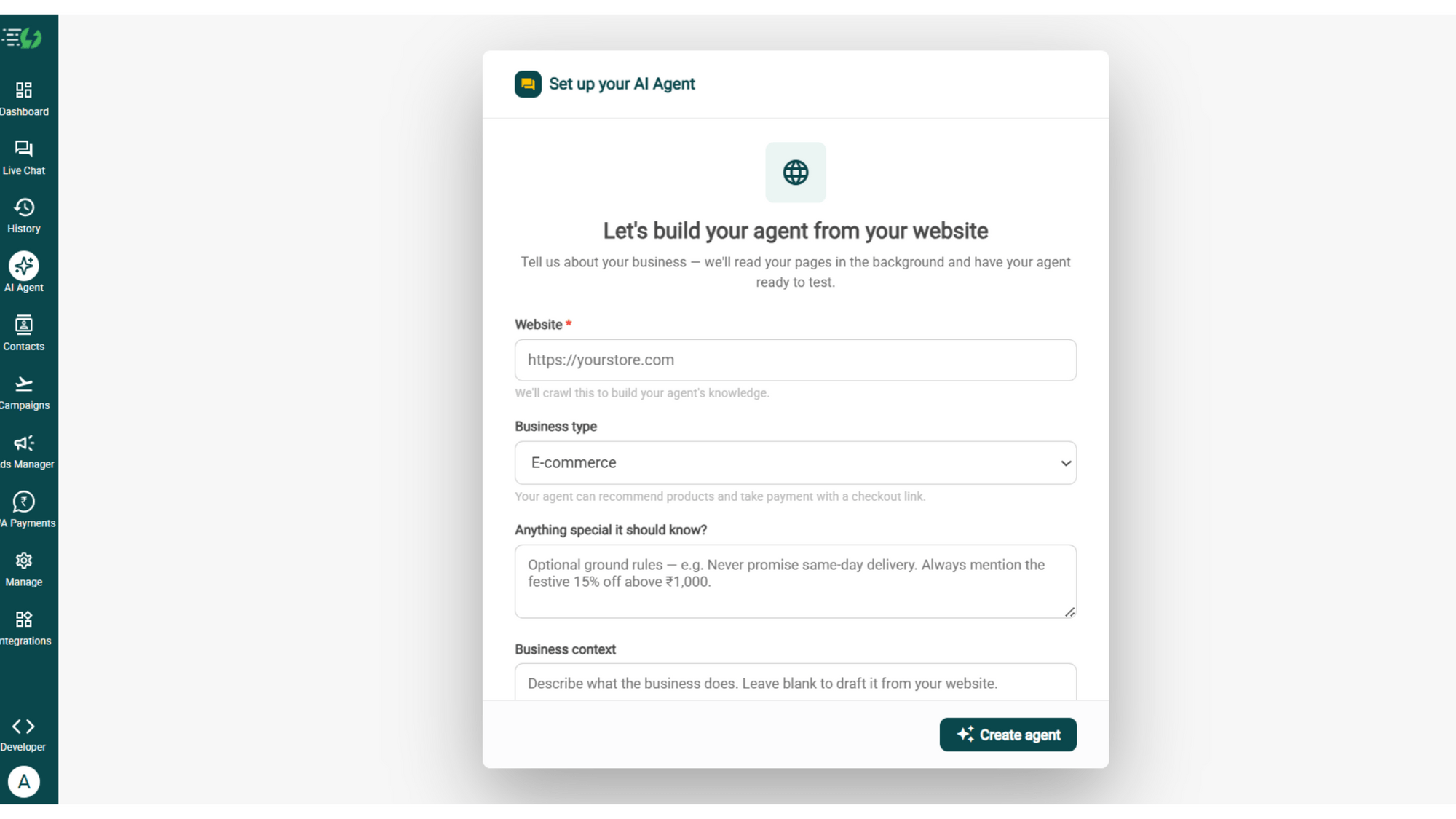
image (4).png

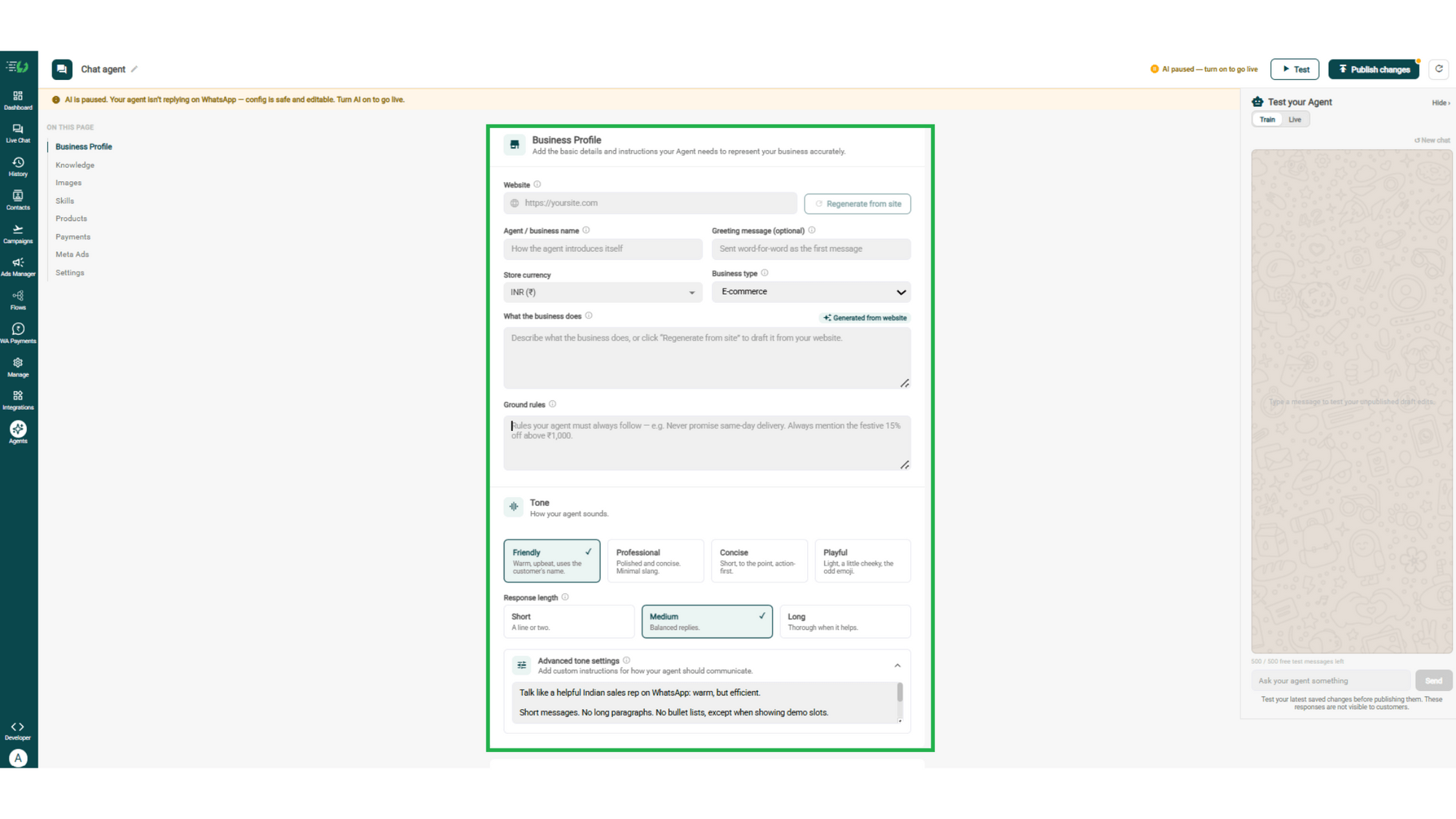
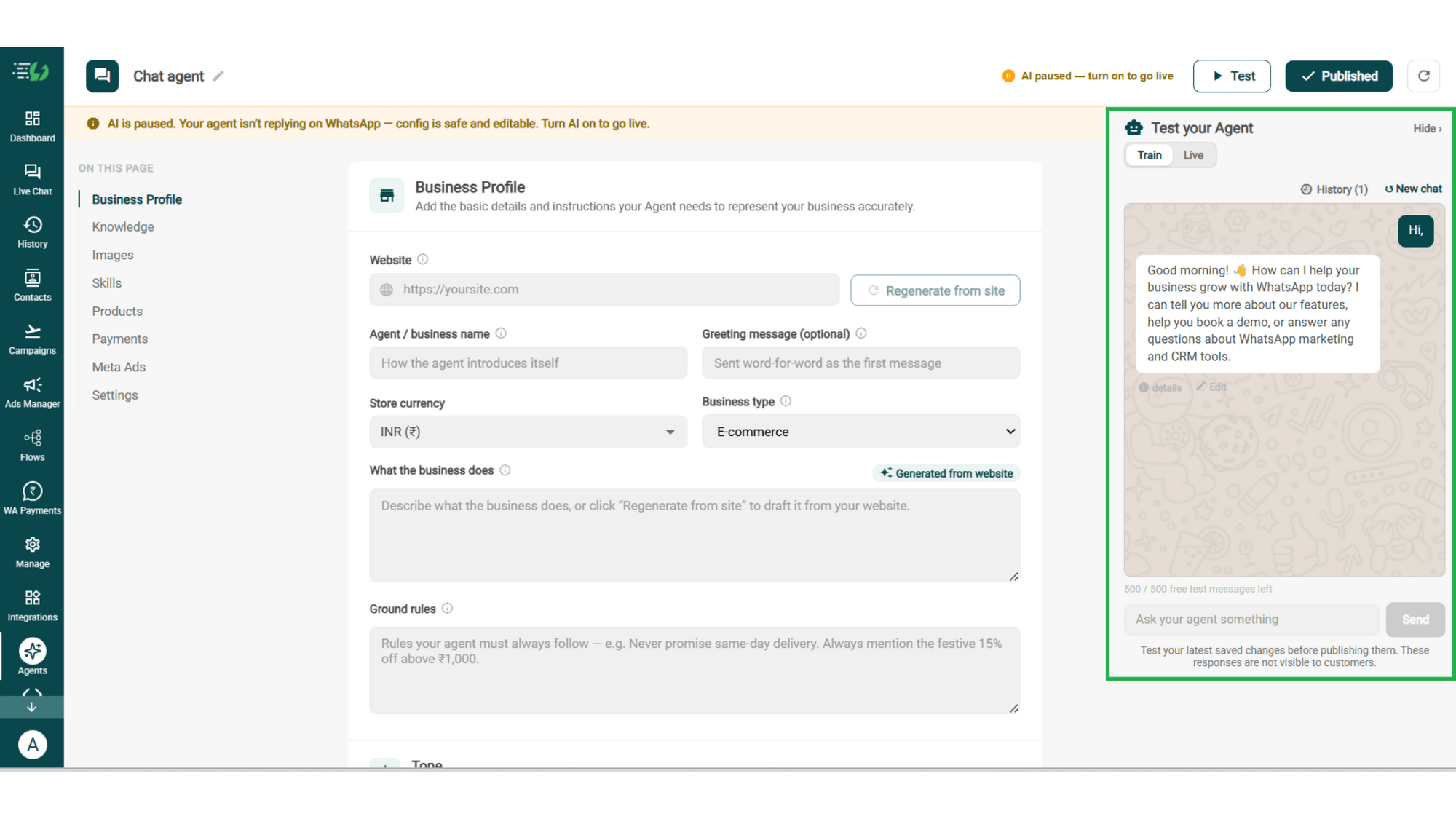
Add Your Business Profile

Add your website & AiSensy auto-generates your business description. Set your agent's name, greeting, and a few ground rules it must always follow.

  • Website

  • Agent/business name

  • Greeting message (optional)

  • Store currency

  • Business type

  • What the business does

  • Ground rules

business profile.png

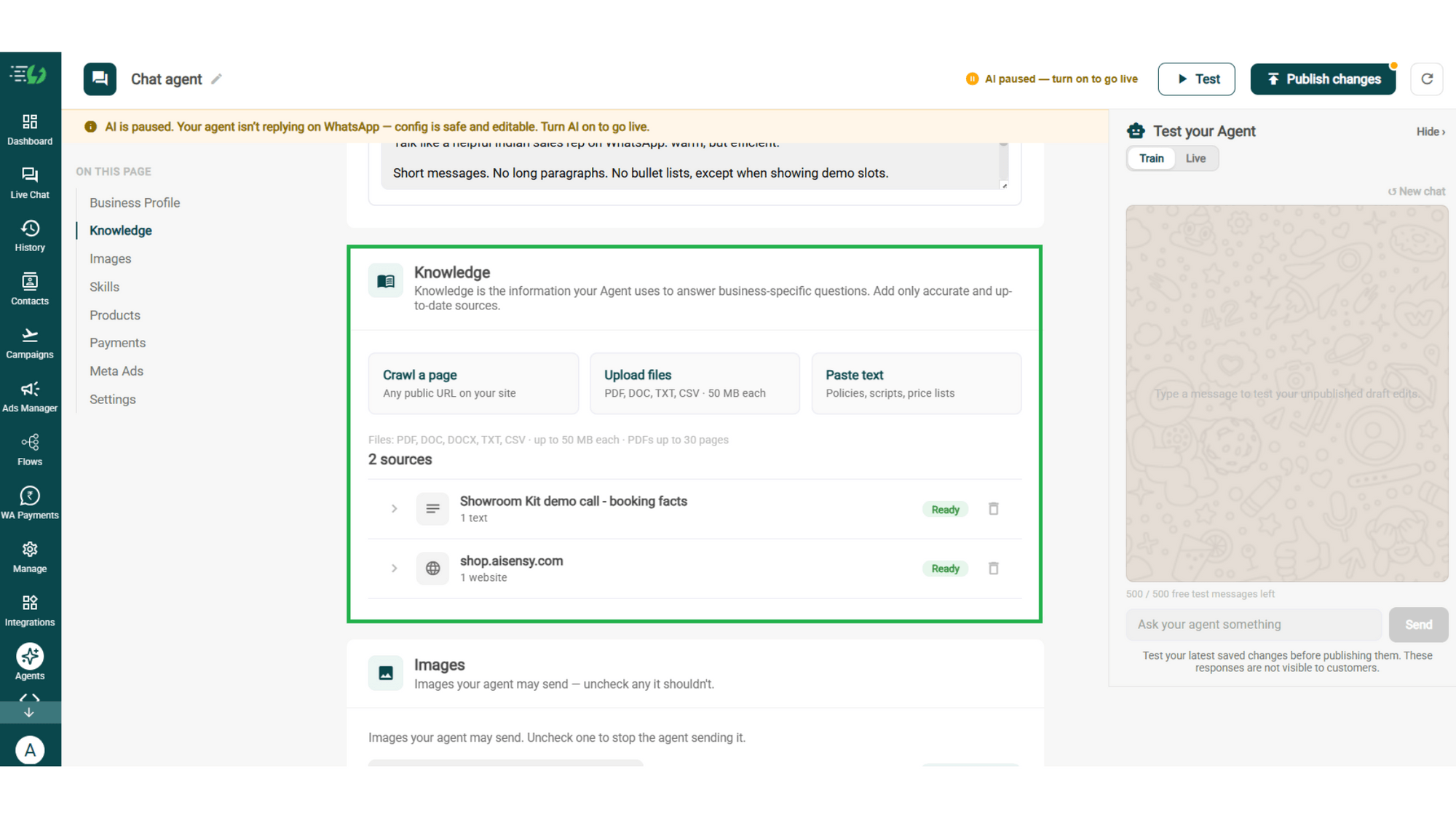
Train the Agent with Your Knowledge

Train the agent on your business - it answers from your information, not generic replies. Every source shows "Ready" once learned.

Details to be filled are:

  • Crawl a page (website URL)

  • Upload files (PDF, DOC, TXT, CSV - up to 50MB each)

  • Paste text (policies, scripts, price lists)
knowledge.png

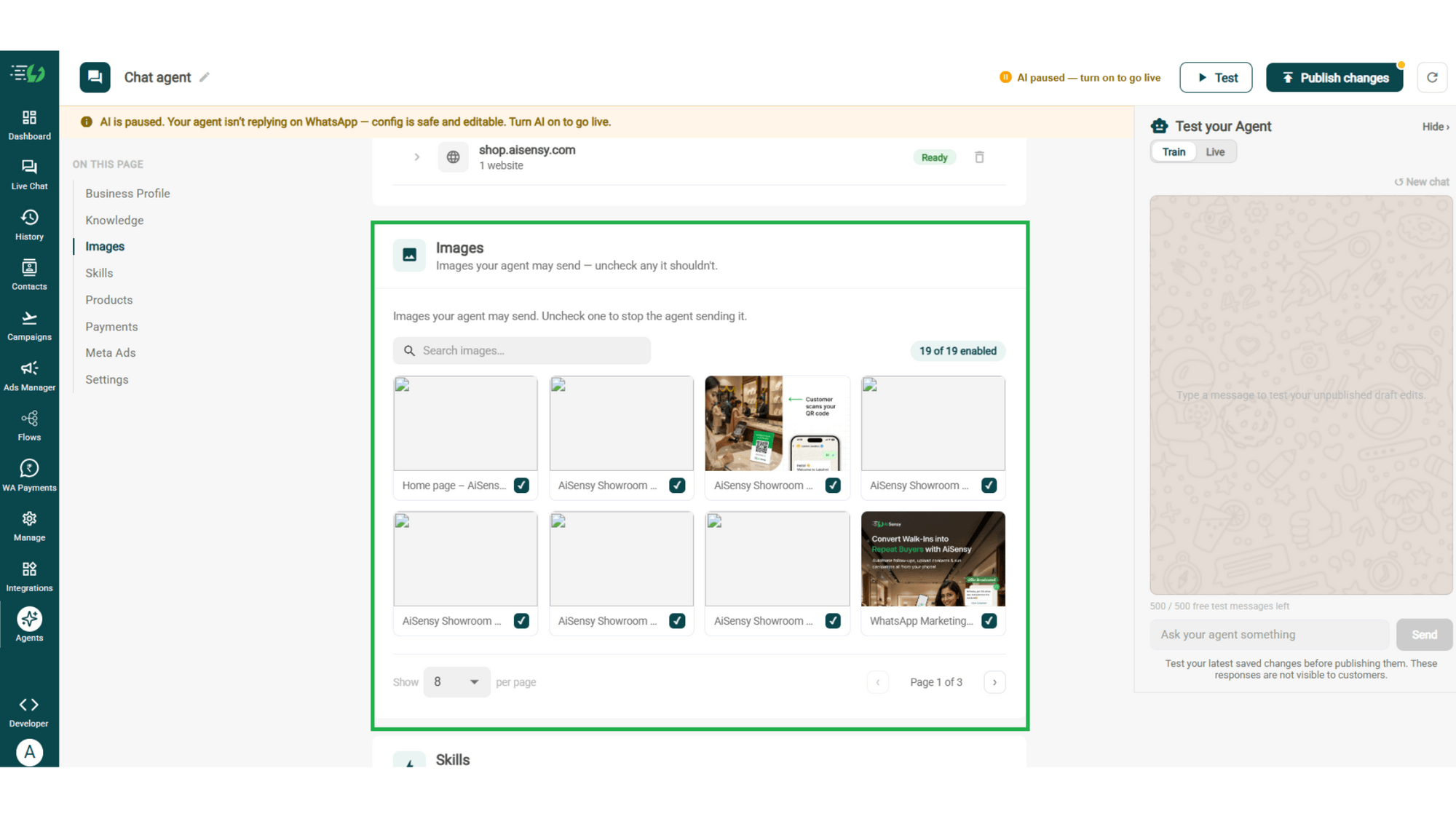
Choose the Images It Can Share

Control the visuals your agent can share in chat - product shots, catalogs, offers. Untick any image it shouldn't send.

  • Image library (enable/disable per image)

  • Search images

images.png

Create the Courses Skill

Skills are the jobs your agent does. Open Add Skills and check the prebuilt list first - there's no Courses skill there, so hit Create custom, name it Courses, and pick Task skill as the type.

  • What kind of skill is this (Lead qualification)

  • Icon & name (Admission)

  • When should the agent use it?

  • Instructions

  • Add skills

Enable It on Your Agent

Your new skill lands in the Skills list. Switch it on, expand it to check the instructions and attach any template it should send, then hit Done.

  • Skills list

  • Enable the Admissions skill

  • Qualification signals

  • Qualify threshold

  • Route a qualified applicant to (counsellor / CRM / booking / nurture)

  • Done

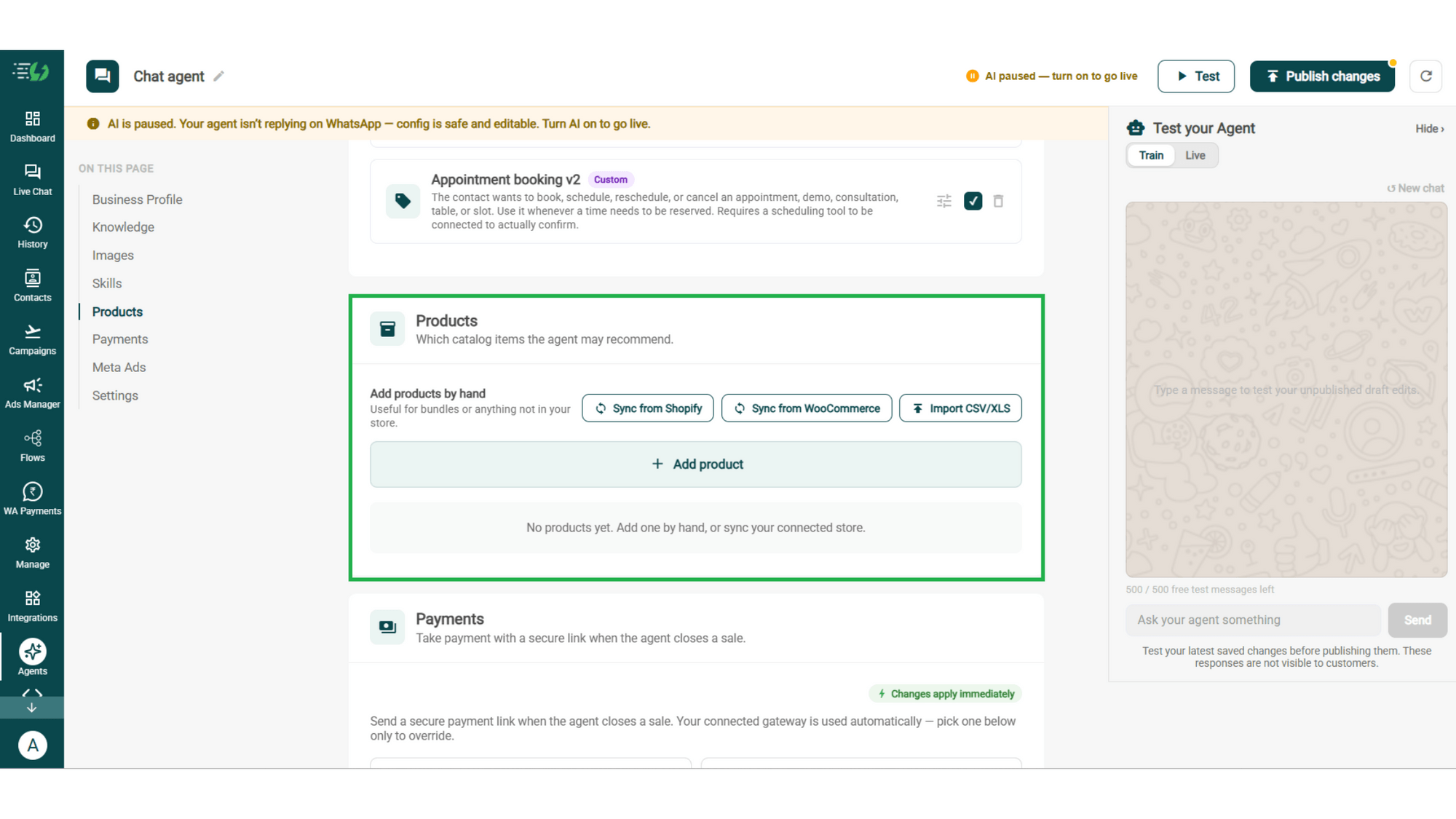
Add Your Products

Choose which catalog items the agent can recommend - so every suggestion comes from your actual range.

  • Catalog products (select what the agent may recommend)

  • Add products by hand (for bundles or items not in your store)
products.png

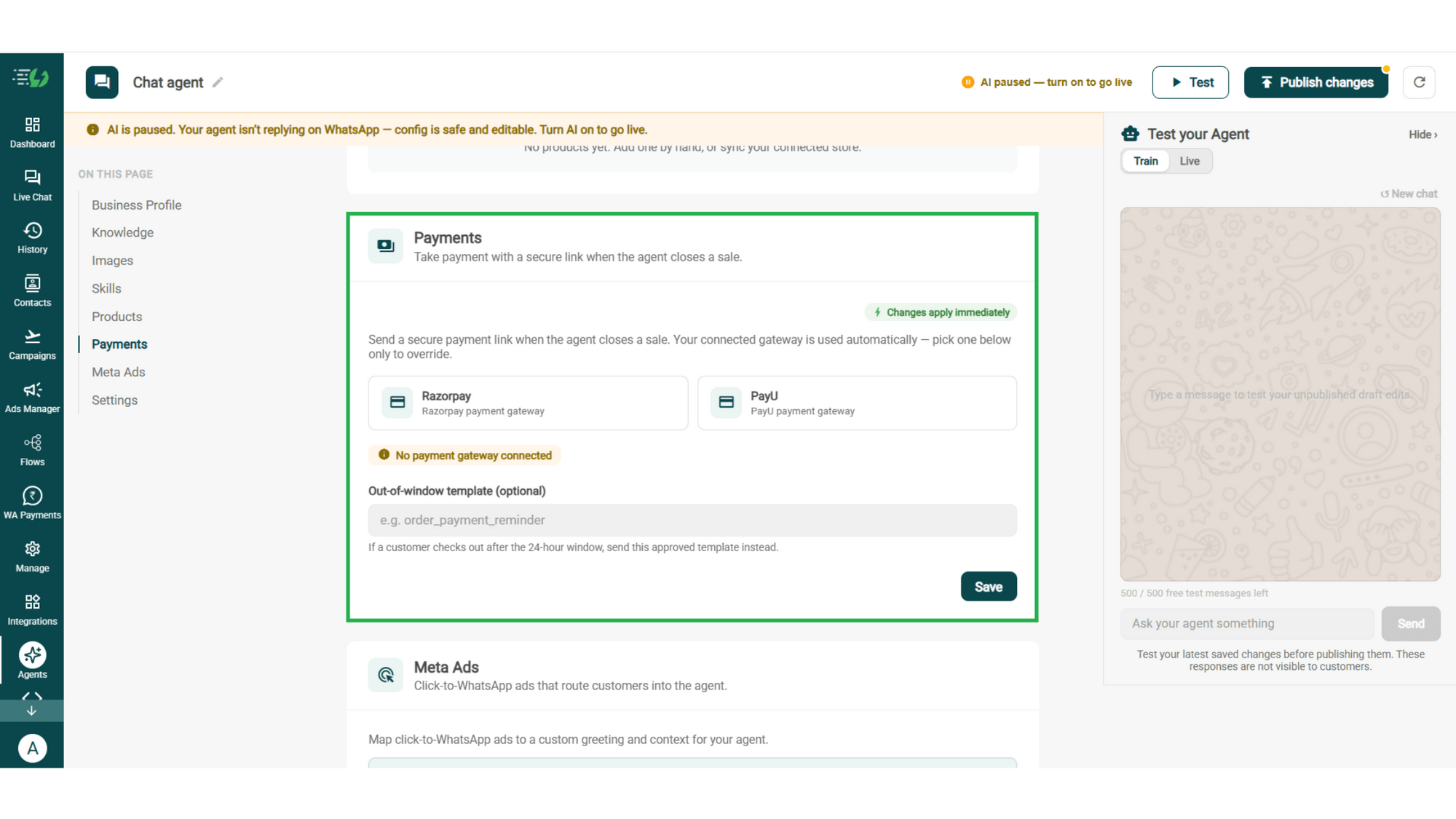
Connect Your Payment Gateway

Connect your payment gateway so the agent closes sales with a secure payment link, right inside the chat.

  • Payment gateway (Razorpay or PayU)

  • Out-of-window template (optional)

payments.png

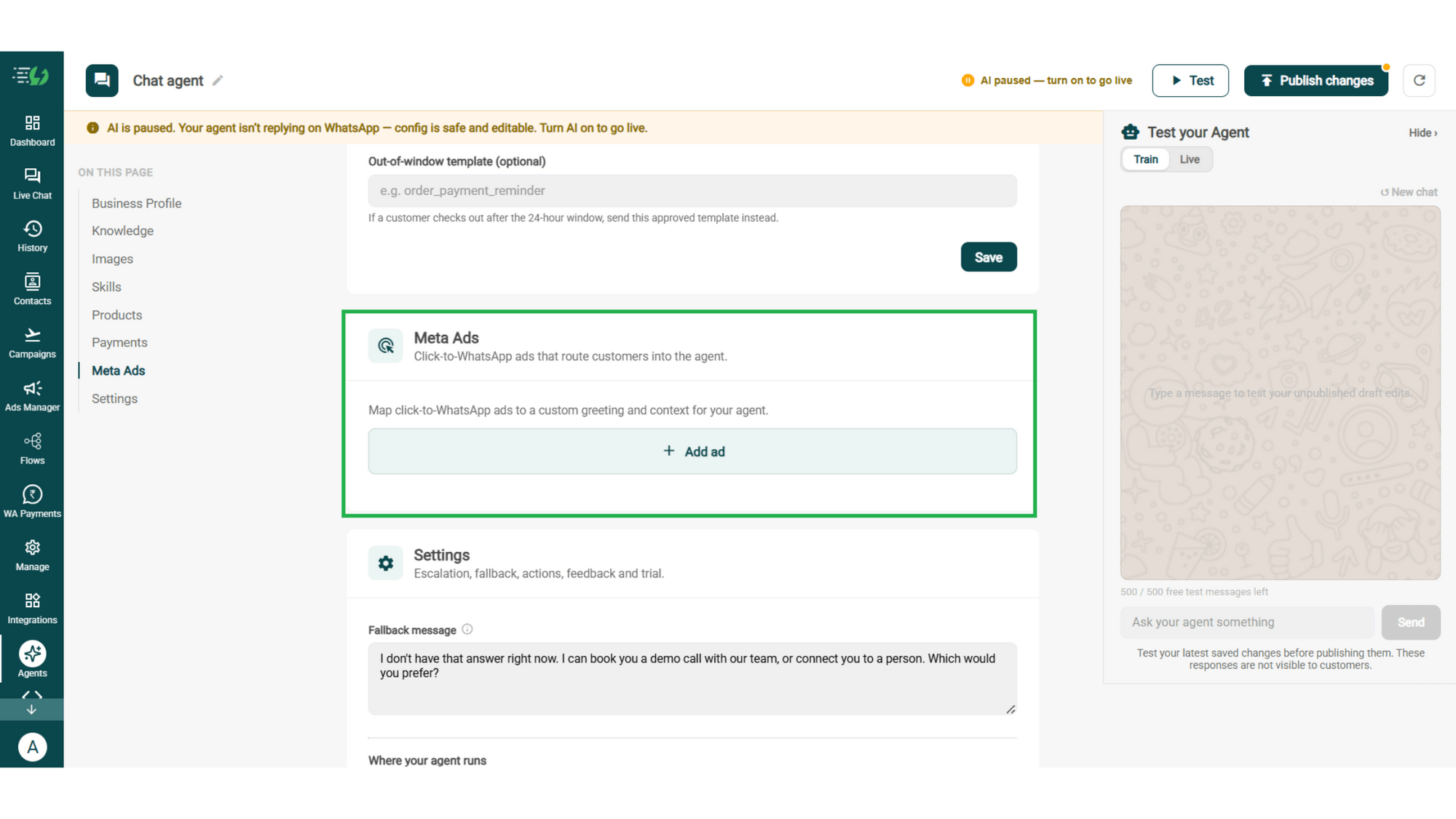
Link Your Meta Ads (Optional)

Running Click-to-WhatsApp ads?

Map each ad to a custom greeting & context, so the agent knows exactly which ad brought the customer in.

  • Add ad (map ad → custom greeting & context)
meta ads.png

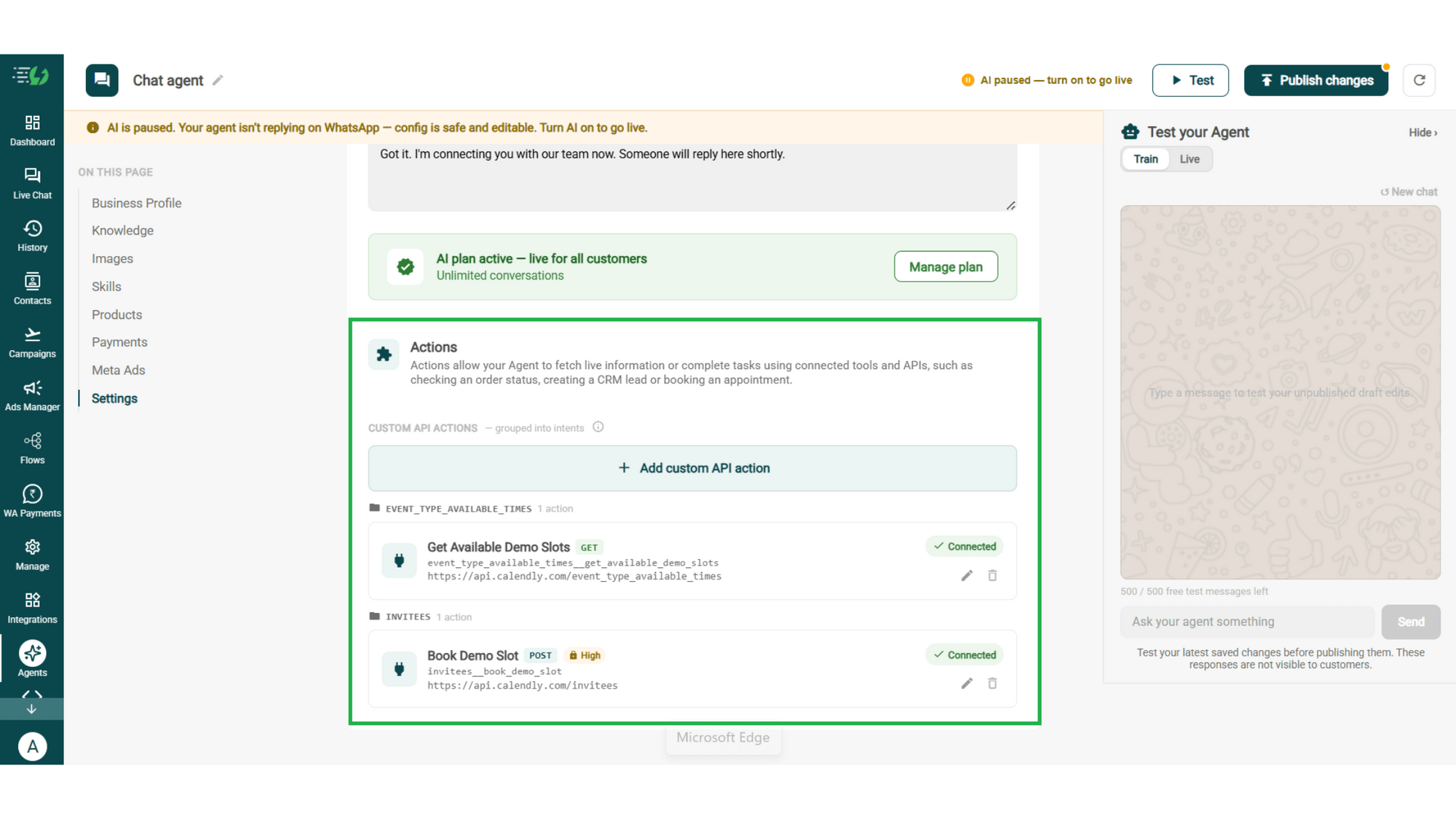
Connect Tools & APIs

Give your agent superpowers - connect tools & APIs so it can fetch live information or complete tasks like booking appointments.

  • Custom API actions (e.g. check order status, book a slot)

  • AI plan (manage your plan)

Action.png

Test, Publish & Go Live

Chat with your agent before your customers do - 500 free AI messages to trial it. Happy?

Publish, switch the AI on & you're live.

  • Test your Agent panel (Train/Live modes)

  • Publish

  • AI on/off toggle

testing.png

How an Enrolment Happens

A real conversation, step by step - no human involved until there isn't one needed.

  • The Enquiry

    Student: "Do you have a data analytics course?"
    The agent replies in seconds & asks one smart question: starting fresh, or already working with data?

  • The Recommendation

    Based on the answer it suggests the right batch - duration, fee, timings - and shares the syllabus.

  • The Objection

    "₹35,000 is a lot." The agent shares the 3-month EMI option and the early-bird discount closing Friday, and the conversation stays alive.

  • The Enrolment

    Payment link in chat, seat confirmed, joining link and batch group sent.

    Total time: 6 minutes. Human involvement: zero.

  • olena-sergienko-dIMJWLx1YbE-unsplash.jpg

    The Courses Agent Works Even Better With…

    One number, one team - agents for every stage of the student journey.

    Admissions AI Agent

    Running degree programs with eligibility criteria? That agent qualifies enquiries against your cut-off and routes them to a counsellor.

    Appointment Booking AI Agent

    Demo classes and counselling calls, booked in the same chat while the student is still interested.

    Feedback AI Agent

    Ask students how the batch went - and hear about a problem before it shows up in a review.

    Simple Pricing. Every Agent Included.

    One plan unlocks the entire library - deploy any AI Agent, or build your own.

    ₹3,500

    Per Month
    Start for Free

    $99

    Per Month

    Buy Now

    WhatsApp AI Agent Features

    Access every pre-built AI Agent in this library, plus the no-code builder to create your own - trained on your business and live on WhatsApp in minutes.

    • 3,500 AI messages every month

    • 500 FREE AI messages for testing

    • Knowledge Base Q&A - train it on your website & documents

    • Long-term customer memory

    • No-code builder to customize any agent

    • Tool calling, skills & API integrations

    FAQ

    Frequently asked questions answered

    What can the Courses AI Agent do?

    It helps a student find the right course, answers the questions that stall a decision, handles the price objection and takes the payment - all inside one WhatsApp conversation.

    How does it know which course to recommend?

    From your catalog and your course pages. You choose which courses it may recommend, so it never suggests a batch you've closed or a course you no longer run.

    Can it actually take the fee, or just talk about courses?

    It enrols. Connect Razorpay or PayU and the agent sends a secure payment link in the chat - the student pays without leaving WhatsApp.

    What happens when a student says it's too expensive?

    It responds the way a good counsellor would - EMI options, an approved discount, or a shorter course that fits their budget. It works within your ground rules and never invents an offer.

    Can it offer discounts on its own?

    Only the ones you allow. Set them in your ground rules and the agent can share an approved code, but it will never negotiate beyond what you've defined.

    Can it share the syllabus or a demo class link?

    Yes. Upload the syllabus under Knowledge and enable the images and links it may send, and the agent shares them at the moment a student asks.

    How is this different from the Admissions AI Agent?

    Courses recommends and enrols in-chat, right through to payment. Admissions qualifies an enquiry against your eligibility criteria and hands serious applicants to a counsellor. Edtech and coaching businesses usually want this one; institutes running degree programmes usually want the other.

    Can I test it before students see it?

    Yes. You get 500 free AI messages to chat with your agent in Train mode, and up to 3 WhatsApp test numbers before going live. Nothing you test is visible to students.