New Launch | Build AI Agents on WhatsApp that qualify & convert 24/7 · Explore More

Login

WhatsApp AI Agent for Customer Support

Answer every customer question on WhatsApp, automatically. Train the ready-made Customer Support AI Agent on your policies & let it clear the queue round the clock.

No coding needed!

olena-sergienko-dIMJWLx1YbE-unsplash.jpg

What Your Customer Support AI Agent Handles

Every customer question, handled on WhatsApp, without adding to your team’s workload.

Answers From Your Actual Policies

Delivery areas, timings, warranty, returns - answered from your documents & website, not invented. If it isn't in your knowledge base, the agent doesn't say it.

Clears the Repeat Questions

Store hours, location, "do you deliver here", "is this available". The questions that eat your team's day, handled the second they're asked.

Replies Instantly, at 2am Too

No queue, no "we'll get back to you tomorrow". Every customer gets a real answer in seconds, whatever time they message.

Looks Up Live Information

Connect your systems & the agent can check things mid-chat - order status, slot availability, ticket state - instead of guessing or raising a ticket.

Hands Over Before Frustration Sets In

A billing dispute, a complaint, or a customer who just wants a person. The agent passes the chat to your team with the full history attached.

Supports in Your Customer's Language

English, Hindi, Hinglish or anything in between - the agent matches how your customer talks.

How to Build Your WhatsApp Customer Support AI Agent in Minutes

Here's how a real brand goes from zero to a live Customer Support AI Agent on WhatsApp.

Build Your Agent from Your Website

Click AI Agent, add your website, and AiSensy automatically builds an agent trained on your business.

  • Website (required)

  • Business type

  • Anything special it should know? (optional)

  • Business context (optional)

Then hit ✨ Create agent.
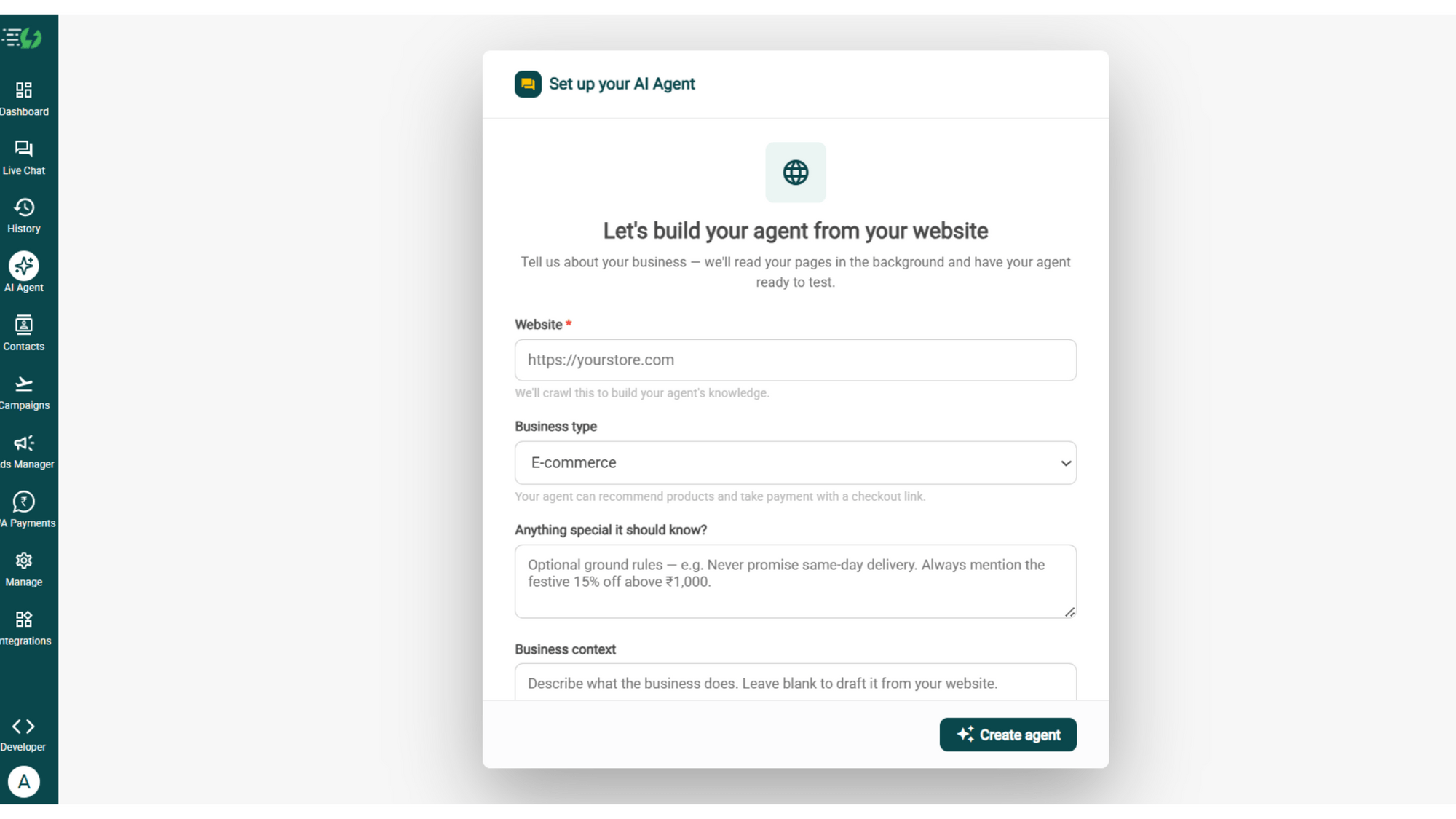
image (4).png

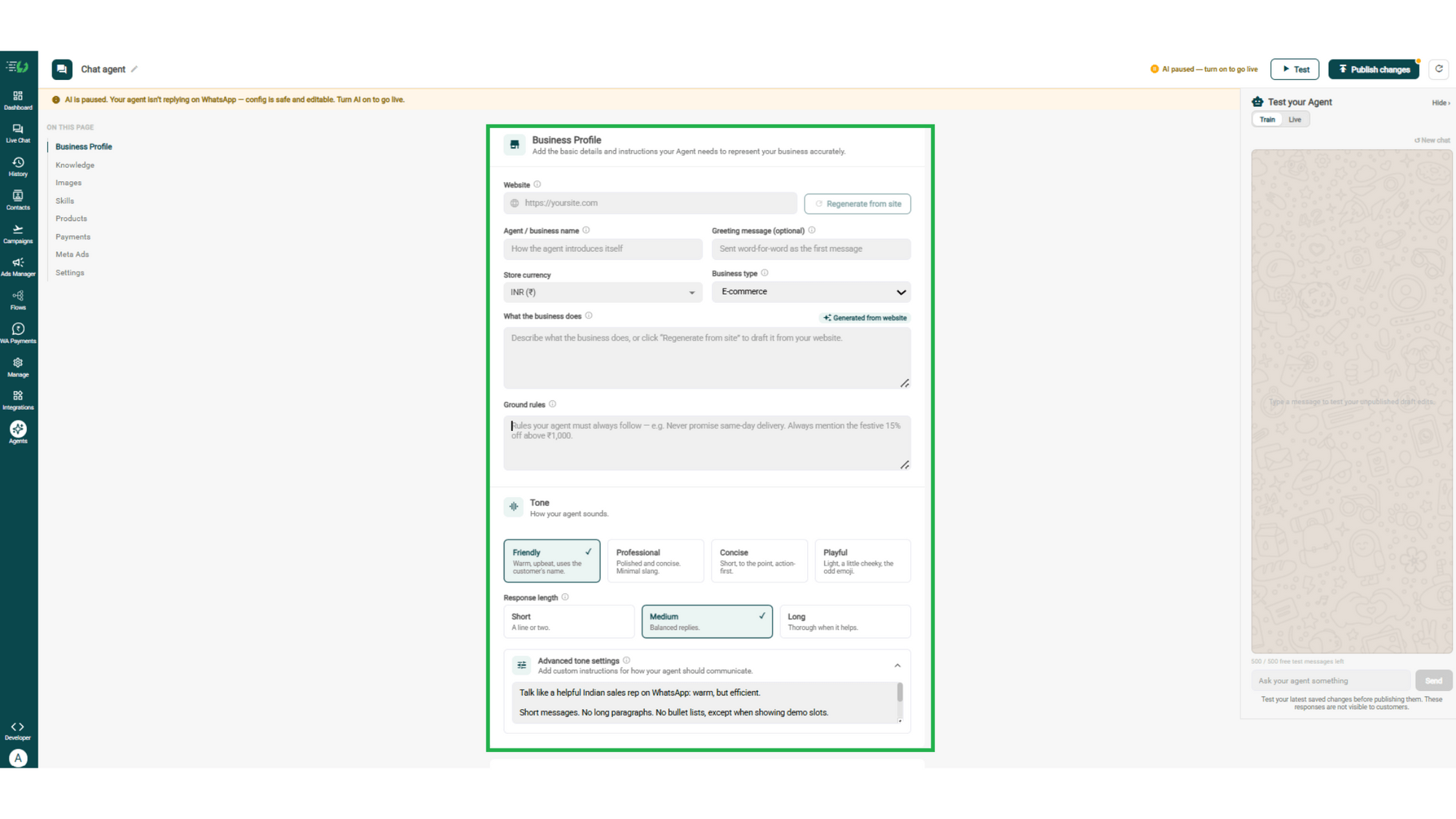
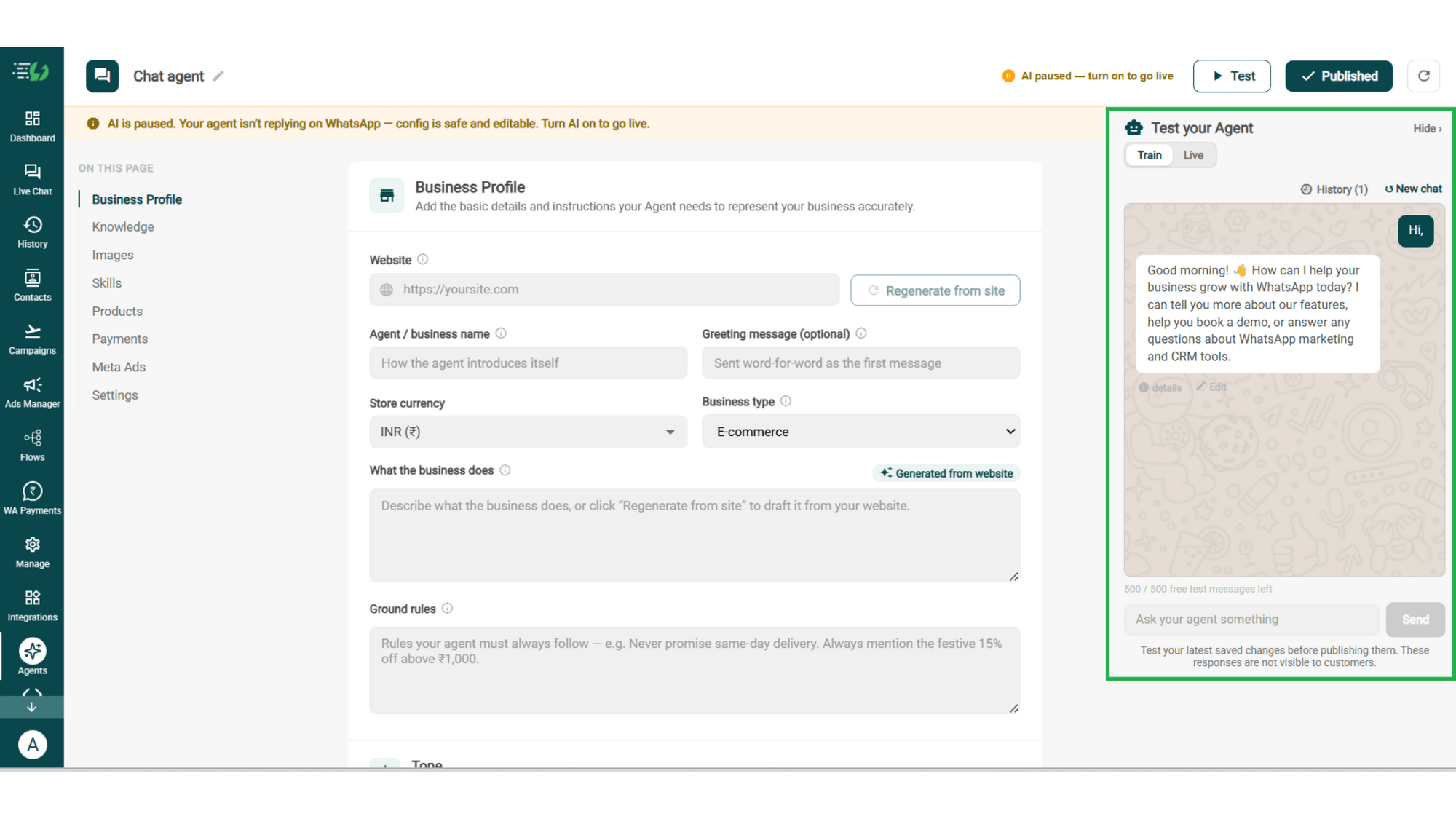
Add Your Business Profile

Add your website & AiSensy auto-generates your business description. Set your agent's name, greeting, and a few ground rules it must always follow.

  • Website

  • Agent/business name

  • Greeting message (optional)

  • Store currency

  • Business type

  • What the business does

  • Ground rules

business profile.png

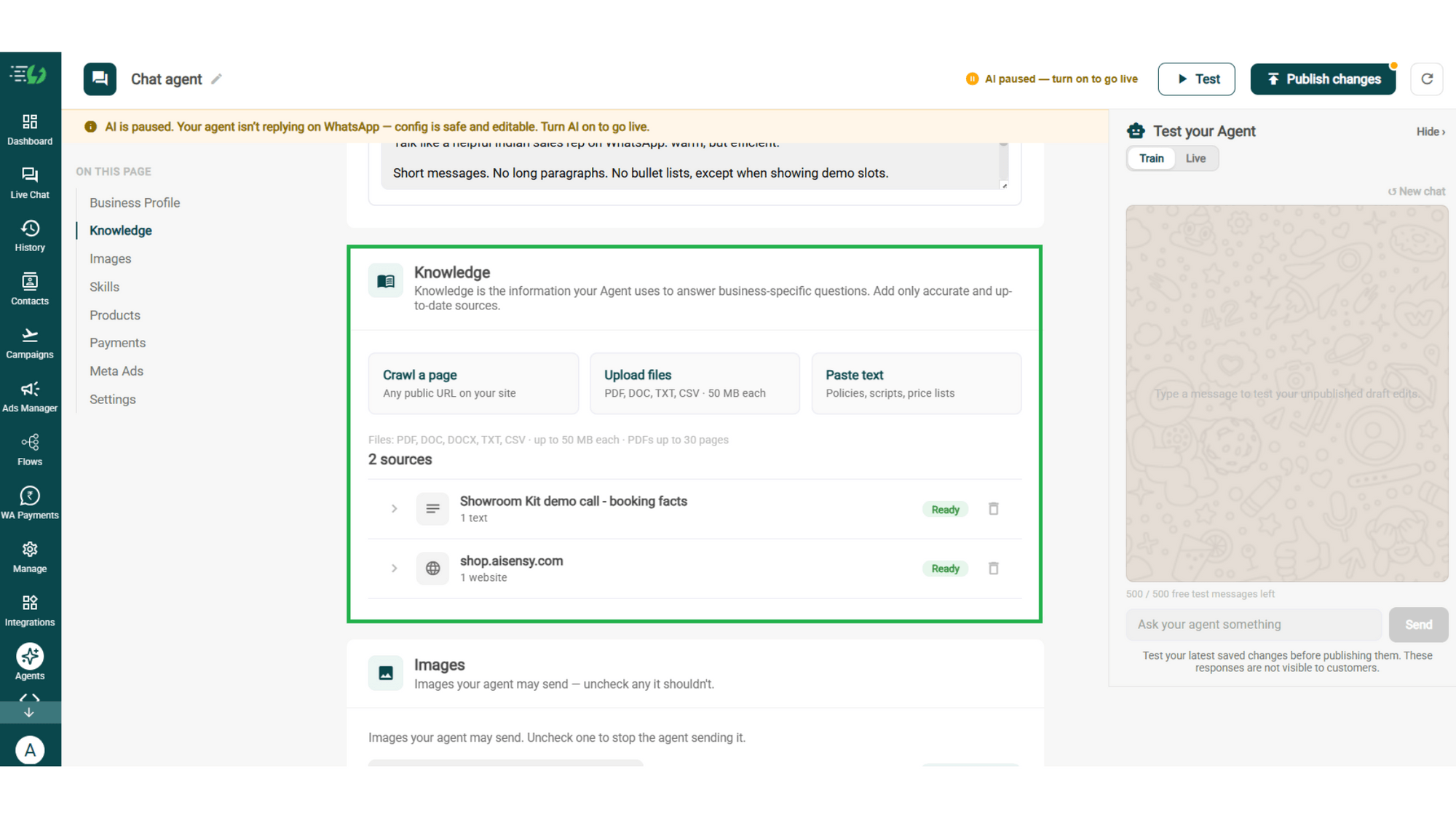
Train the Agent with Your Knowledge

Train the agent on your business - it answers from your information, not generic replies. Every source shows "Ready" once learned.

Details to be filled are:

  • Crawl a page (website URL)

  • Upload files (PDF, DOC, TXT, CSV - up to 50MB each)

  • Paste text (policies, scripts, price lists)
knowledge.png

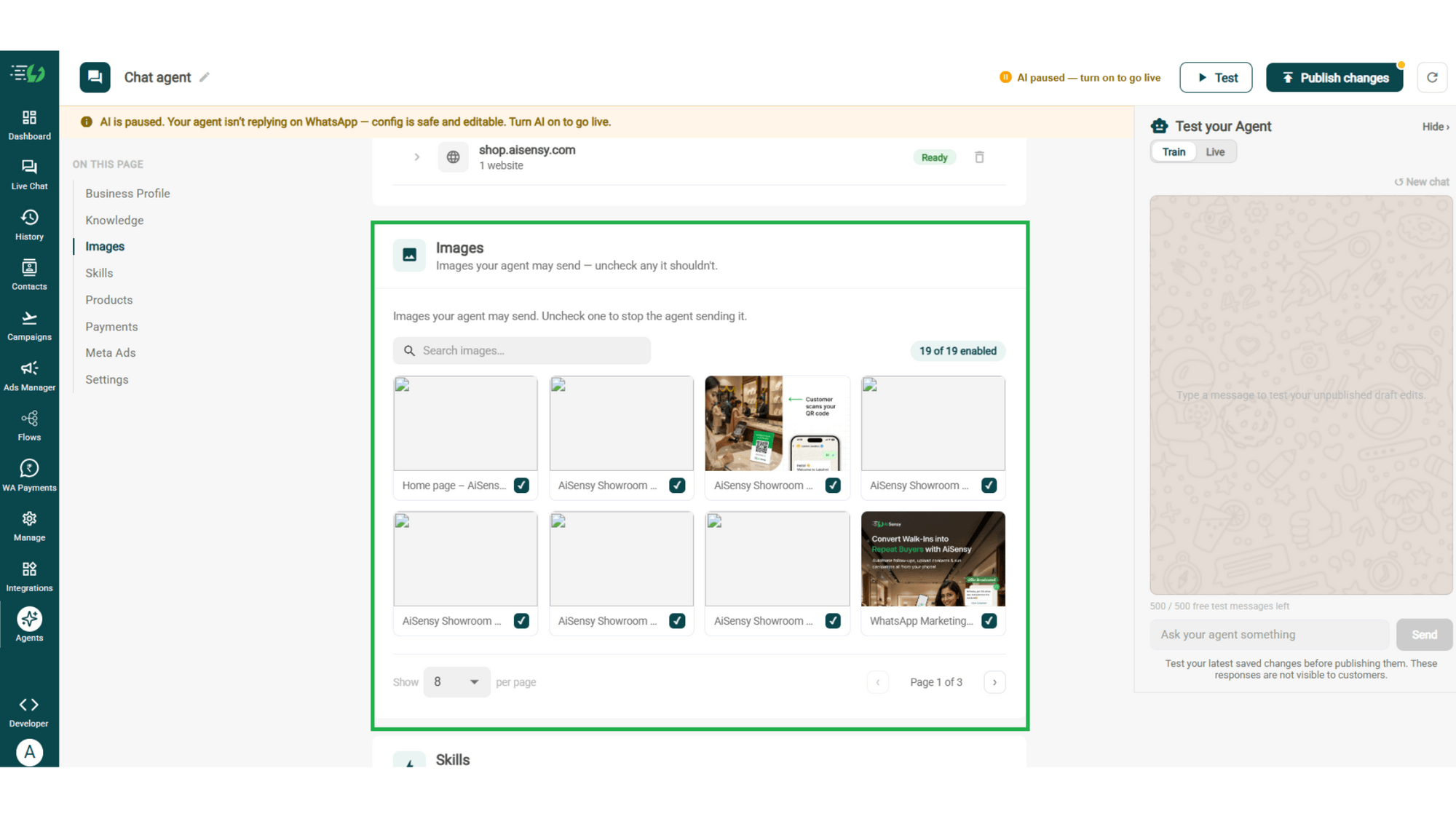
Choose the Images It Can Share

Control the visuals your agent can share in chat - product shots, catalogs, offers. Untick any image it shouldn't send.

  • Image library (enable/disable per image)

  • Search images

images.png

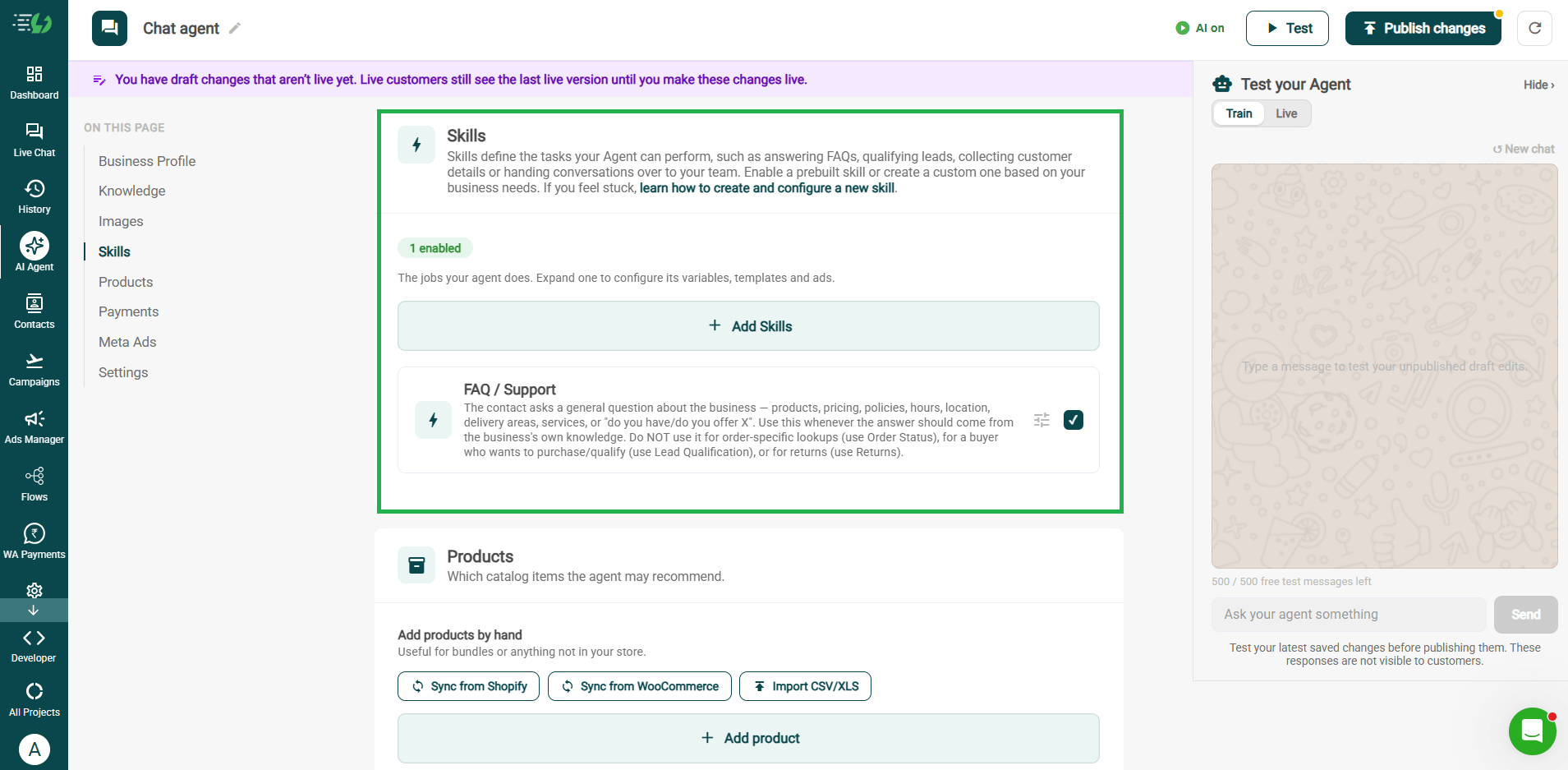
Enable the FAQ / Support Skill

Skills are the jobs your agent does. Switch on the prebuilt FAQ / Support skill, and pair it with others as needed.

  • Add Skills

  • Create custom skill (optional)

  • Per-skill configuration (variables, templates & ads)
skills.png

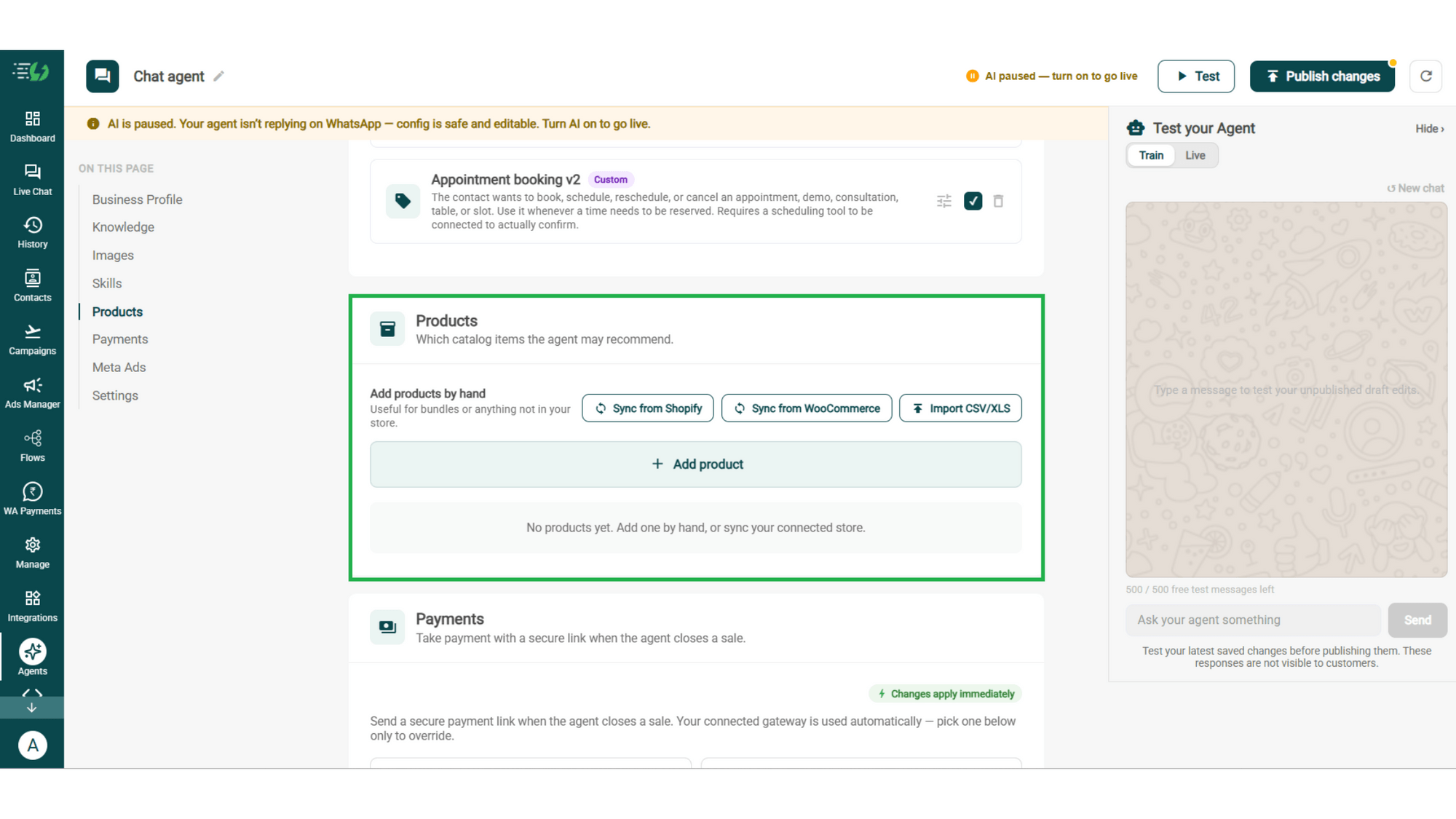
Add Your Products

Choose which catalog items the agent can recommend - so every suggestion comes from your actual range.

  • Catalog products (select what the agent may recommend)

  • Add products by hand (for bundles or items not in your store)
products.png

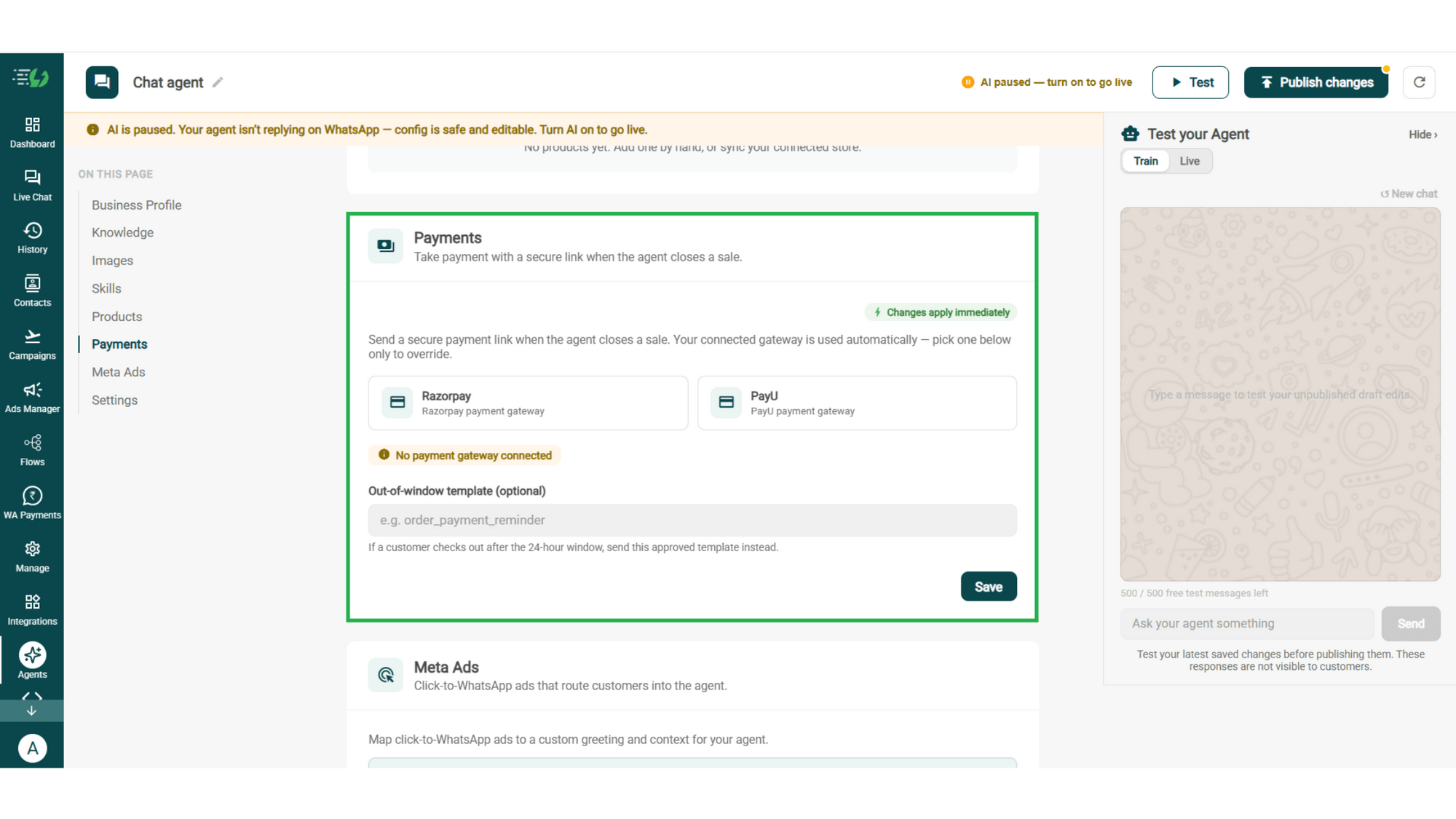
Connect Your Payment Gateway

Connect your payment gateway so the agent closes sales with a secure payment link, right inside the chat.

  • Payment gateway (Razorpay or PayU)

  • Out-of-window template (optional)

payments.png

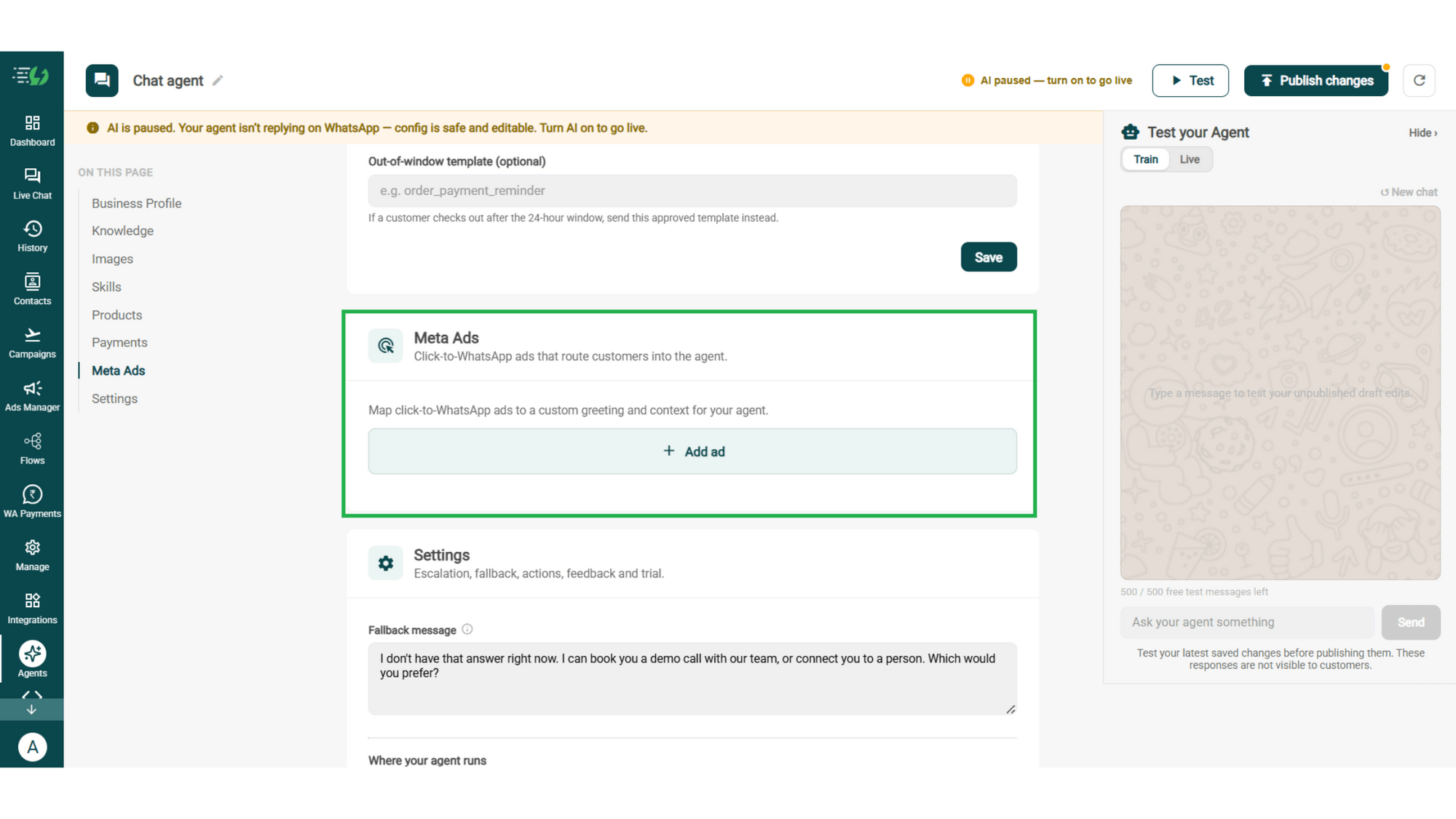
Link Your Meta Ads (Optional)

Running Click-to-WhatsApp ads?

Map each ad to a custom greeting & context, so the agent knows exactly which ad brought the customer in.

  • Add ad (map ad → custom greeting & context)
meta ads.png

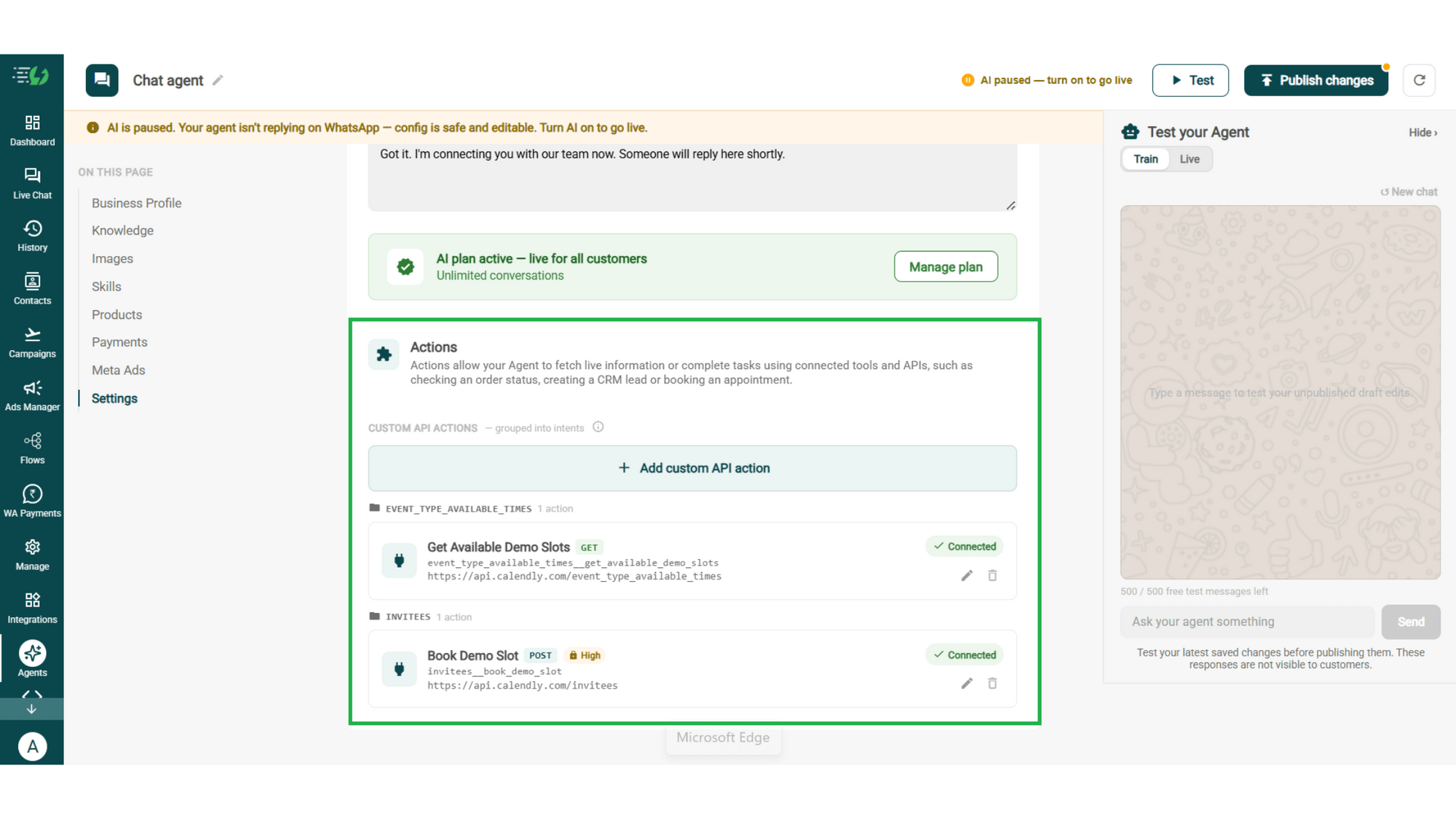
Connect Tools & APIs

Give your agent superpowers - connect tools & APIs so it can fetch live information or complete tasks like booking appointments.

  • Custom API actions (e.g. check order status, book a slot)

  • AI plan (manage your plan)

Action.png

Test, Publish & Go Live

Chat with your agent before your customers do - 500 free AI messages to trial it. Happy?

Publish, switch the AI on & you're live.

  • Test your Agent panel (Train/Live modes)

  • Publish

  • AI on/off toggle

testing.png

How a Question Gets Answered

A real conversation, step by step - your team only enters when a human actually has to decide something.

  • The Question

    Customer: "Do you deliver to Coimbatore? And how long is the warranty?"
    Both answered in seconds, straight from your delivery policy & warranty document.

  • The Follow-Up

     "What if it stops working in month 8?"

    The agent walks through the claim process step by step & shares the warranty document itself.

  • The Lookup

    "Where's my order?"

    The agent checks your system through a connected API & replies with the actual status. No ticket, no wait.

  • The Handover

    Now the customer wants a replacement approved. That's a human decision, so the chat goes to your support team with every message attached.

    Total time: 2 minutes. Tickets raised: zero.

  • olena-sergienko-dIMJWLx1YbE-unsplash.jpg

    The Support Agent Works Even Better With…

    One number, one team - agents for before, during & after the sale.

    Sales AI Agent

    When a support question turns into buying intent, this agent picks it up & closes in-chat.

    Lead Qualification AI Agent

     Some "support" chats are really new inquiries. This agent captures who they are & routes them to your team.

    Feedback AI Agent

    Once an issue is resolved, this agent asks how it went - so you hear about a bad experience before a review site does.

    Simple Pricing. Every Agent Included.

    One plan unlocks the entire library - deploy any AI Agent, or build your own.

    ₹3,500

    Per Month
    Start for FREE

    $99

    Per Month, Billed Annually
    Buy Now

    WhatsApp AI Agent Features

    Access every pre-built AI Agent in this library, plus the no-code builder to create your own - trained on your business and live on WhatsApp in minutes.

    • 3,500 AI messages every month

    • 500 FREE AI messages for testing

    • Knowledge Base Q&A - train it on your website & documents

    • Long-term customer memory

    • No-code builder to customize any agent

    • Tool calling, skills & API integrations

    FAQ

    Frequently asked questions answered

    What can the Customer Support AI Agent answer?

    Anything covered by your own information - products, pricing, policies, hours, location, delivery areas and services. It handles the general questions that fill your inbox, so your team only sees the ones that genuinely need them.

    Where does it get its answers from?

    From the knowledge you give it. Crawl your website, upload your policy documents and price lists, or paste text directly. The agent answers from those sources rather than from generic internet knowledge.

    Will it make things up?

    It answers from your knowledge base, and you set ground rules it has to follow. When something isn't covered, the right behaviour is to say so and hand over - which is exactly what the fallback message and Human Handoff skill are for.

    Can it check my customers' order status?

    Yes, through a connected API. Order status isn't a prebuilt skill - you connect your system under Tools & APIs and the agent looks the order up mid-conversation instead of raising a ticket.

    What happens when it can't answer?

    You set a fallback message so no customer hits a dead end, and the Human Handoff skill passes the chat to your team. Billing disputes, complaints and anything sensitive should route to a person by design, not by accident.

    When does a human take over the conversation?

    Whenever you decide. A customer explicitly asking for a person, clear frustration, or anything outside the agent's scope - all handed over with the full conversation attached, so nobody repeats themselves.

    Does it work in Hindi and other languages?

    Yes. The agent replies in the language your customer writes in, including Hinglish, so you don't need a separate flow per language.

    How is this different from a WhatsApp chatbot?

    A chatbot follows a flow you draw - buttons, branches, fixed paths. This agent reads the question and answers from your knowledge, so it handles the phrasings you never anticipated. AiSensy offers both - the chatbot builder and the AI agent are separate add-ons.

    Can I test it before customers see it?

    Yes. You get 500 free AI messages to chat with your agent in Train mode, and you can add up to 3 WhatsApp test numbers before going live. Nothing you test is visible to customers.

    How much does the Customer Support AI Agent cost?

    It's included in the AI Agent plan at ₹3,500 a month. That one plan unlocks every pre-built agent in the library plus the no-code builder to create your own - you're not paying per agent.