WhatsApp AI Agent for Feedback
Hear from every customer, not just the angry ones. Build the Feedback AI Agent in minutes & let it collect the rating, the reason and the review inside WhatsApp.
No coding needed!

What Your Feedback AI Agent Handles
Every step of collecting feedback happens inside WhatsApp, taking it off your plate.
Asks Where They Actually Reply
Feedback emails get ignored and forms get abandoned. A WhatsApp message gets read, and answered in the same thread.
Two Questions, Not a Survey
A rating, then why. That's it. Short enough that people finish it, specific enough that you learn something.
Catches the Unhappy Customer
A low rating goes straight to your team with the comment attached - so you can fix it privately, while it's still a conversation and not a public review.
Takes Feedback in Their Own Words
No fixed options to pick from. Customers tell you what they actually thought, so you get the reason behind the number.
Points Customers to a Review
Once someone has told you how it went, the agent shares your review link while the experience is still fresh.
Collects Feedback in Your Customer's Language
English, Hindi, Hinglish or anything in between - the agent matches how your customer talks.
How to Build Your Feedback AI Agent in Minutes
Here's how a real brand goes from zero to a live Feedback AI Agent on WhatsApp.
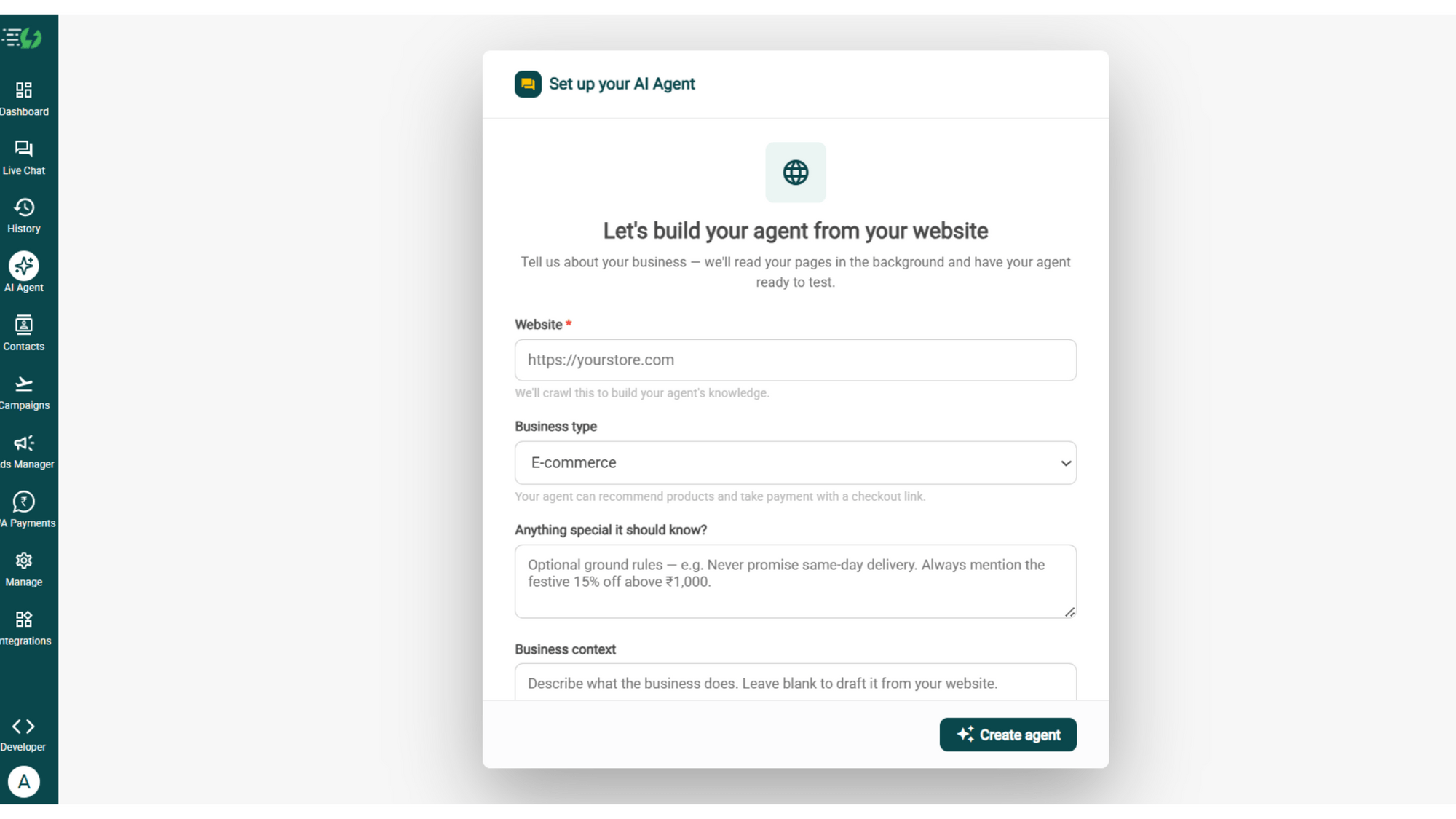
Build Your Agent from Your Website
Click AI Agent, add your website, and AiSensy automatically builds an agent trained on your business.
Website (required)
Business type
Anything special it should know? (optional)
Business context (optional)
Then hit ✨ Create agent.
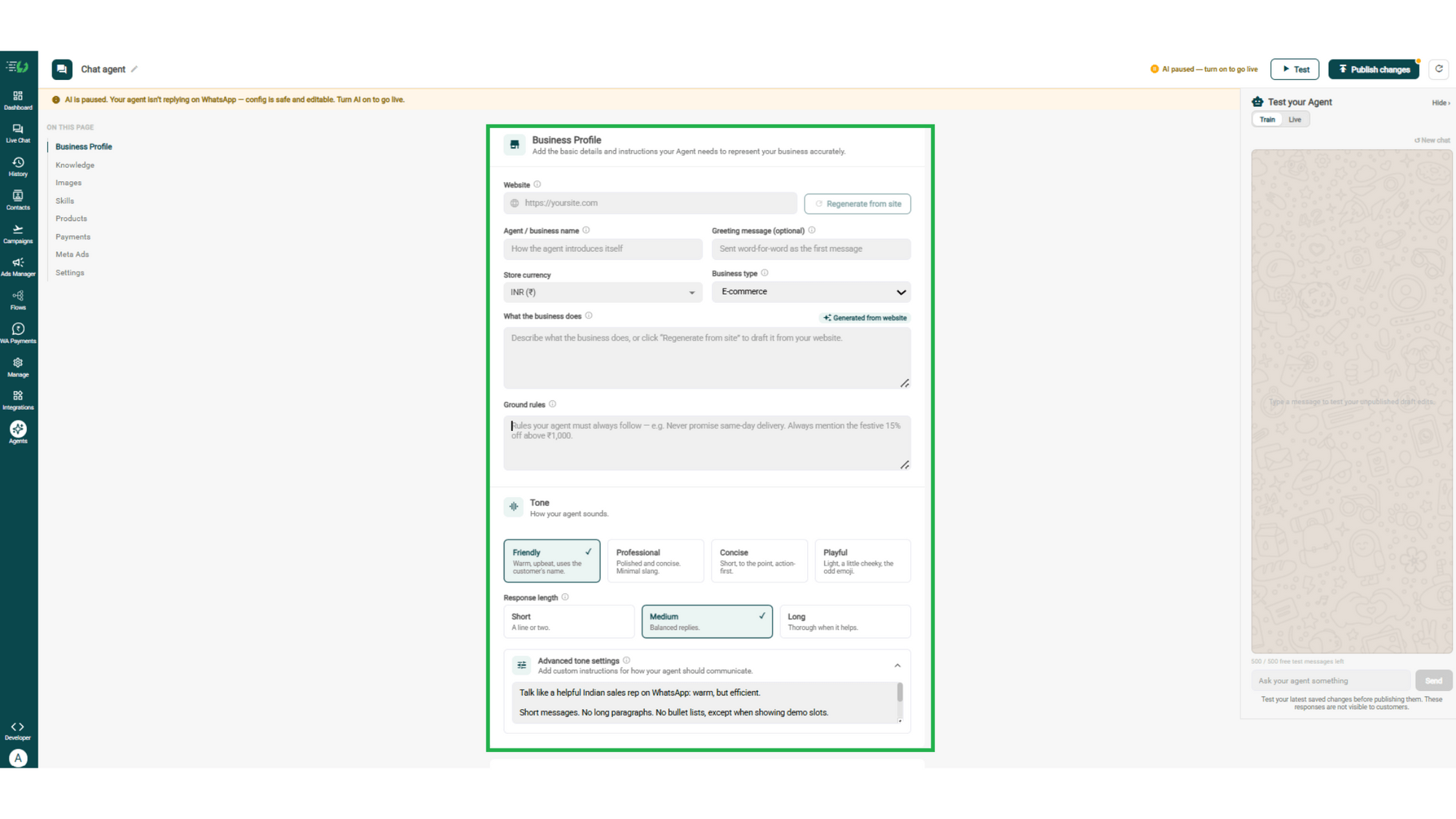
Add Your Business Profile
Add your website & AiSensy auto-generates your business description. Set your agent's name, greeting, and a few ground rules it must always follow.
Website
Agent/business name
Greeting message (optional)
Store currency
Business type
What the business does
Ground rules
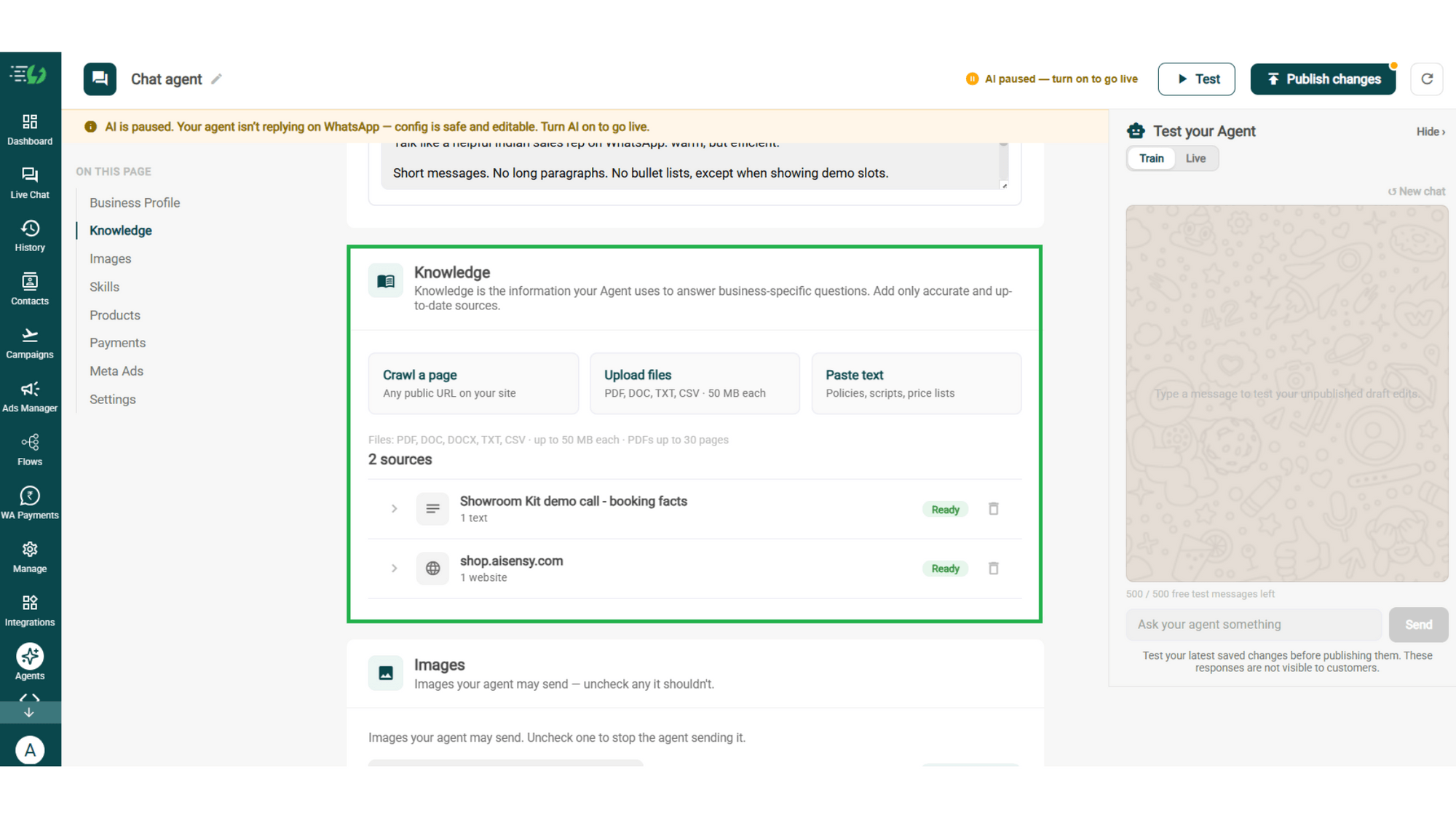
Train the Agent with Your Knowledge
Train the agent on your business - it answers from your information, not generic replies. Every source shows "Ready" once learned.
Details to be filled are:
Crawl a page (website URL)
Upload files (PDF, DOC, TXT, CSV - up to 50MB each)
Paste text (policies, scripts, price lists)
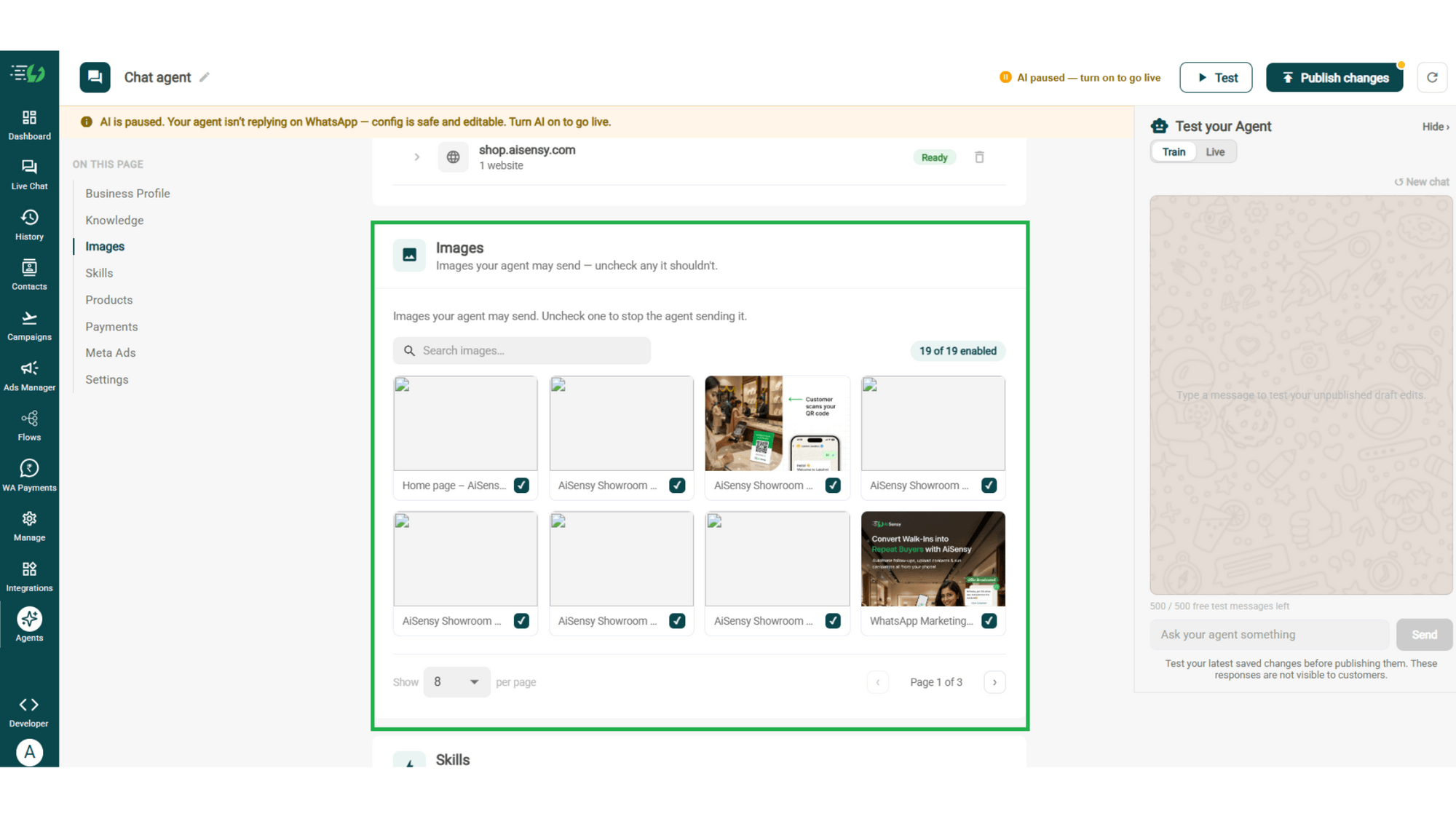
Choose the Images It Can Share
Control the visuals your agent can share in chat - product shots, catalogs, offers. Untick any image it shouldn't send.
Image library (enable/disable per image)
Search images
Create the Feedback Skill
Skills are the jobs your agent does. Open Add Skills, and if the job you need isn't in the prebuilt list, hit Create custom - there's no prebuilt Feedback skill, so tap the Feedback starting point and it fills the fields in for you.
What kind of skill is this (Task skill)
Start from a suggestion (Feedback)
Or describe what this skill should do
Icon & name
When should the agent use it?
Instructions
Add skills
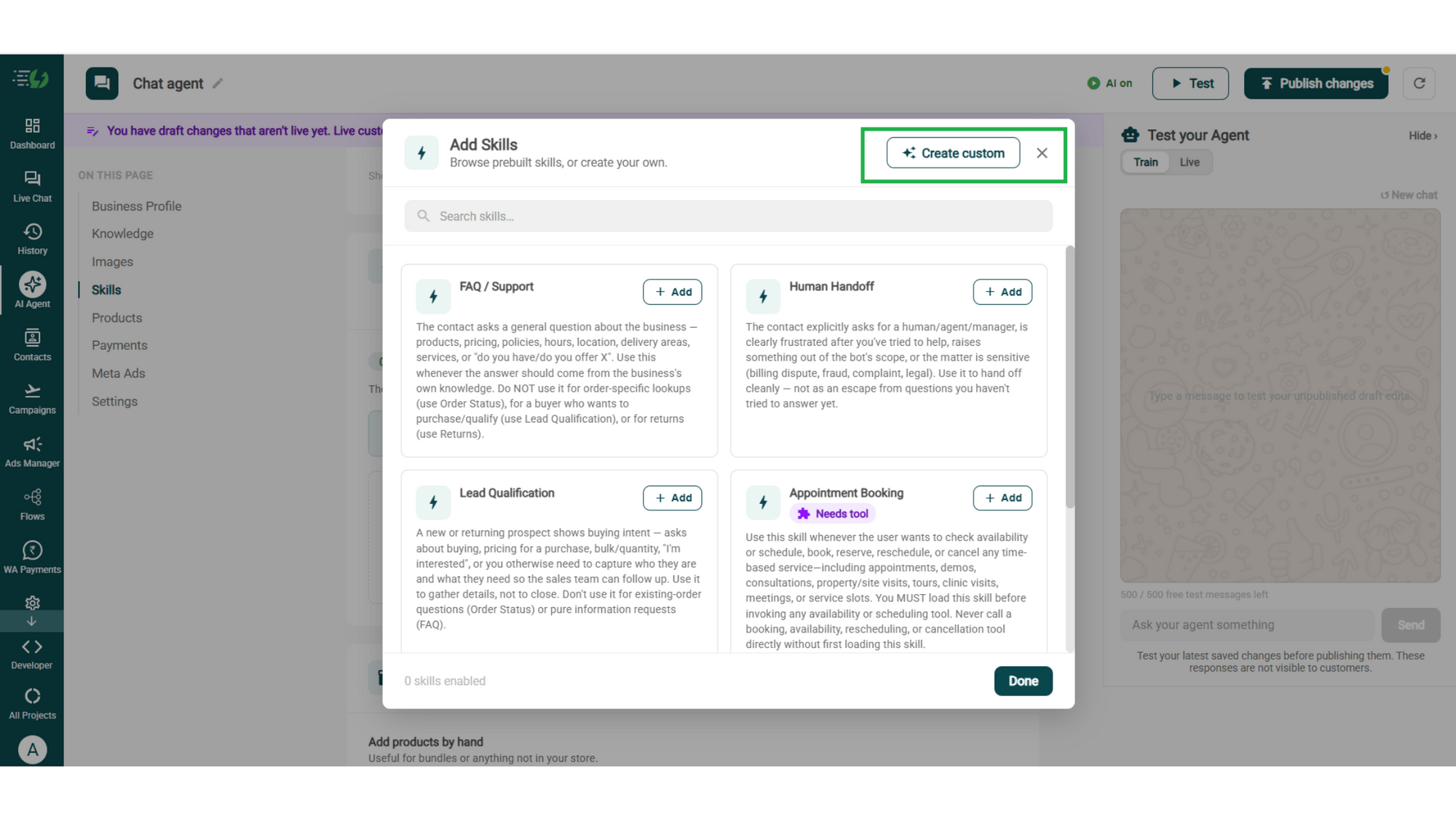
Enable It on Your Agent
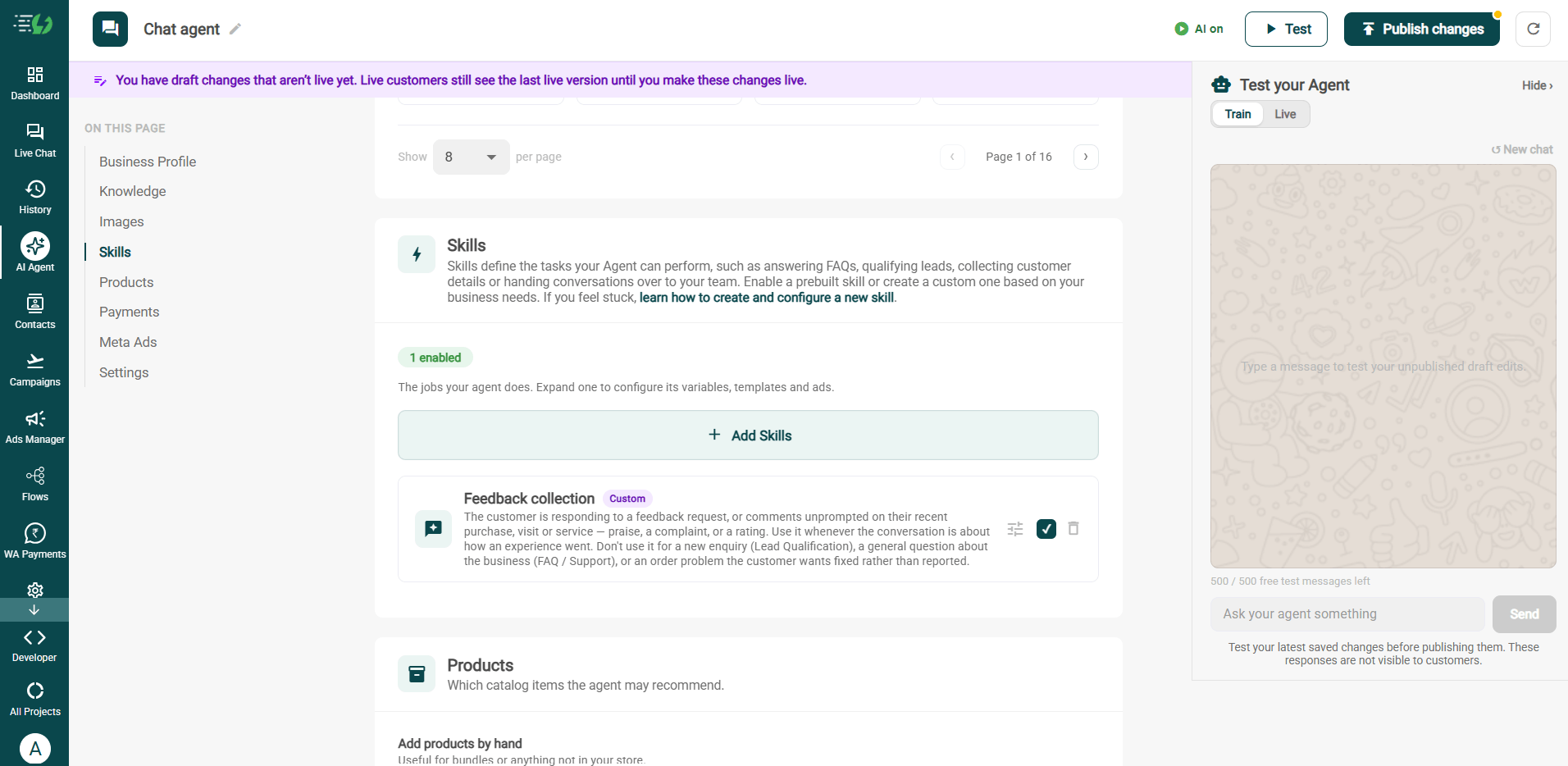
Switch on the recently created Feedback Collection skill, and pair it with others if needed.
Add Skills
Create custom skill (optional)
Per-skill configuration (variables, templates & ads)
Add Your Products
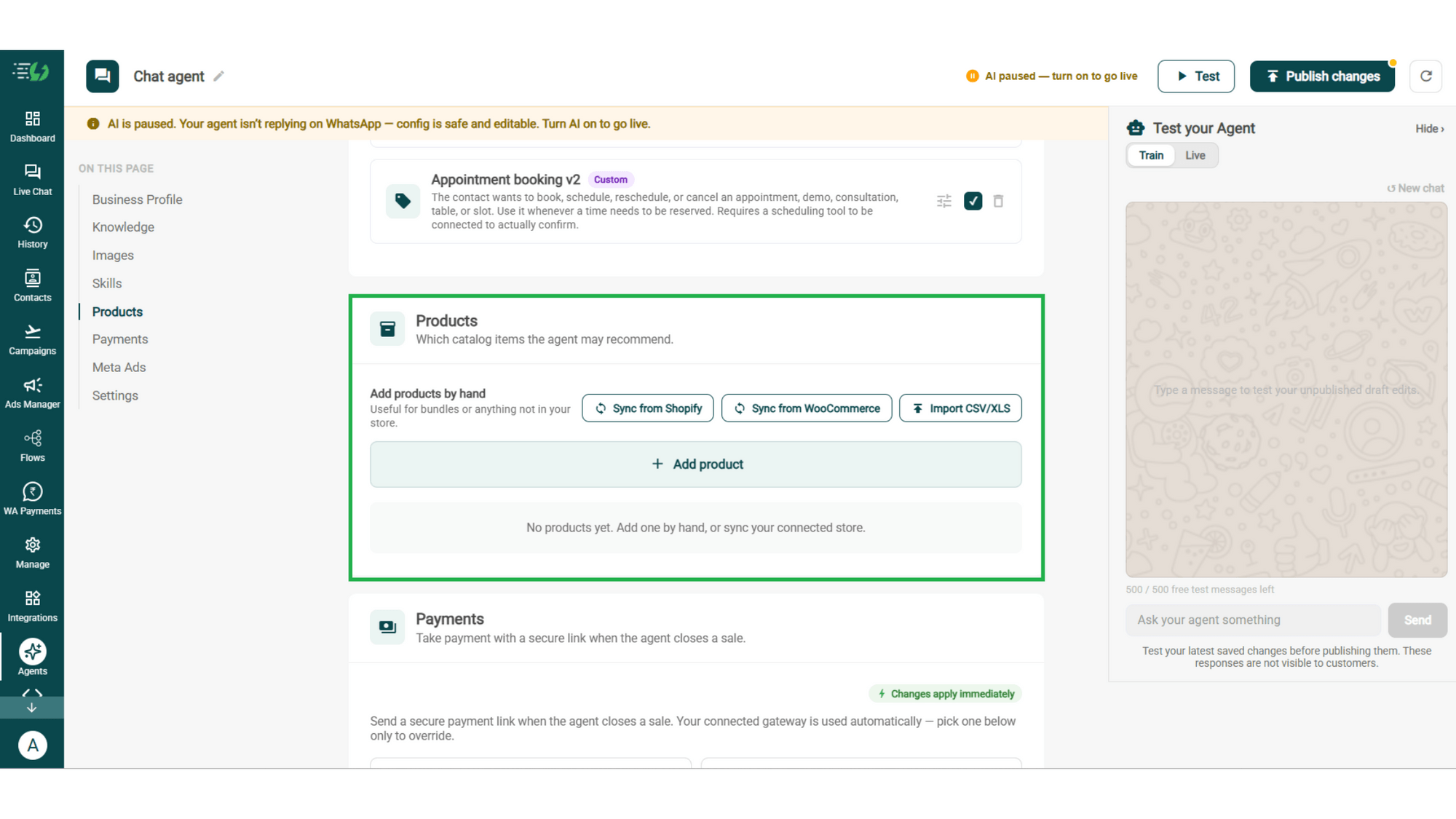
Choose which catalog items the agent can recommend - so every suggestion comes from your actual range.
Catalog products (select what the agent may recommend)
Add products by hand (for bundles or items not in your store)
Connect Your Payment Gateway
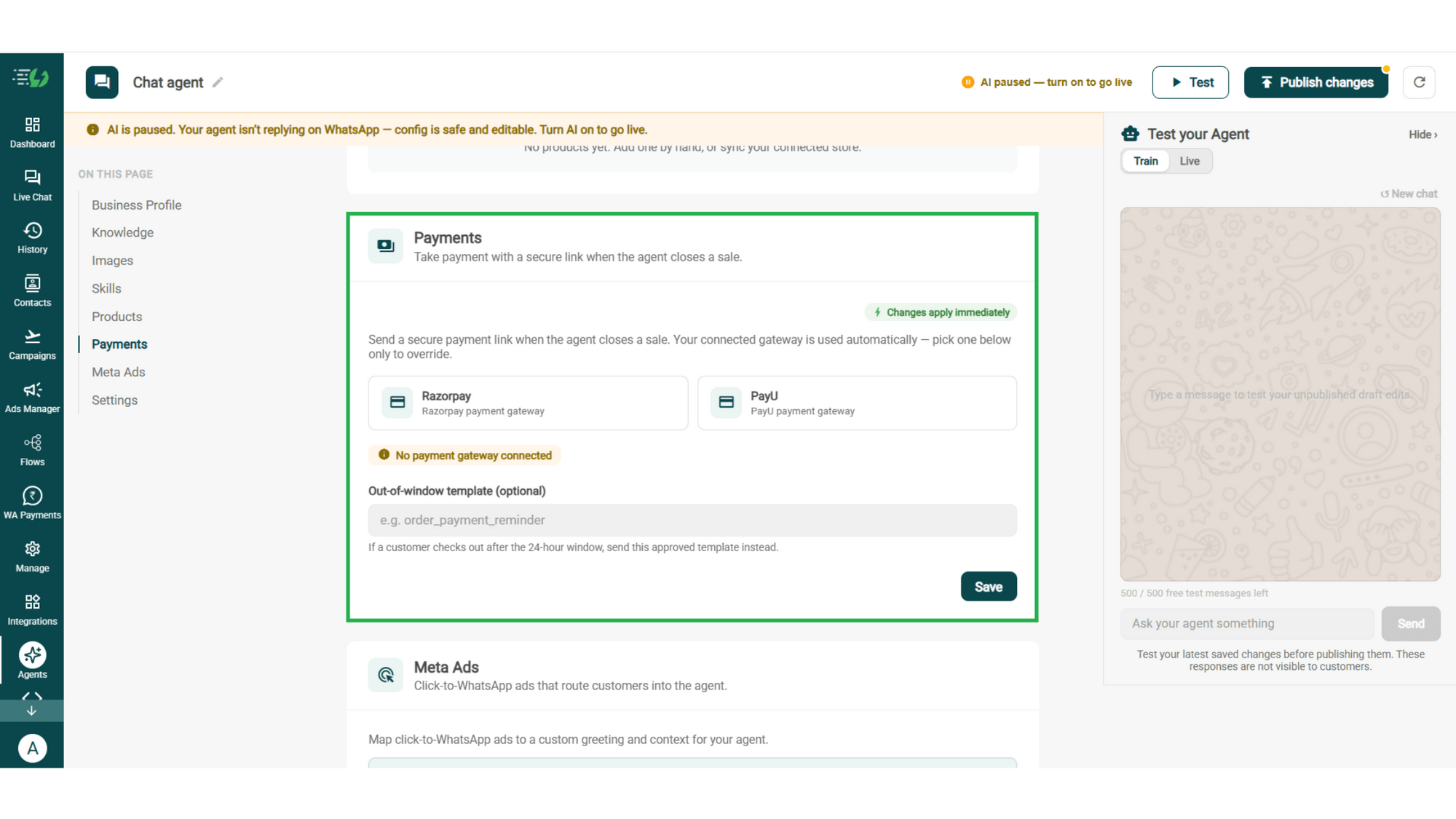
Connect your payment gateway so the agent closes sales with a secure payment link, right inside the chat.
Payment gateway (Razorpay or PayU)
Out-of-window template (optional)
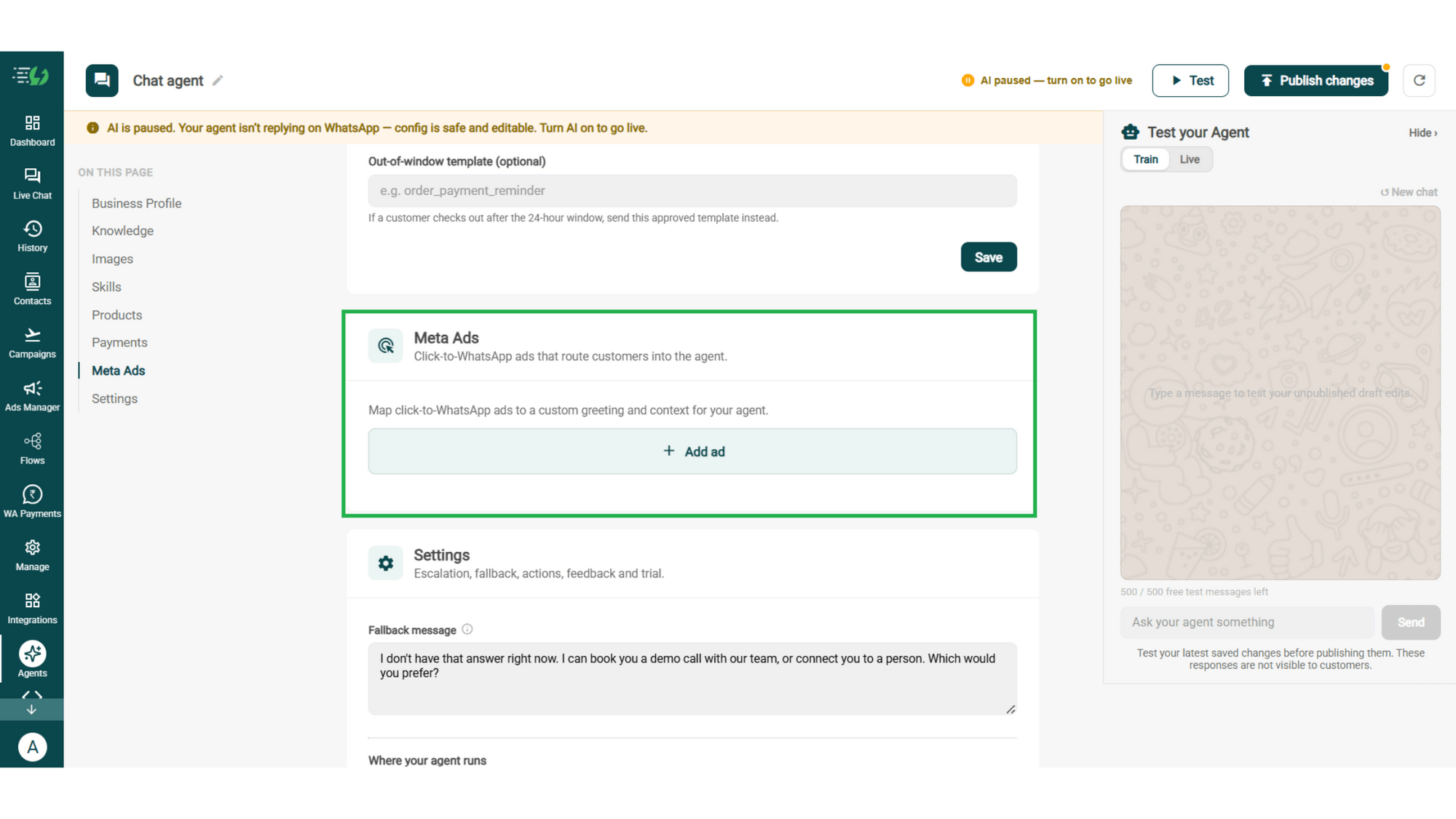
Link Your Meta Ads (Optional)
Running Click-to-WhatsApp ads?
Map each ad to a custom greeting & context, so the agent knows exactly which ad brought the customer in.
Add ad (map ad → custom greeting & context)
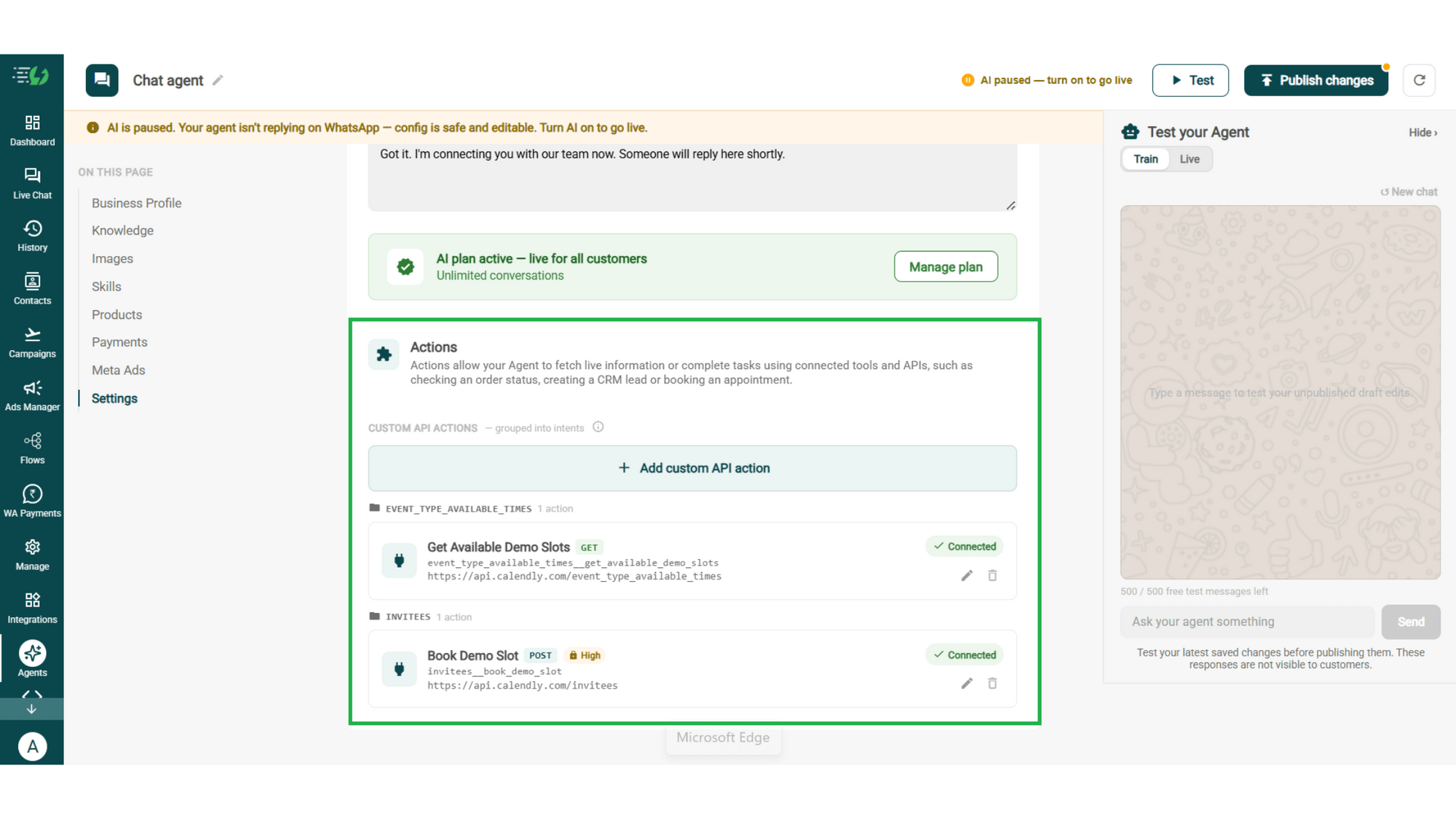
Connect Tools & APIs
Give your agent superpowers - connect tools & APIs so it can fetch live information or complete tasks like booking appointments.
Custom API actions (e.g. check order status, book a slot)
AI plan (manage your plan)
Test, Publish & Go Live
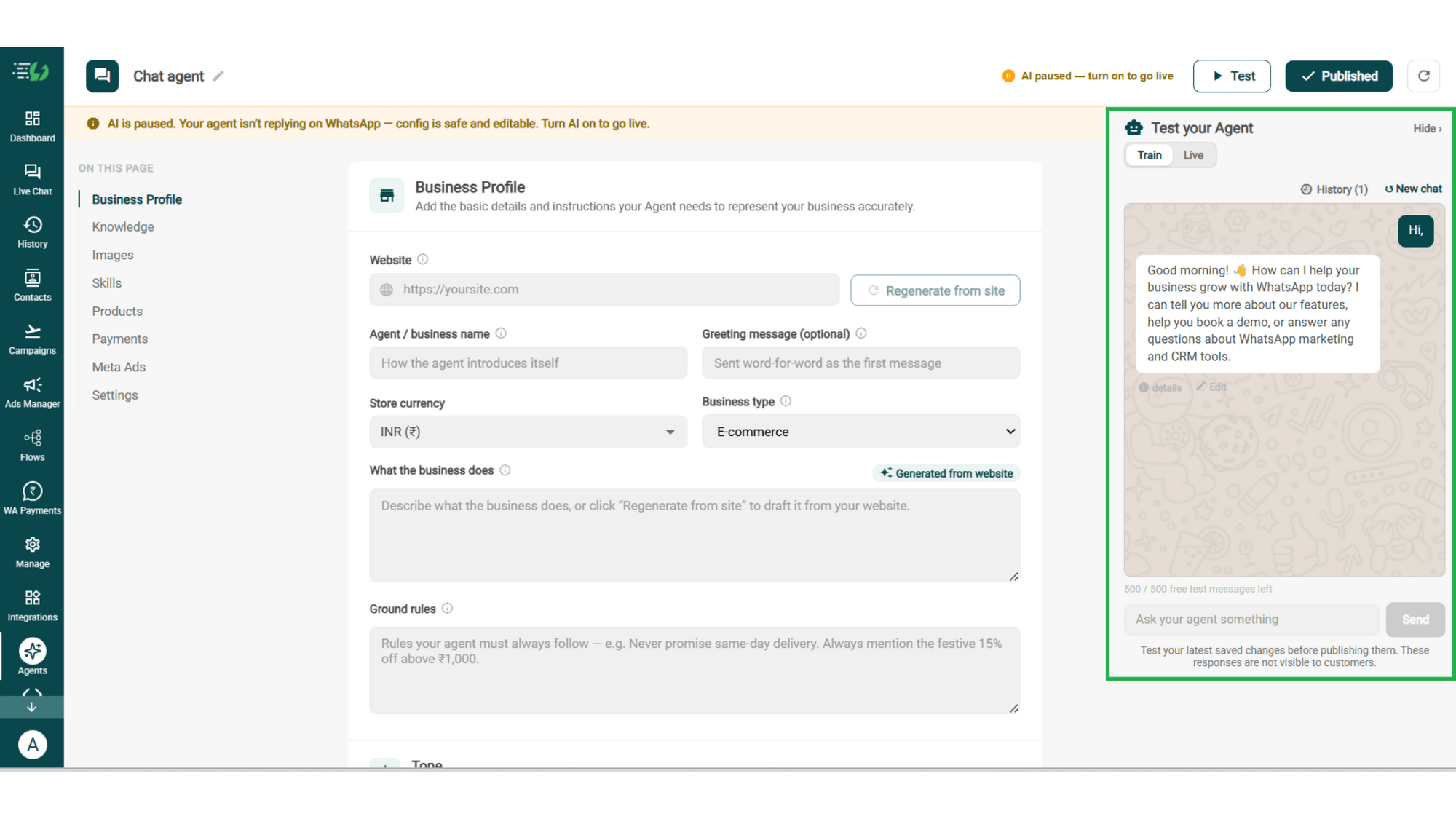
Chat with your agent before your customers do - 500 free AI messages to trial it. Happy?
Publish, switch the AI on & you're live.
Test your Agent panel (Train/Live modes)
Publish
AI on/off toggle
How Feedback Gets Collected
A real conversation, step by step - your team only steps in when something went wrong.
The Nudge
A day after the visit, your approved template goes out: "How was dinner with us?"
The Rating
The customer replies "3". The agent thanks them & asks what would have made it a 5.
The Reason
"Food was great, the wait was 40 minutes."
Specific, in their words, and nothing a star rating alone would have told you.
The Save
Because it's a 3, the chat goes to your manager with the comment attached. She replies personally that evening - before it becomes a Google review.

The Feedback Agent Works Even Better With…
One number, one team - agents for before, during & after the sale.
Customer Support AI Agent
Feedback tells you something broke. This agent handles the questions that follow.
Sales AI Agent
A customer who just told you it went well is your easiest next sale. This agent picks up from there.
Appointment Booking AI Agent
Good visit? Book the next one in the same conversation, while they're still happy.
Simple Pricing. Every Agent Included.
One plan unlocks the entire library - deploy any AI Agent, or build your own.
WhatsApp AI Agent Features
Access every pre-built AI Agent in this library, plus the no-code builder to create your own - trained on your business and live on WhatsApp in minutes.
3,500 AI messages every month
500 FREE AI messages for testing
Knowledge Base Q&A - train it on your website & documents
Long-term customer memory
No-code builder to customize any agent
Tool calling, skills & API integrations
What does the Feedback AI Agent do?
It asks how an experience went, captures a rating and the reason behind it, and decides what happens next - a thank you and your review link, or a handover to your team if something went wrong.
How does the conversation start?
With a message from you. An AI agent replies, it doesn't cold-message - so an approved template or campaign goes out after the purchase or visit, and the agent takes over the moment the customer replies.
What questions does it ask?
Whatever you set. The default is deliberately short - a rating, then what drove it - because two questions get finished and ten don't. You write the instructions the agent follows.
What happens when someone gives a bad rating?
The chat goes to your team with the rating and the customer's own words attached. That's the whole point - you hear it while it's still a private conversation, not after it's been posted somewhere public.
Will it ask customers to leave a public review?
It shares your review link after someone has given their feedback. We'd suggest asking everyone rather than only the happy ones - selectively soliciting reviews breaches Google's policies, and so does offering anything in return.
Do I have to build this from scratch?
Not really. The agent builder has a Feedback starting point that fills in the skill for you - you adjust the questions and instructions to match your business, which takes a couple of minutes.
When does a human take over the conversation?
Whenever you decide. A low rating, a customer who's clearly upset, or anything outside the agent's scope - handed to your team with the full conversation attached.
Does it work in Hindi and other languages?
Yes. The agent replies in the language your customer writes in, including Hinglish, so you don't need a separate flow per language.
Can I test it before customers see it?
Yes. You get 500 free AI messages to chat with your agent in Train mode, and up to 3 WhatsApp test numbers before going live. Nothing you test is visible to customers.
How much does the Feedback AI Agent cost?
It's included in the AI Agent plan at ₹3,500 a month. That one plan unlocks every pre-built agent in the library plus the no-code builder to create your own - you're not paying per agent.