New Launch | Build AI Agents on WhatsApp that qualify & convert 24/7 · Explore More

Login

WhatsApp AI Agent Library

WhatsApp AI Agent for Lead Qualification

Turn every WhatsApp enquiry into a qualified lead, automatically.

Train the ready-made Lead Qualification AI Agent on your criteria & let it filter, score and route round the clock.

No coding needed!

olena-sergienko-dIMJWLx1YbE-unsplash.jpg

What Your Lead Qualification AI Agent Handles

Qualify every lead automatically, right inside WhatsApp.

Asks the Right Questions

Budget, timeline, city, team size, use case - the agent collects what you actually need to judge a lead, one question at a time instead of a form nobody fills.

Scores Every Lead

Hot, warm or cold, decided by the rules you set. Your team opens WhatsApp to a ranked list, not 400 unread chats.

Filters Low-Intent Leads

Research enquiries, wrong-city leads, budgets nowhere near your minimum. The agent handles them politely & keeps them out of your pipeline.

Routes Hot Leads Instantly

A big-ticket enquiry doesn't sit in a queue. The agent hands it to the right salesperson instantly, with the full chat & every answer attached.

Updates Your CRM

Name, number, budget, requirement - pushed straight into your CRM or sheet, so nobody re-types a lead at 9pm.

Qualifies in Any Language

English, Hindi, Hinglish or anything in between - the agent matches how your customer talks.

How to Build Your Lead Qualification AI Agent in Minutes

Here's how a real brand goes from zero to a live Lead Qualification AI Agent on WhatsApp.

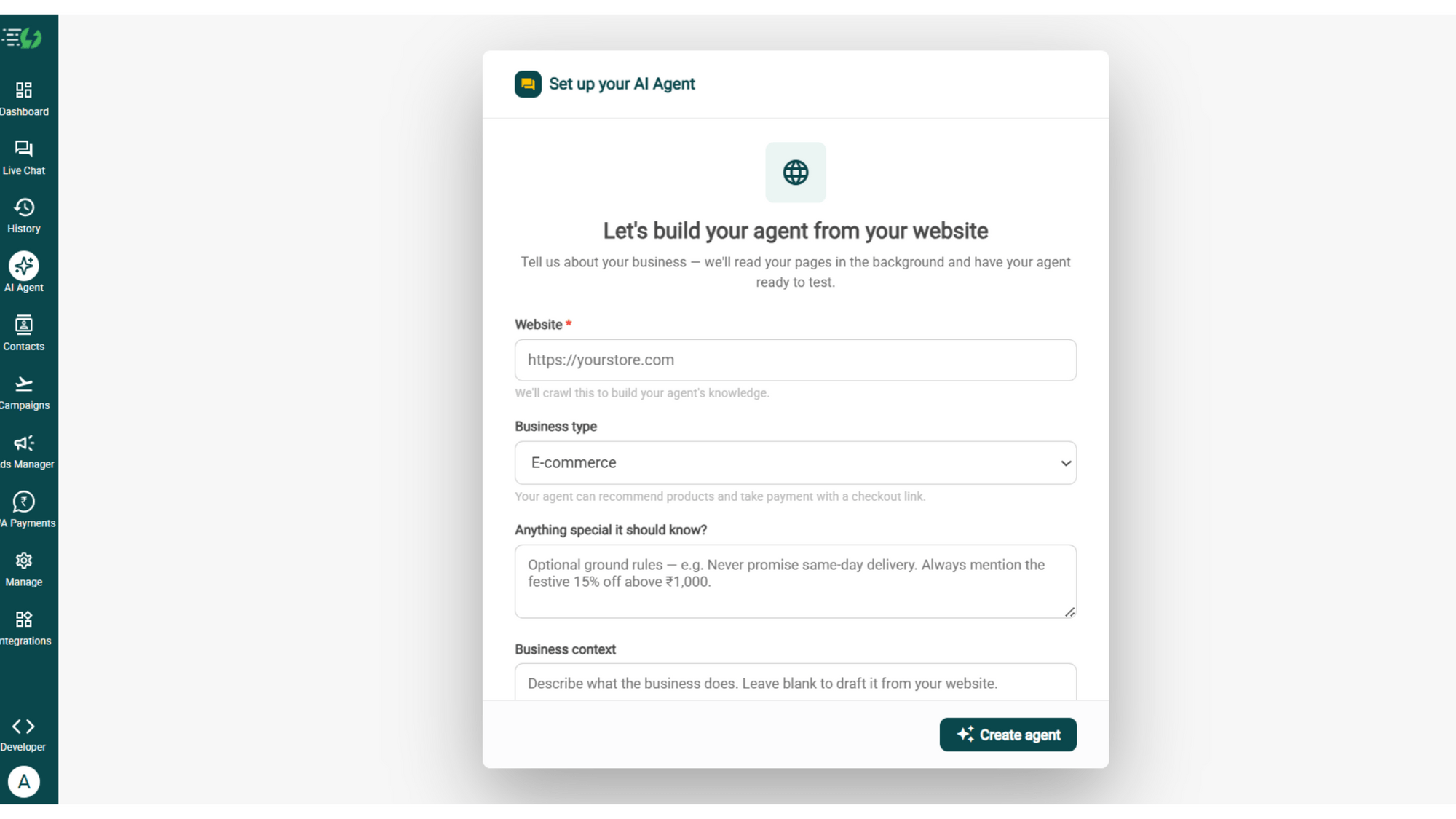
Build Your Agent from Your Website

Click AI Agent, add your website, and AiSensy automatically builds an agent trained on your business.

  • Website (required)

  • Business type

  • Anything special it should know? (optional)

  • Business context (optional)

Then hit ✨ Create agent.

image (4).png

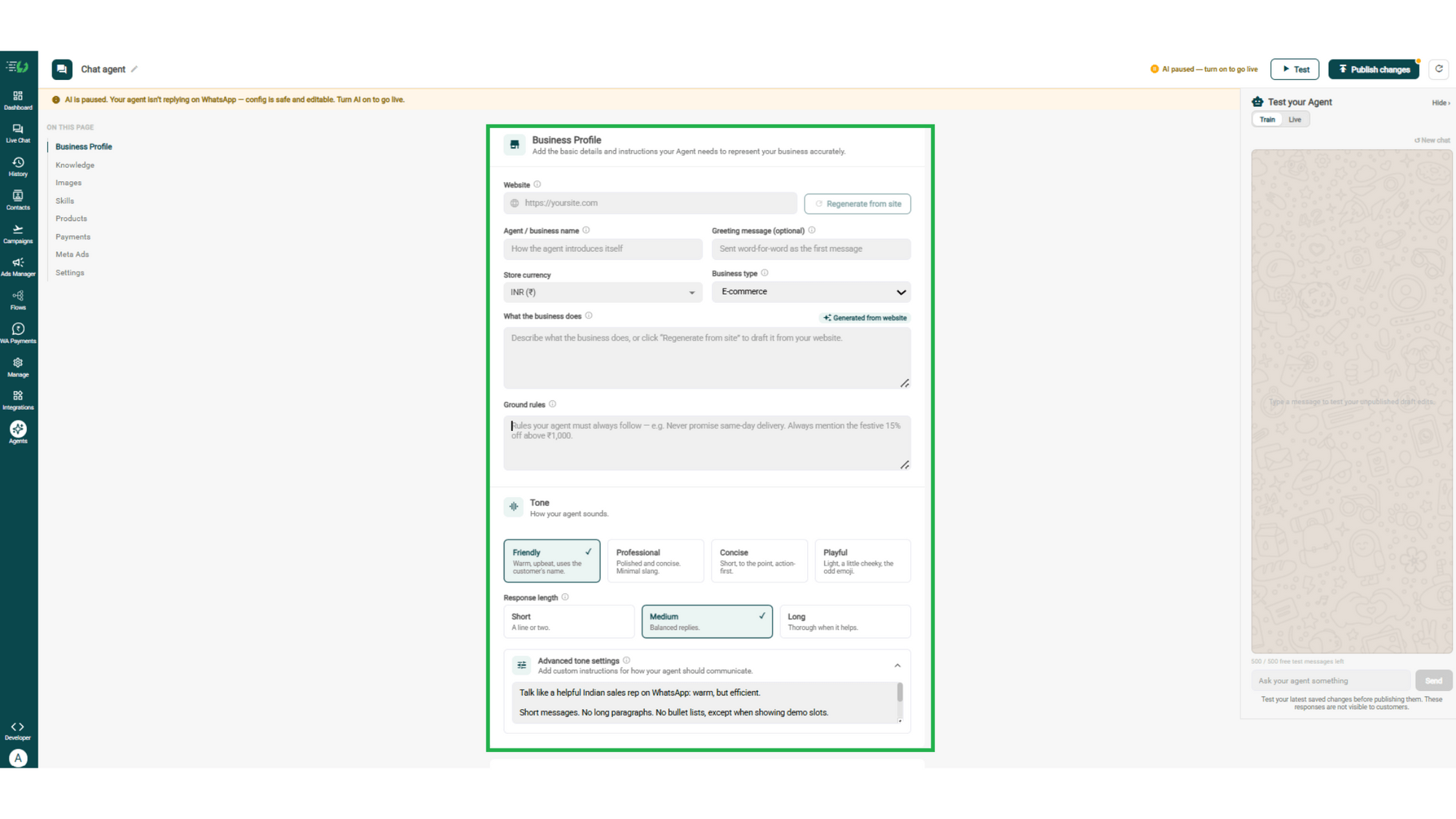
Add Your Business Profile

Add your website & AiSensy auto-generates your business description. Set your agent's name, greeting, and a few ground rules it must always follow.

  • Website

  • Agent/business name

  • Greeting message (optional)

  • Store currency

  • Business type

  • What the business does

  • Ground rules

business profile.png

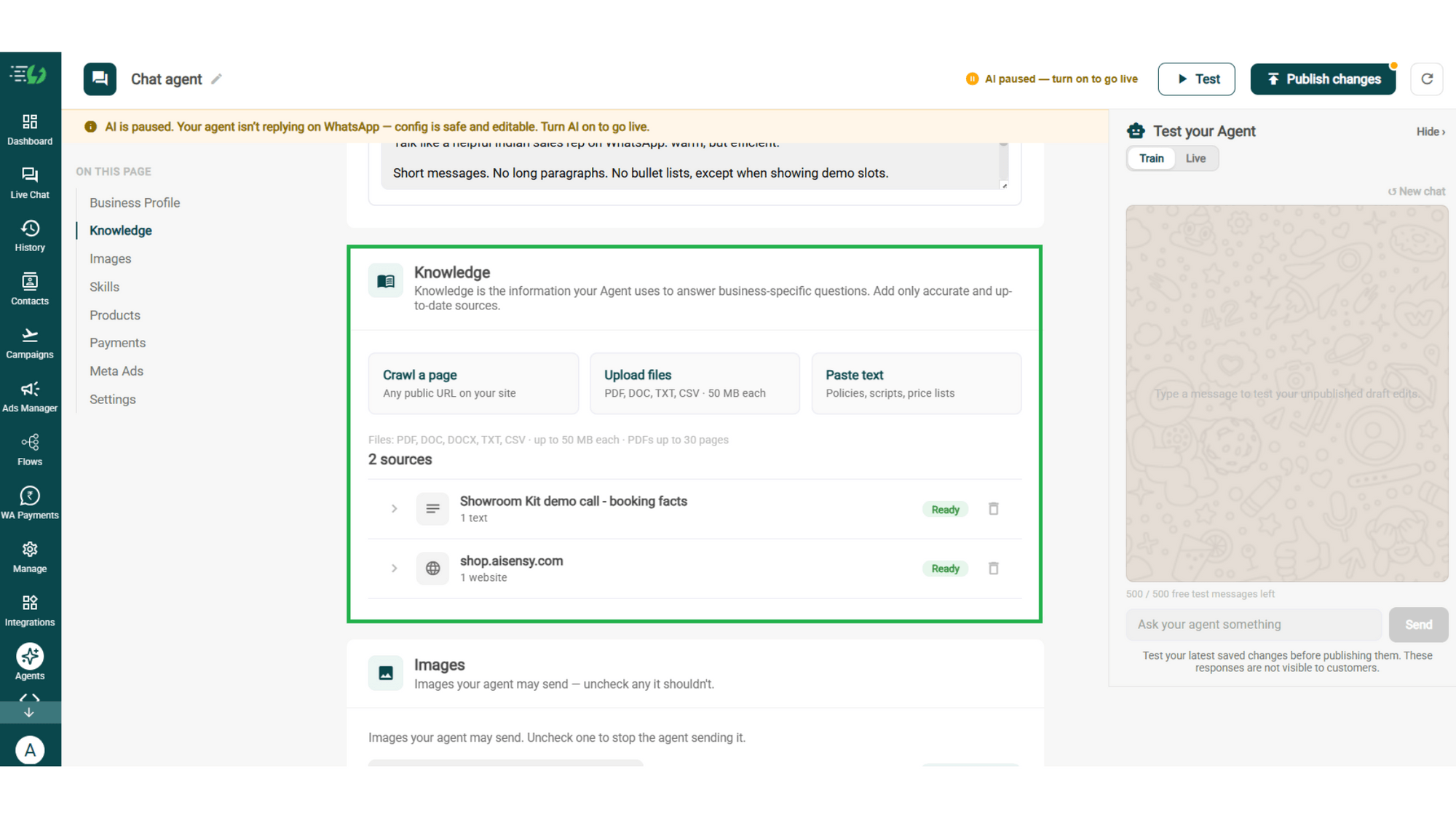
Train the Agent with Your Knowledge

Train the agent on your business - it answers from your information, not generic replies. Every source shows "Ready" once learned.

Details to be filled are:

  • Crawl a page (website URL)

  • Upload files (PDF, DOC, TXT, CSV - up to 50MB each)

  • Paste text (policies, scripts, price lists)

knowledge.png

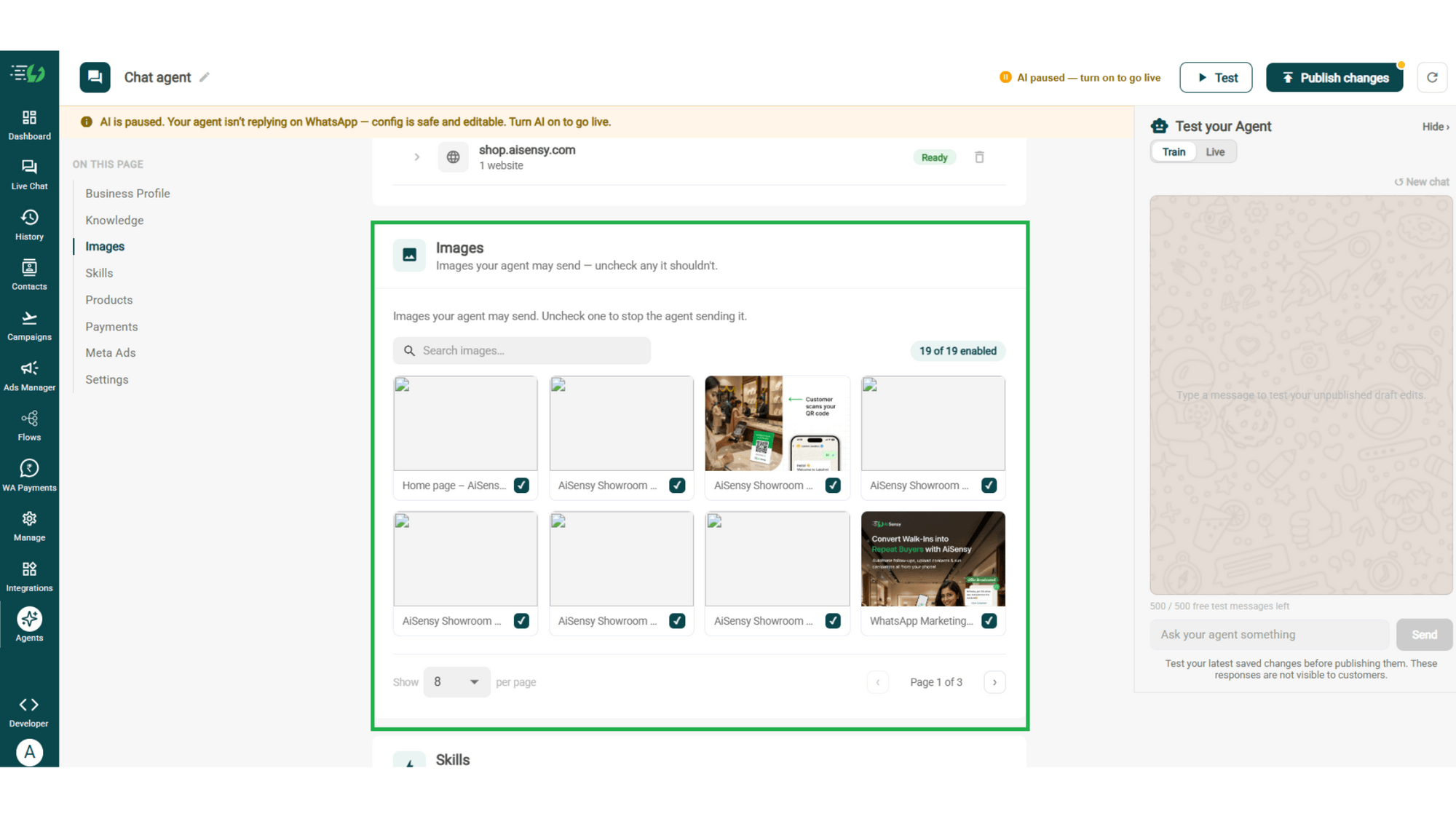
Choose the Images It Can Share

Control the visuals your agent can share in chat - product shots, catalogs, offers. Untick any image it shouldn't send.

  • Image library (enable/disable per image)

  • Search images

images.png

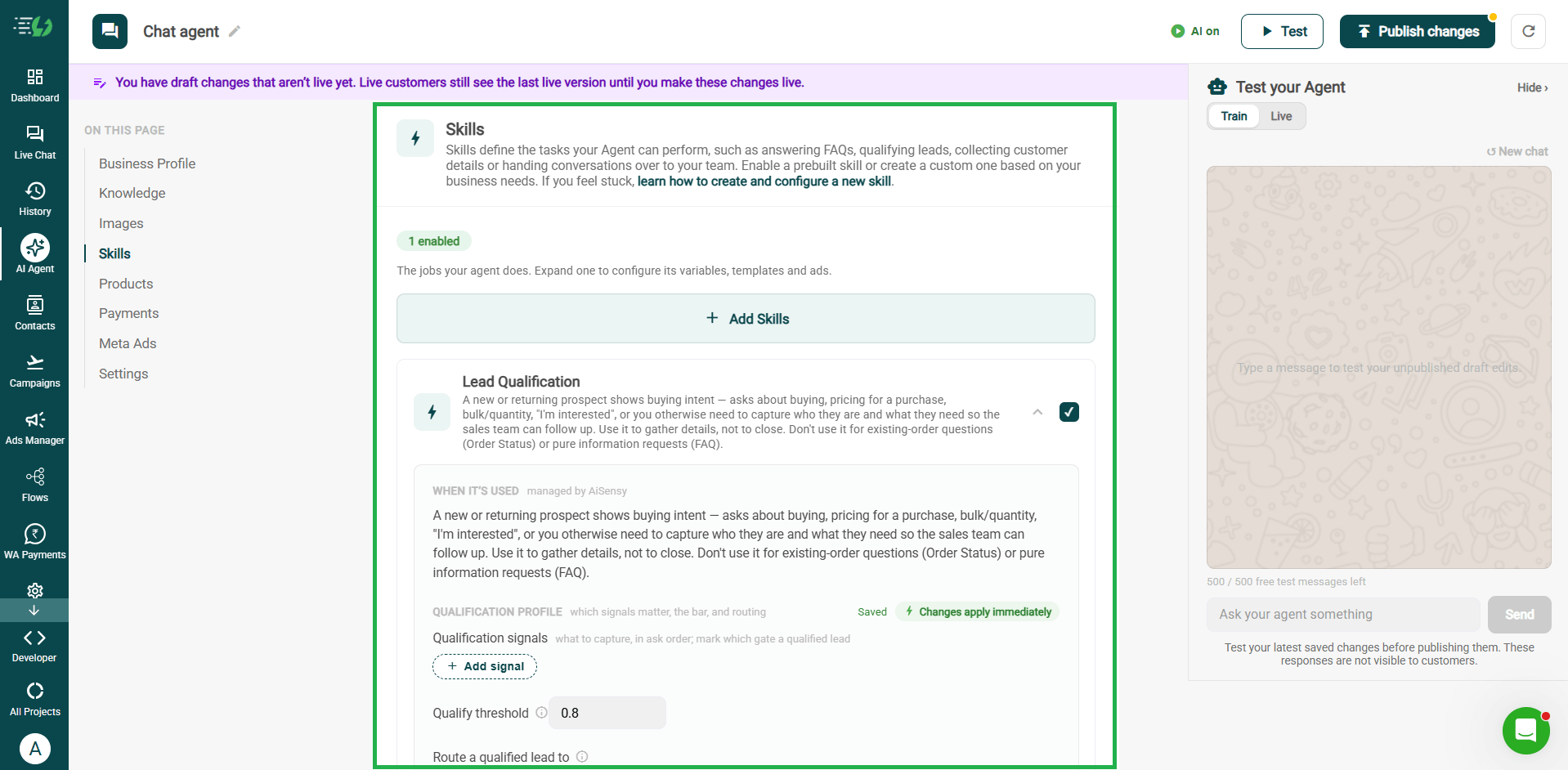
Enable the Lead Qualification Skill

Skills are the jobs your agent does. Switch on the prebuilt Lead Qualification skill, and pair it with others as needed.

  • Add Skills

  • Create custom skill (optional)

  • Per-skill configuration (variables, templates & ads)

skills.png

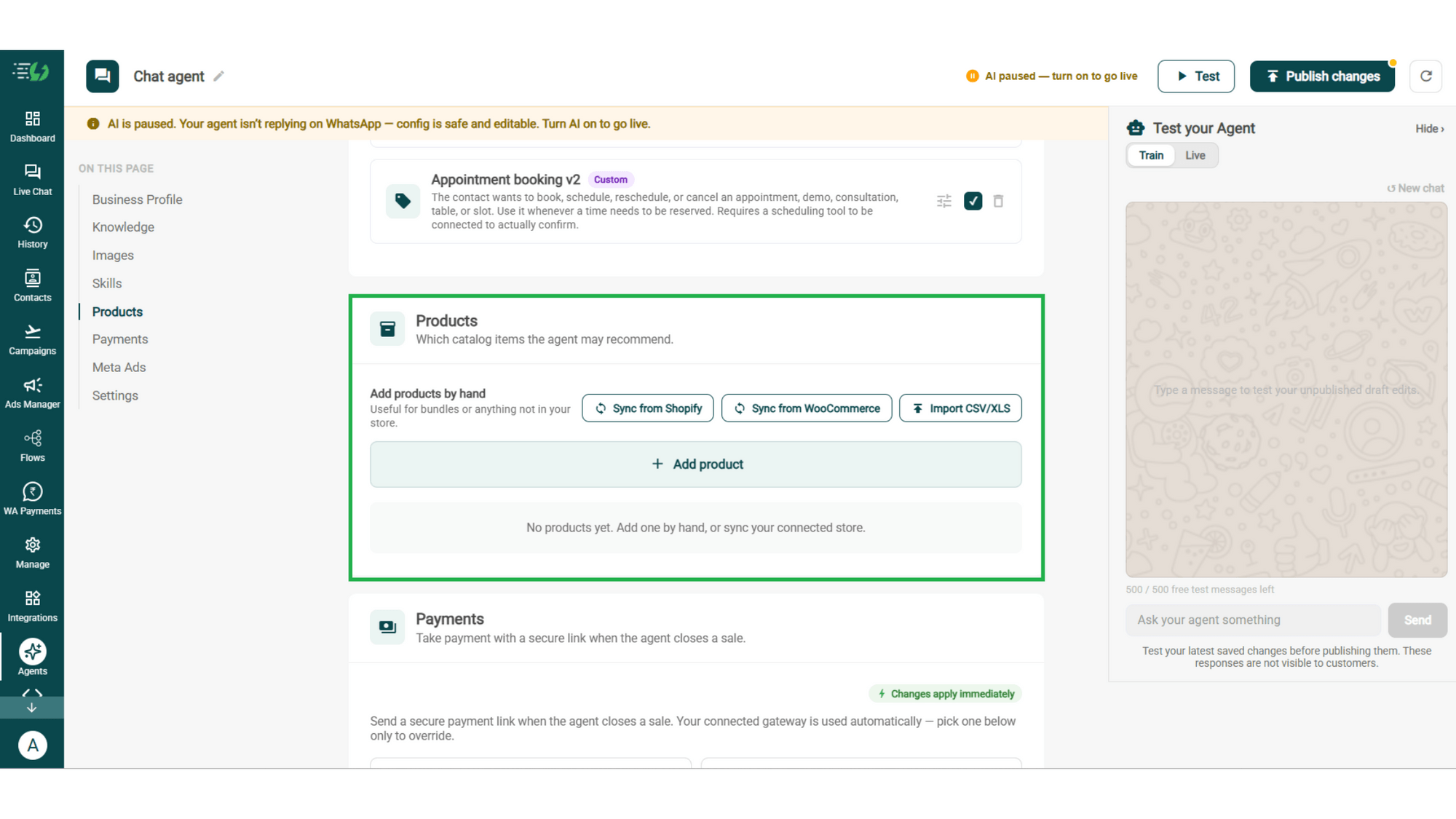
Add Your Products

Choose which catalog items the agent can recommend - so every suggestion comes from your actual range.

  • Catalog products (select what the agent may recommend)

  • Add products by hand (for bundles or items not in your store)

products.png

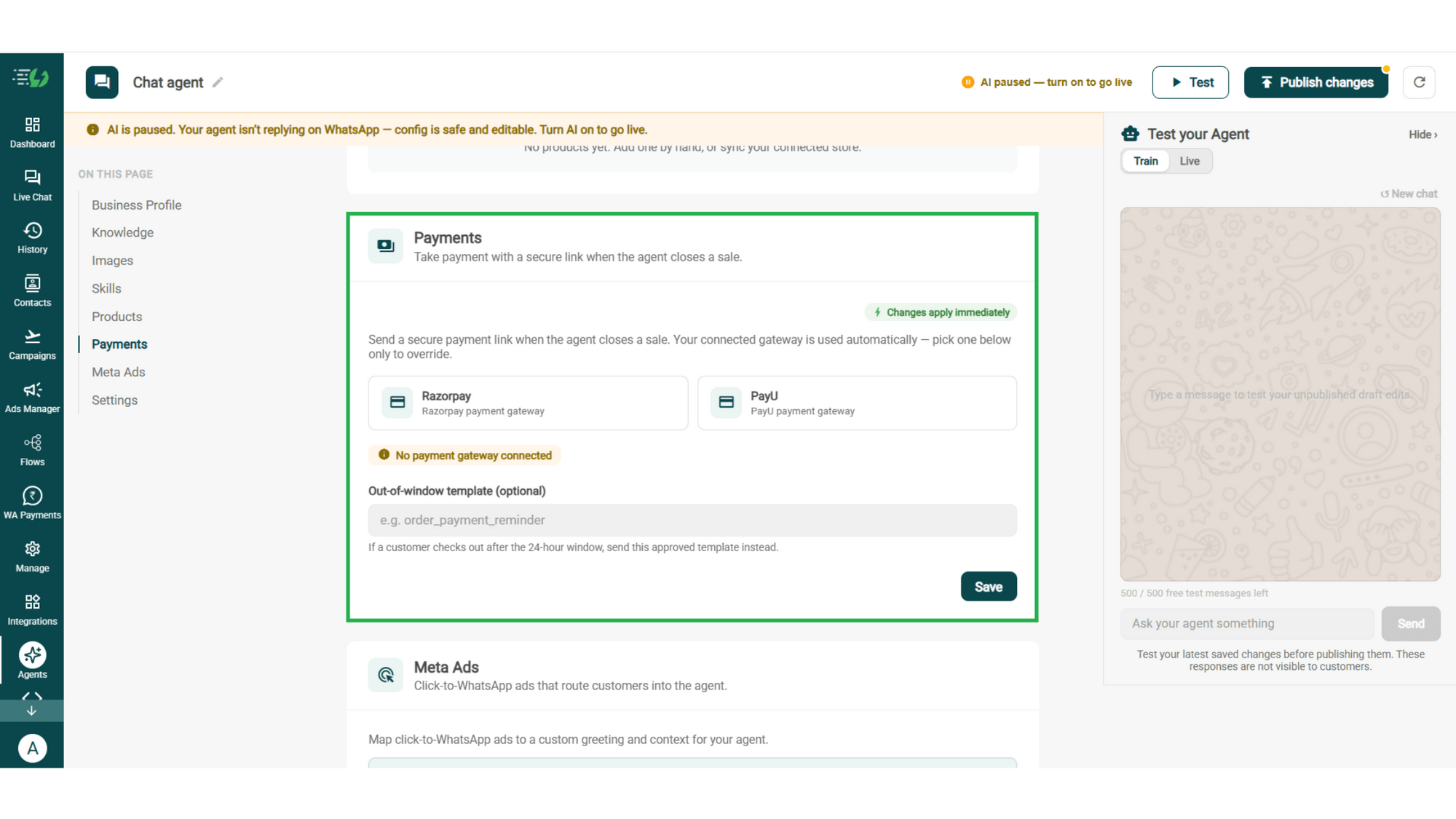
Connect Your Payment Gateway

Connect your payment gateway so the agent closes sales with a secure payment link, right inside the chat.

  • Payment gateway (Razorpay or PayU)

  • Out-of-window template (optional)

payments.png

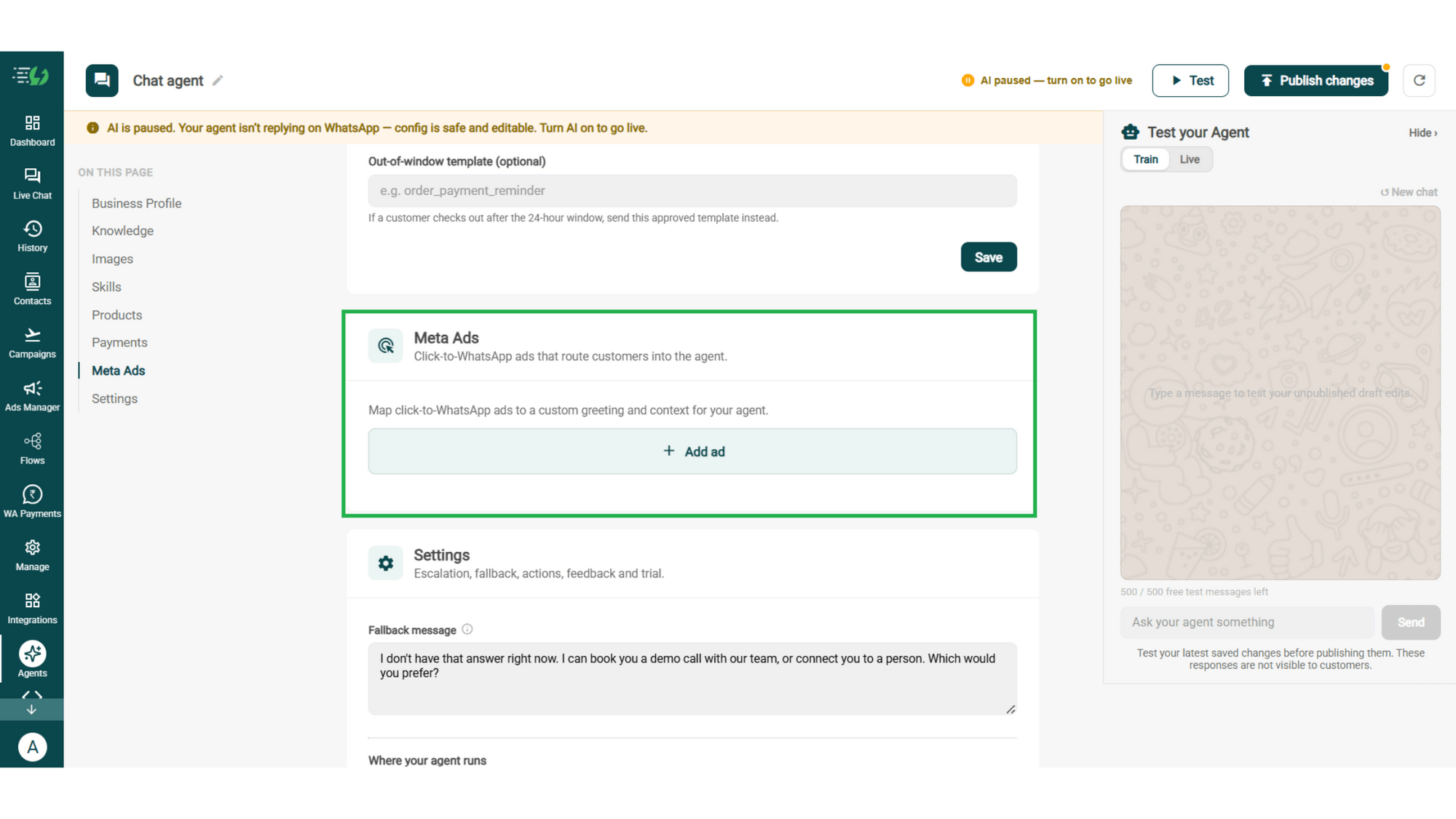
Link Your Meta Ads (Optional)

Running Click-to-WhatsApp ads?

Map each ad to a custom greeting & context, so the agent knows exactly which ad brought the customer in.

  • Add ad (map ad → custom greeting & context)

meta ads.png

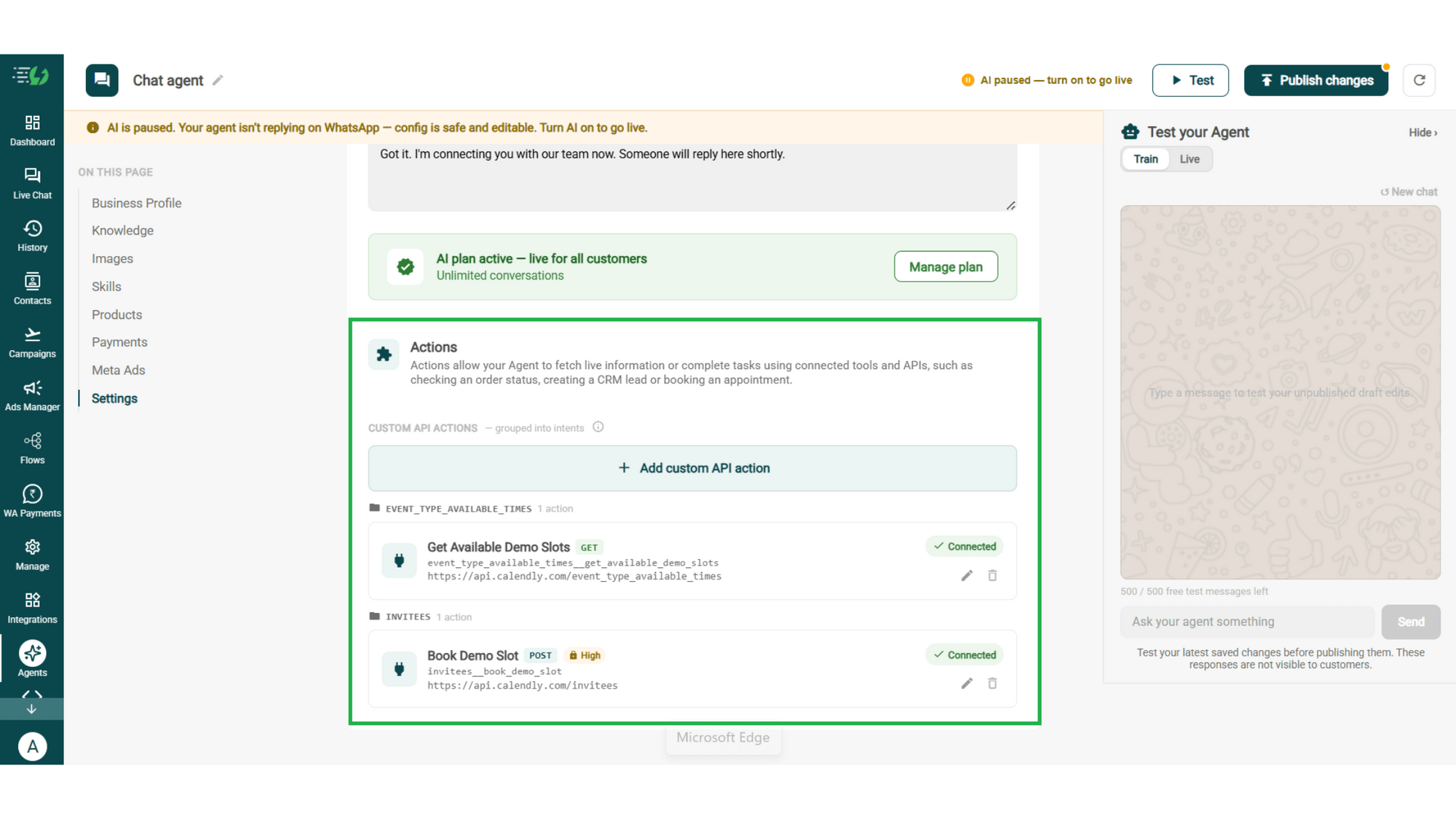
Connect Tools & APIs

Give your agent superpowers - connect tools & APIs so it can fetch live information or complete tasks like booking appointments.

  • Custom API actions (e.g. check order status, book a slot)

  • AI plan (manage your plan)

Action.png

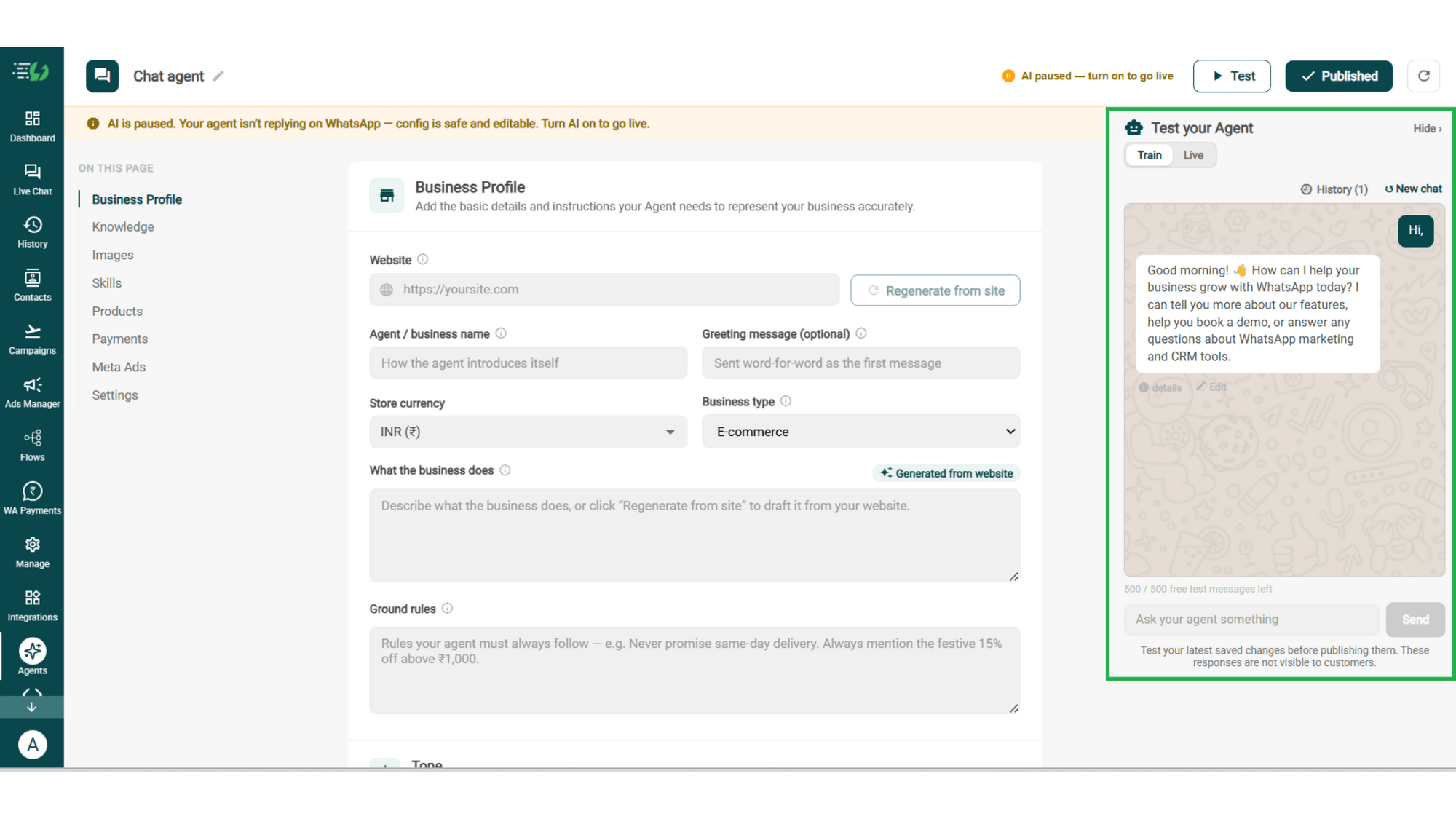
Test, Publish & Go Live

Chat with your agent before your customers do - 500 free AI messages to trial it. Happy?

Publish, switch the AI on & you're live.

  • Test your Agent panel (Train/Live modes)

  • Publish

  • AI on/off toggle

testing.png

How a Lead Gets Qualified

A real conversation, step by step - your team only enters once the lead is worth their time.

  • The Enquiry

    Customer: "Saw your 3BHK listing in Whitefield. Interested."
    The agent replies in seconds & asks one smart question first: buying to live in, or to invest?

  • The Questions

    Asks about budget and move-in timeline naturally, without making it feel like a form.

  • The Verdict

    Budget ₹1.4 Cr, move-in in 3 months.

    The agent marks the lead Hot, updates the CRM, and suggests matching projects.

  • The Handover

    The lead reaches the right sales rep with full context. Qualified in 3 minutes, with no human involvement until the call.

  • olena-sergienko-dIMJWLx1YbE-unsplash.jpg

    The Lead Qualification Agent Works Even Better With…

    One number, one team - agents for before, during & after the sale.

    Sales AI Agent

    Takes the qualified lead & closes it in-chat - recommends the right option, handles objections and shares the payment link.

    Follow-up AI Agent

    Qualified but not ready yet? This agent keeps warm leads alive & brings them back when the timing is right.

    Customer Support AI Agent

    Handles the questions that come up mid-qualification, so a product doubt never stalls a hot lead.

    Simple Pricing. Every Agent Included.

    One plan unlocks the entire library - deploy any AI Agent, or build your own.

    ₹3,500

    Per Month
    Buy Now

    $99

    Per Month, Billed Annually
    Buy Now

    WhatsApp AI Agent Features

    Access every pre-built AI Agent in this library, plus the no-code builder to create your own - trained on your business and live on WhatsApp in minutes.

    • 3,500 AI messages every month

    • 500 FREE AI messages for testing

    • Knowledge Base Q&A - train it on your website & documents

    • Long-term customer memory

    • No-code builder to customize any agent

    • Tool calling, skills & API integrations

    FAQ

    Frequently asked questions answered

    What exactly does the Lead Qualification AI Agent do?

    It talks to every new inquiry, asks the qualifying questions you've set, and checks the answers against your qualifying threshold. Leads that clear the bar get routed where you chose - to a person, your CRM, a booking, or a nurture list. The rest never clog your pipeline.

    What questions will it ask my leads?

    Whatever you decide. You set the first qualifying question and the two that follow, plus anything else the agent must collect before it hands over - budget, timeline, city, team size, requirement. It asks them naturally across the conversation instead of dumping a form, and works just as well for B2B enquiries as B2C.

    How does it decide a lead is qualified?

    On your rules, not its own judgement. You set the signals it must capture, the order it asks them in, and the threshold a lead has to clear. Changes apply immediately, so you can tighten the bar any time.

    Will it push leads into my CRM?

    Yes, and it's built in rather than a workaround. "Push to CRM" is one of the routing options on the skill itself, so every signal the agent captures lands in your CRM automatically. Your team never re-types a lead.

    Can I nurture leads that aren't ready to buy yet?

    Yes. When a lead clears your threshold you choose where it goes - hand to a person, push to CRM, send to booking, or add to a drip / nurture list. A lead that qualifies but isn't ready today goes to nurture instead of a salesperson's queue.

    When does a human take over the conversation?

    Whenever you want. "Hand to a person" is one of the routing options, so a qualified lead can go straight to your team with the full conversation attached. You also set exactly what the agent must collect before it transfers - name, requirement, budget - so the lead never repeats themselves.

    Will it work with my Click-to-WhatsApp ads?

    Yes. Map each ad to its own greeting & context, so the agent knows which campaign the lead came from and skips the questions your ad already answered. You can even set the skill to fire only for contacts arriving from a specific ad.

    How is this different from the Sales AI Agent?

    Lead Qualification captures details & passes serious prospects to your team to close. The Sales Agent closes in-chat, guiding the customer from choosing a product all the way to payment. Many businesses run both together - in the dashboard they're two skills on the same agent, so you can switch on one or both.

    Can I test it before my leads see it?

    Yes. You get 500 free AI messages to chat with your agent in Train mode. Nothing you test is ever visible to customers.

    How much does the Lead Qualification AI Agent cost?

    It's included in the AI Agent plan at ₹3,500 a month. That one plan unlocks every pre-built agent in the library plus the no-code builder to create your own - you're not paying per agent.