WhatsApp AI Agent for Product
From product questions to final choice, the Product AI Agent guides shoppers through your catalog directly on WhatsApp.
No coding needed!

What Your Product AI Agent Handles
Every question a shopper asks before they buy, handled inside WhatsApp.
Finds the Right Product, Not Every Product
Asks what they need it for, then narrows your catalog down to one or two options - instead of sending a link to a page with sixty.
Answers the Spec Questions
Capacity, materials, warranty, compatibility, what's in the box. Straight from your product information, in the detail a buyer actually wants.
Compares Two Options Side by Side
"What's the difference between these?" The agent lays out the real distinction and says which suits their situation - the thing a comparison table can't do.
Only Recommends What You Stock
You pick which catalog items it may suggest, so it never sends someone after a product you've discontinued or a variant you don't carry.
Sends the Photo, Not Just the Name
Product shots, spec sheets and catalogs shared in chat, so nobody has to open a browser to see what they're buying.
Helps in Your Customer's Language
English, Hindi, Hinglish or anything in between - the agent matches how your customer writes.
How to Build Your Product AI Agent in Minutes
Here's how a real brand goes from zero to a live Product AI Agent on WhatsApp.
Build Your Agent from Your Website
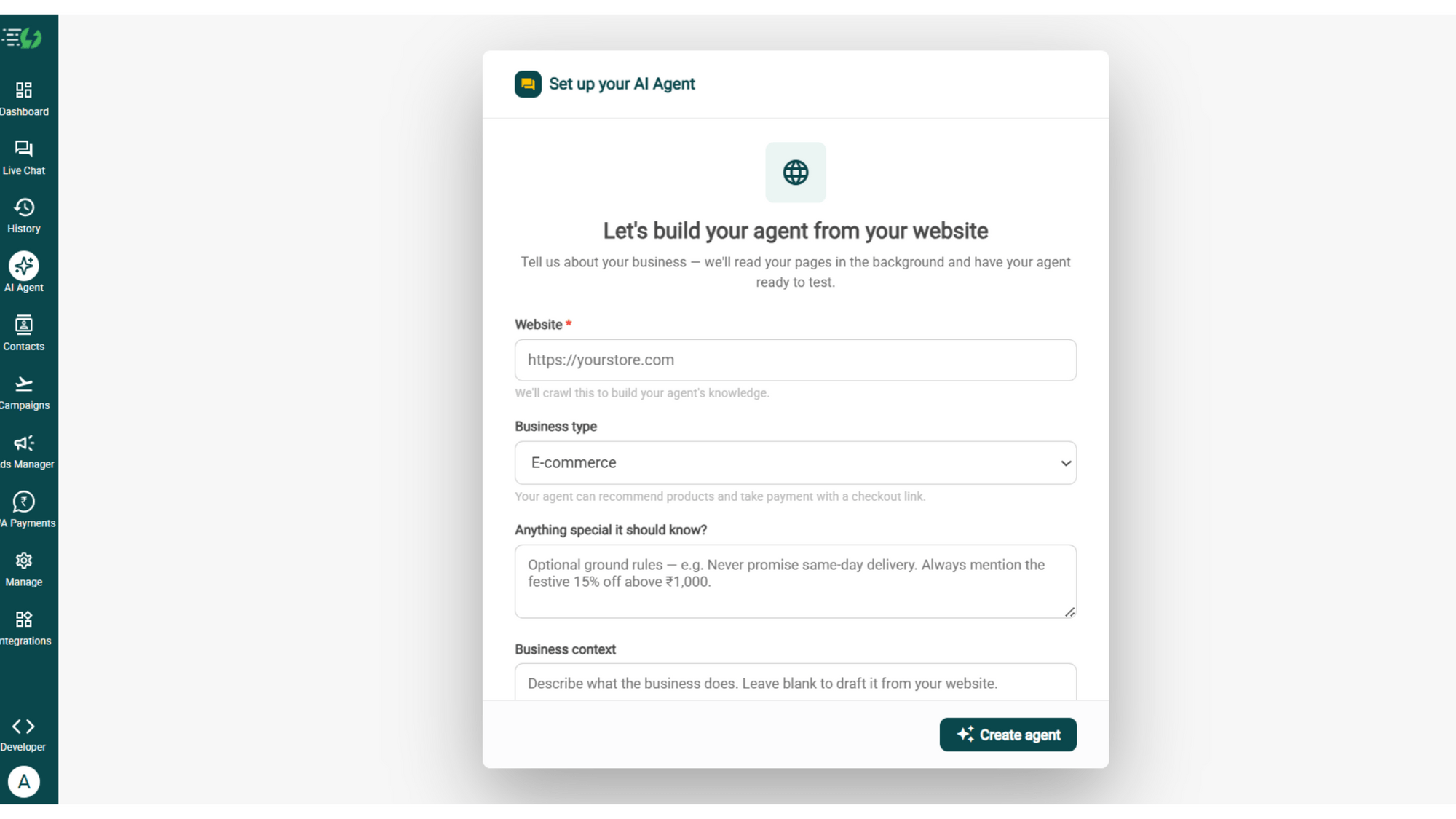
Click AI Agent, add your website, and AiSensy automatically builds an agent trained on your business.
Website (required)
Business type
Anything special it should know? (optional)
Business context (optional)
Then hit ✨ Create agent.
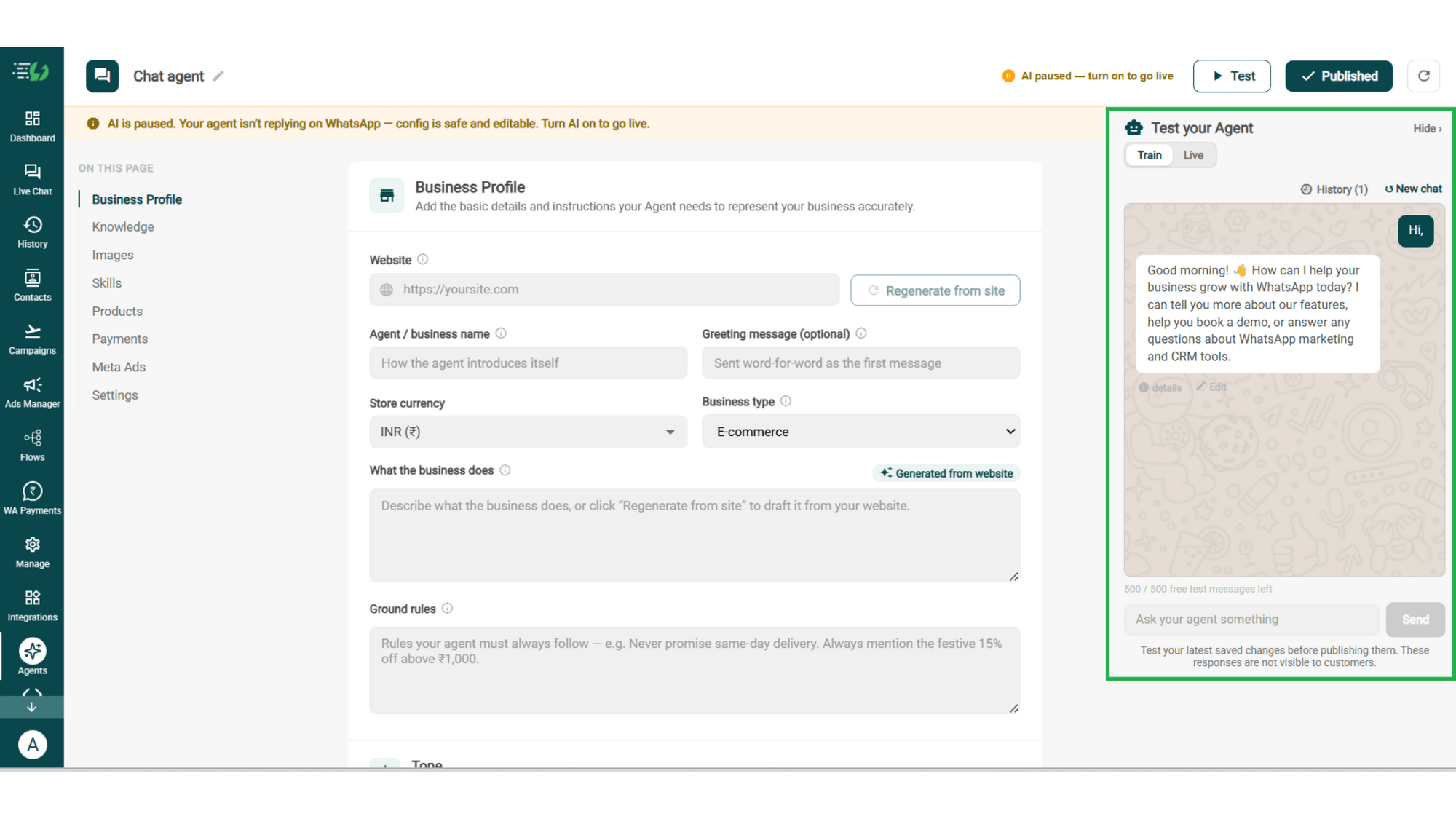
Add Your Business Profile
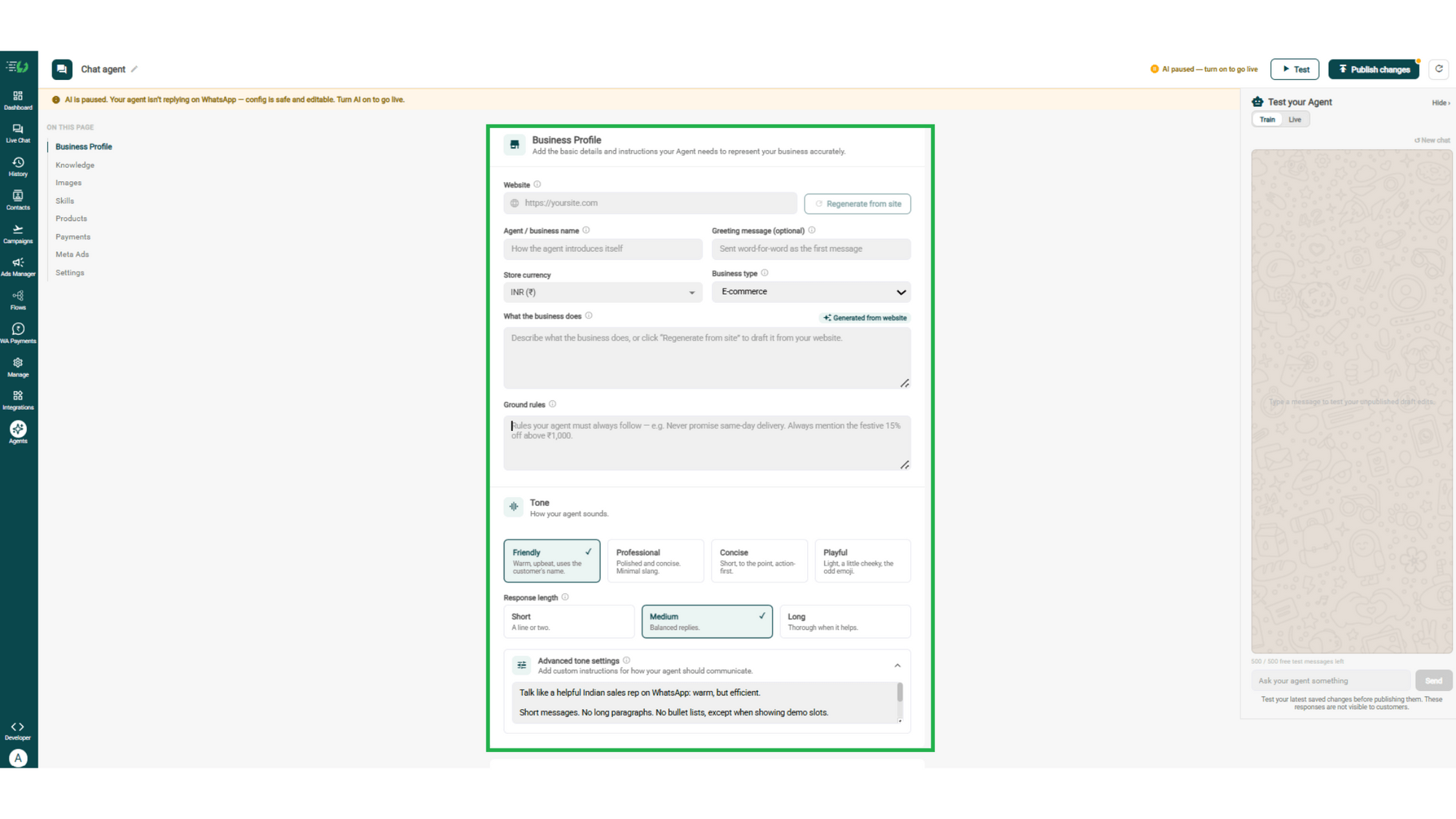
Add your website & AiSensy auto-generates your business description. Set your agent's name, greeting, and a few ground rules it must always follow.
Website
Agent/business name
Greeting message (optional)
Store currency
Business type
What the business does
Ground rules
Train the Agent with Your Knowledge
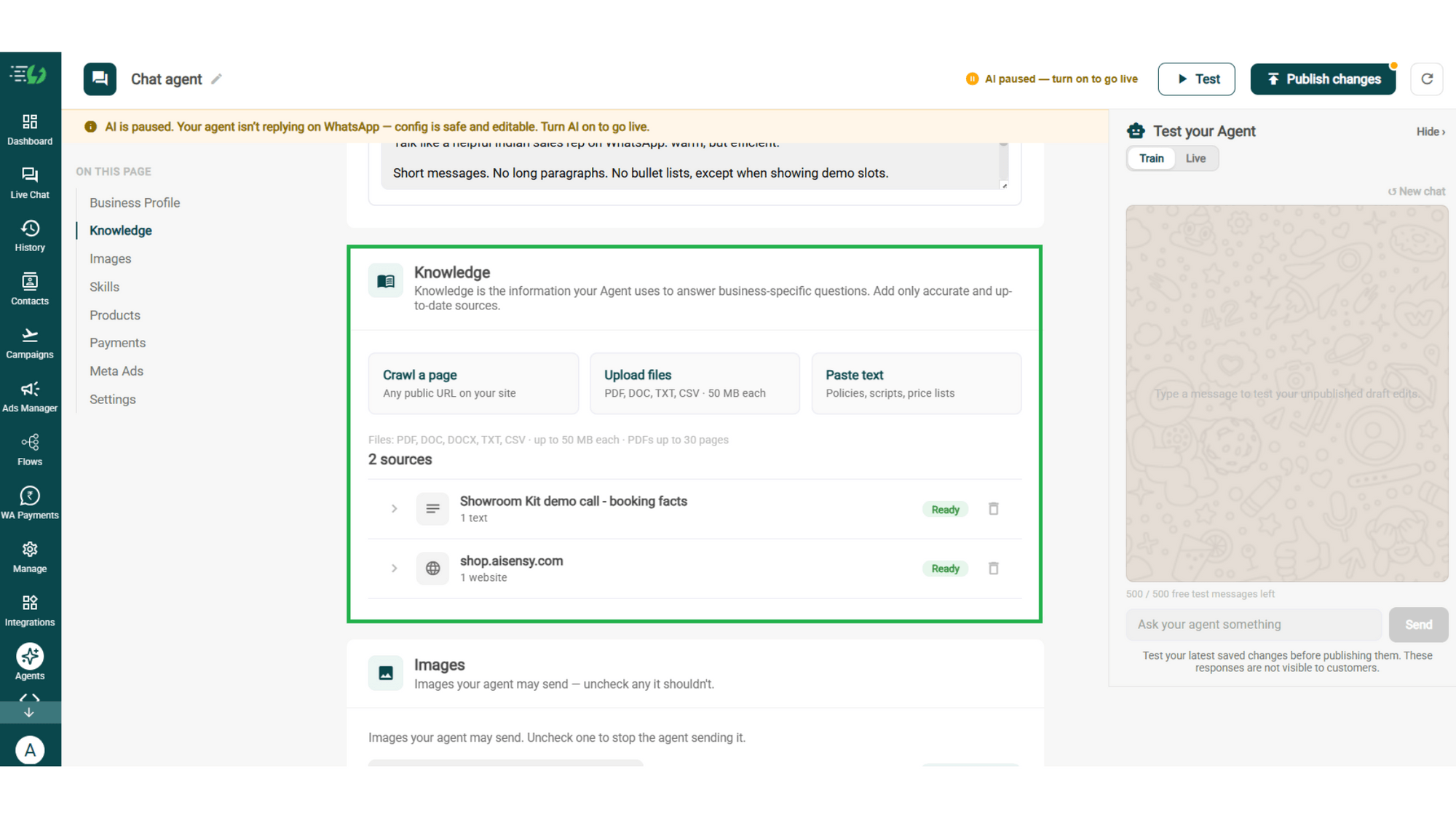
Train the agent on your business - it answers from your information, not generic replies. Every source shows "Ready" once learned.
Details to be filled are:
Crawl a page (website URL)
Upload files (PDF, DOC, TXT, CSV - up to 50MB each)
Paste text (policies, scripts, price lists)
Choose the Images It Can Share
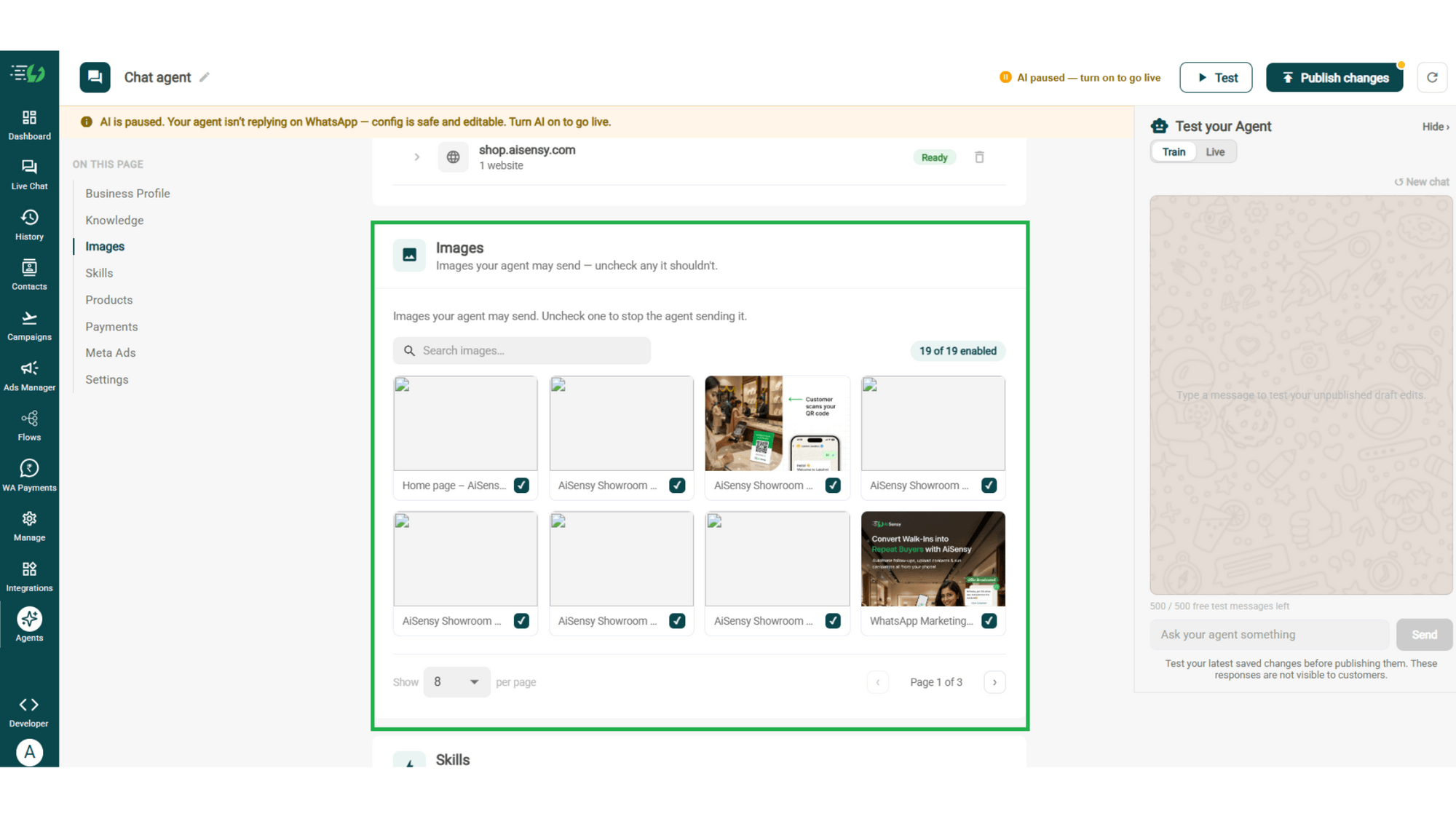
Control the visuals your agent can share in chat - product shots, catalogs, offers. Untick any image it shouldn't send.
Image library (enable/disable per image)
Search images
Create the Product Skill
Open Add Skills and check the prebuilt list first - if the skill you need isn't there, hit Create custom, name it Product, and pick Task skill as the type.
Task skill
Icon & name: Product
When should the agent use it?
Instructions
Add skills
Enable It on Your Agent
Your new skill lands in the Skills list. Switch it on, expand it to set your qualifying questions, your cut-off and where a qualified applicant should go, then hit Done.
Skills list
Enable the product skill
Expand to configure its variables, templates & ads
Skills enabled counter
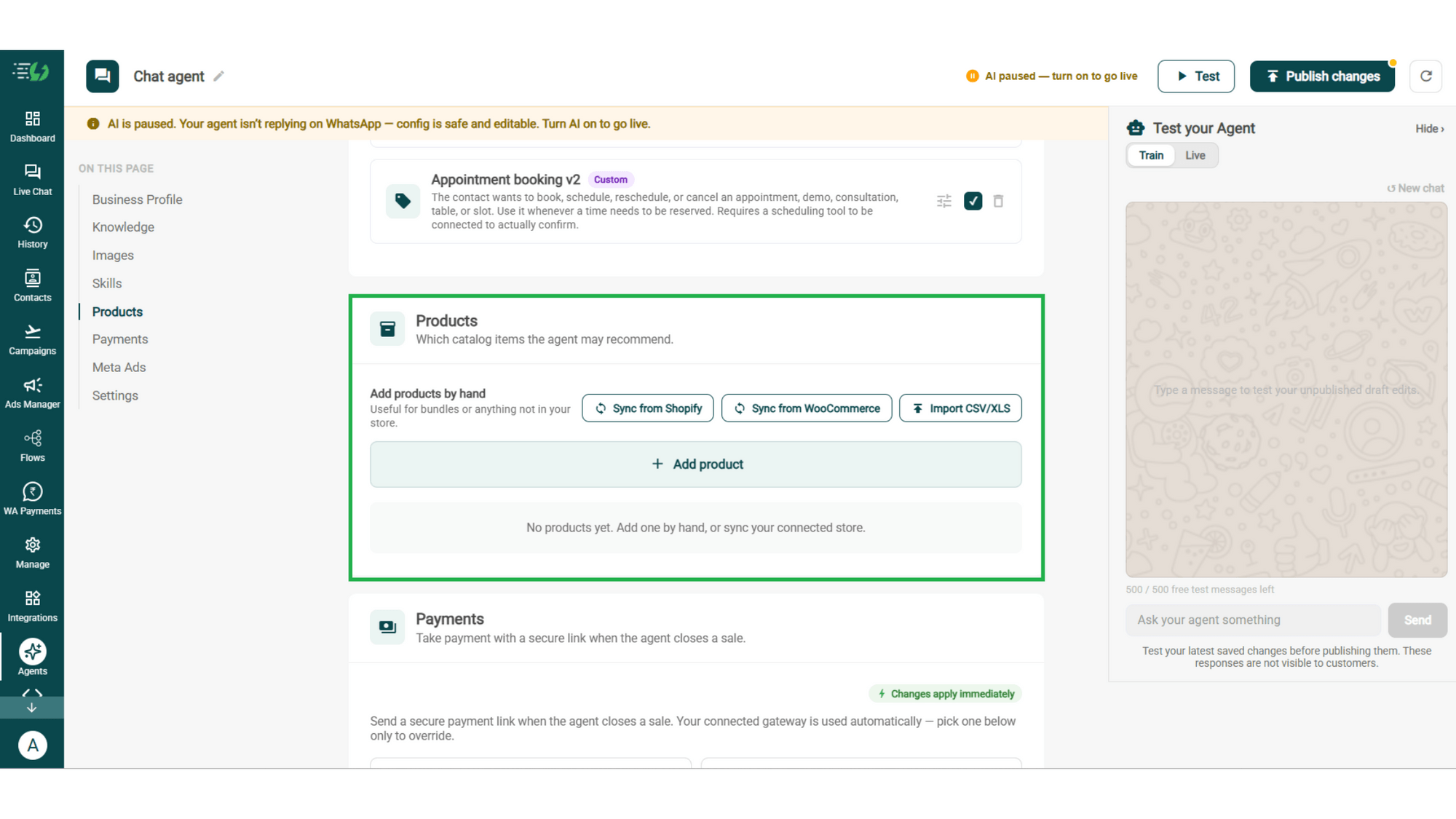
Add Your Products
Choose which catalog items the agent can recommend - so every suggestion comes from your actual range.
Catalog products: select what the agent can recommend
Add products manually: for bundles or non-store items
Sync from Shopify
Sync from WooCommerce
Import via CSV/XLS
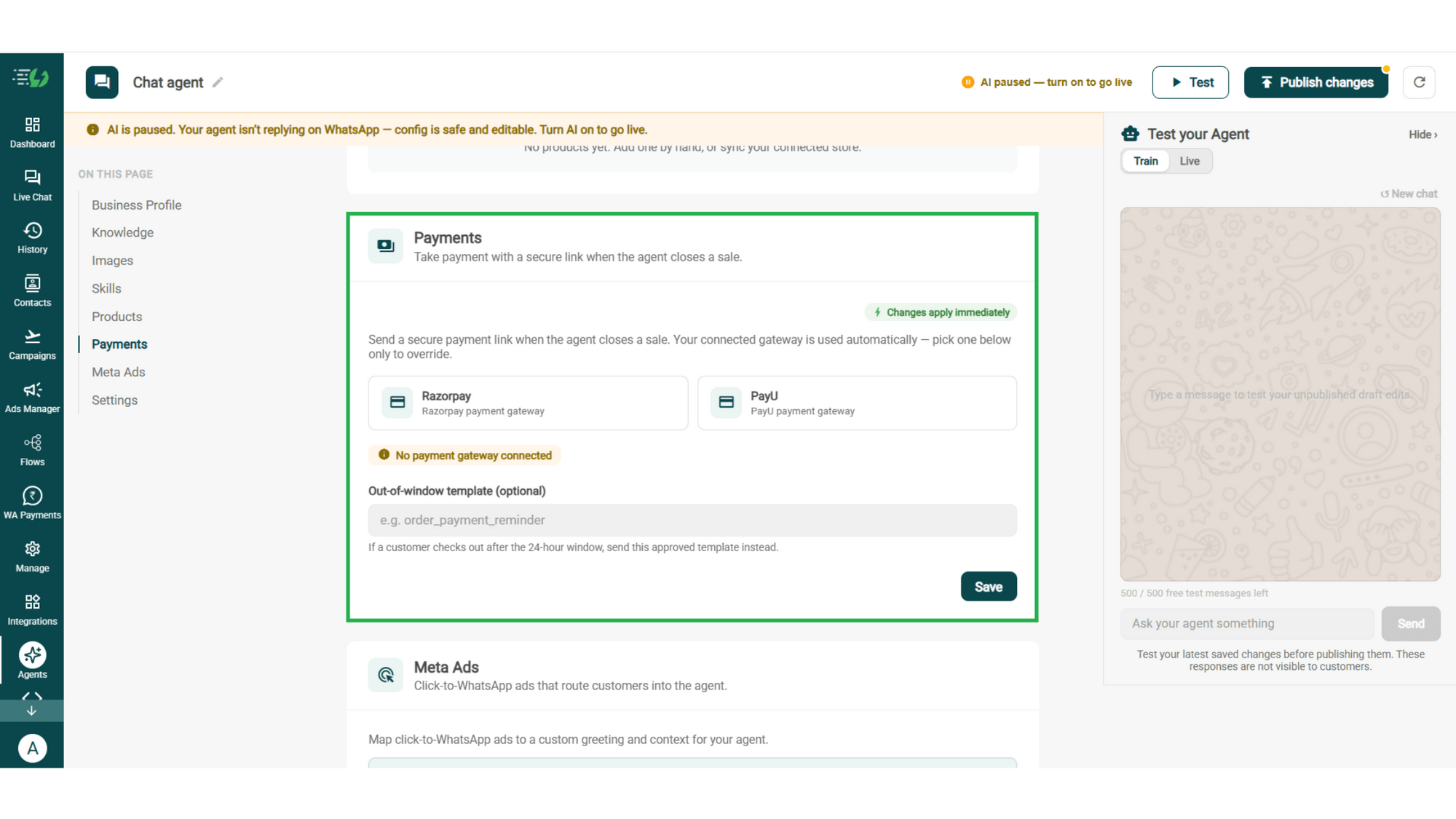
Connect Your Payment Gateway
Connect your payment gateway so the agent closes sales with a secure payment link, right inside the chat.
Payment gateway (Razorpay or PayU)
Out-of-window template (optional)
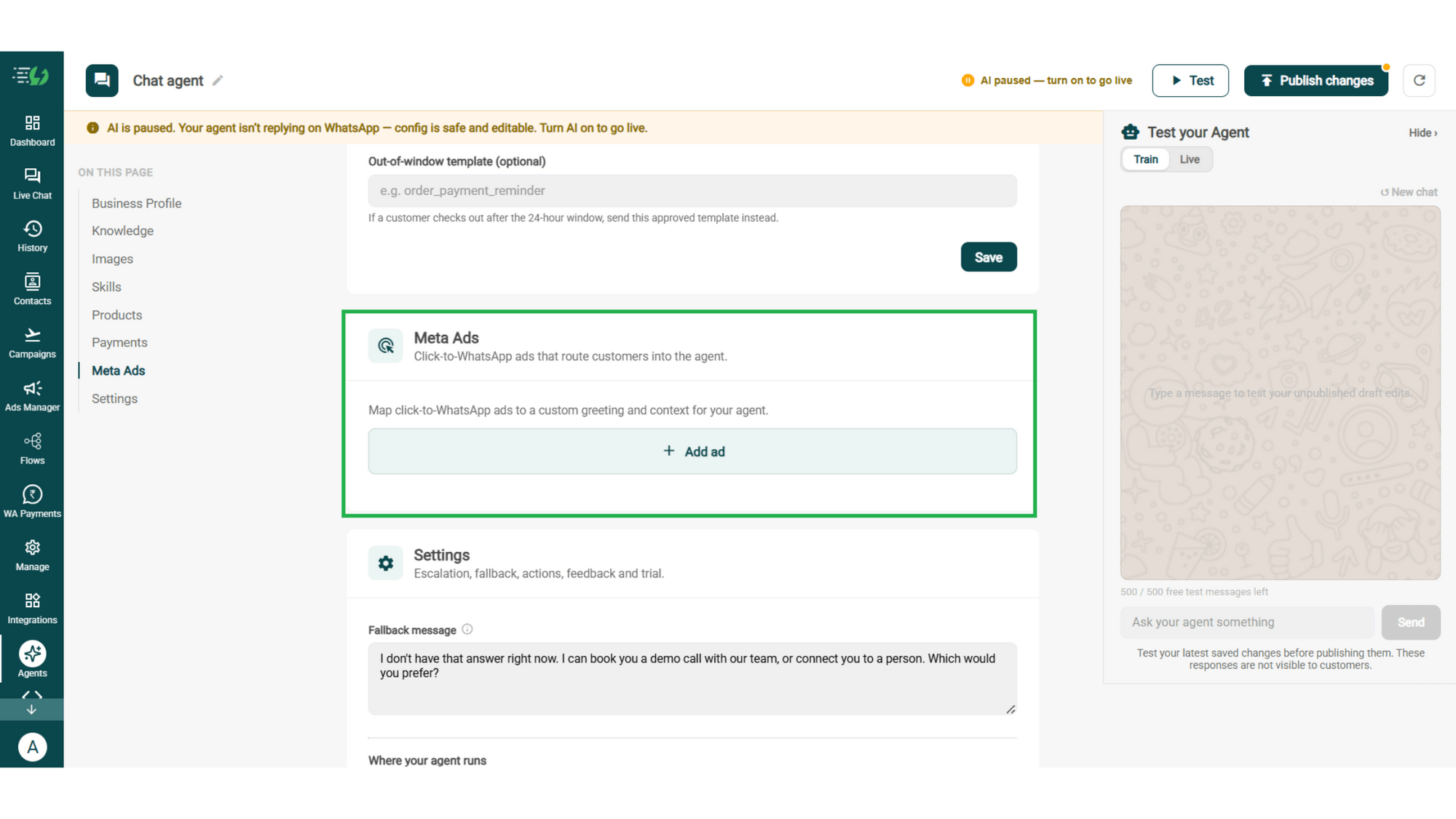
Link Your Meta Ads (Optional)
Running Click-to-WhatsApp ads?
Map each ad to a custom greeting & context, so the agent knows exactly which ad brought the customer in.
Add ad (map ad → custom greeting & context)
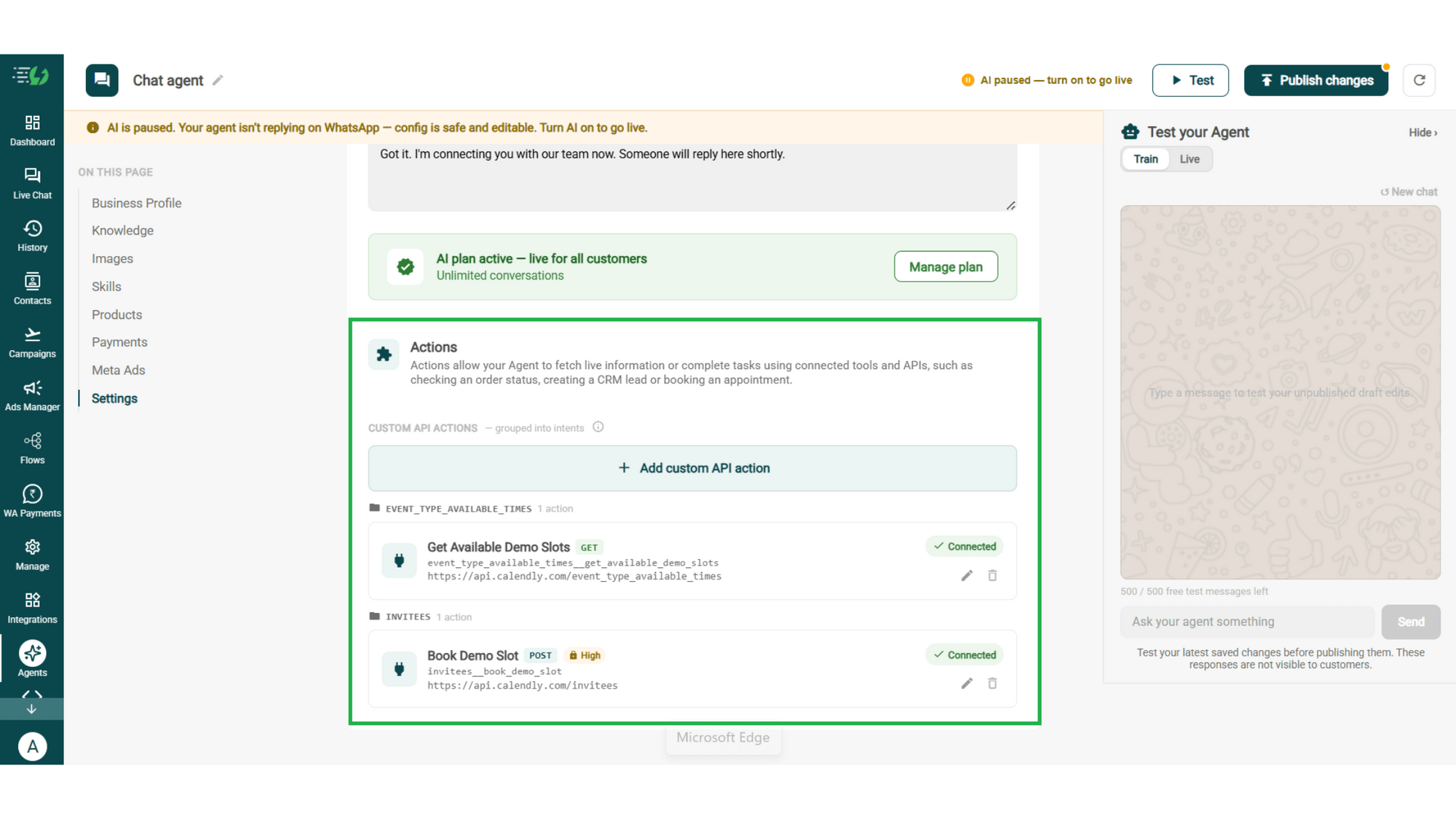
Connect Tools & APIs
Give your agent superpowers - connect tools & APIs so it can fetch live information or complete tasks like booking appointments.
Custom API actions (e.g. check order status, book a slot)
AI plan (manage your plan)
Test, Publish & Go Live
Chat with your agent before your customers do - 500 free AI messages to trial it. Happy?
Publish, switch the AI on & you're live.
Test your Agent panel (Train/Live modes)
Publish
AI on/off toggle
How a Shopper Finds the Right Product
A real conversation, step by step - the sale you'd otherwise lose to a browser tab.
The Question
Customer: "Which water purifier should I get?"
The agent asks one thing back: how many people in the house, and is it municipal or borewell water?
The Narrowing
Four people, borewell. That rules out the UV-only models - the agent suggests two RO+UV options and explains what the price difference actually buys.
The Detail
"What's the difference in maintenance?" Filter life, service interval, annual running cost - from your product documents, not a guess.
The Choice
The customer picks one. The agent sends the photo, the spec sheet and the link to buy.
Total time: 5 minutes. Human involvement: zero.

The Product AI Agent Works Even Better With…
One number, one team - agents for before, during & after the sale.
Sales AI Agent
Once they've chosen, this agent handles the objection and closes with a payment link.
Customer Support AI Agent
Takes over after the order - delivery, setup, warranty and everything that follows.
Feedback AI Agent
Asks how the product turned out, so you hear about a problem before a review site does.
Simple Pricing. Every Agent Included.
One plan unlocks the entire library - deploy any AI Agent, or build your own.
WhatsApp AI Agent Features
Access every pre-built AI Agent in this library, plus the no-code builder to create your own - trained on your business and live on WhatsApp in minutes.
3,500 AI messages every month
500 FREE AI messages for testing
Knowledge Base Q&A - train it on your website & documents
Long-term customer memory
No-code builder to customize any agent
Tool calling, skills & API integrations
How does it decide which product to recommend?
It asks what the customer needs it for first, then matches that against your catalog. You control which items it may recommend, so the shortlist is always drawn from what you actually want to sell.
Can it answer technical questions about a product?
Yes, as far as your own documents go. Upload spec sheets, size charts and manuals under Knowledge and the agent answers from those - capacity, materials, compatibility, what's in the box.
Can it compare two products for a customer?
Yes, and that's where it earns its keep. It explains the real difference between two options and which one suits the customer's situation, rather than dumping a comparison table on them.
Does it work with my Shopify or WooCommerce catalog?
Yes. Sync directly from Shopify or WooCommerce, import a CSV or XLS, or add products by hand for bundles and anything that isn't in your store.
What stops it recommending something I've discontinued?
You select which catalog items the agent may suggest. Anything you haven't selected is invisible to it, so a discontinued line can't resurface in a conversation.
Can it tell a customer whether something is in stock?
Only if you connect the system that knows. Live stock is a Tools & APIs connection - without it the agent works from your catalog, which tells it what you sell but not what's on the shelf today.
Can it suggest add-ons or a better version?
Yes, if you tell it to. Write it into the skill's instructions and the agent can suggest the accessory that goes with the purchase, or the model up when it genuinely fits the need.
Does it remember what a customer asked last time?
Yes. Long-term customer memory is part of the AI Agent plan, so a returning customer doesn't have to explain their requirement from scratch.
Can it help with sizing or fit?
Yes, from your own size chart. Upload it under Knowledge and the agent walks a customer to the right size rather than leaving them to guess and return it later.
Is the Product AI Agent charged separately?
No. One AI Agent plan at ₹3,500 a month covers every agent in the library plus the no-code builder, so running this alongside Sales and Support costs the same as running one.