New Launch | Build AI Agents on WhatsApp that qualify & convert 24/7 · Explore More

Login

WhatsApp AI Agent for Ecommerce Shopping

Build the Shopping AI Agent in minutes & let it turn "show me something nice" into a shortlist, a choice and a paid order - without leaving WhatsApp.

No coding needed!

olena-sergienko-dIMJWLx1YbE-unsplash.jpg

What Your Shopping AI Agent Handles

The browsing that happens before anyone knows what they're buying, handled inside WhatsApp.

Helps Unsure Customers Choose

"Something for a housewarming."

No product name, no category. The agent asks two questions and comes back with three real options.

Shops to a Budget

"Under ₹2,000" is a filter your search box can do and your homepage can't. The agent only ever shows what they can actually afford.

Shows What's New & What's Back

New arrivals, restocked favourites, this season's range - surfaced in the conversation instead of waiting to be discovered.

Turns Browsing Into a Shortlist

Sixty products on a category page is not a choice, it's a decision to postpone. The agent narrows it to three, in chat, in under a minute.

Sends the Photos That Actually Sell

Product images shared in the conversation, so nobody has to open a browser tab to see what they're considering.

Shops in Your Customer's Language

English, Hindi, Hinglish or anything in between - the agent matches how your customer writes.

How to Build Your Shopping AI Agent in Minutes

Here's how a real brand goes from zero to a live Shopping AI Agent on WhatsApp.

Build Your Agent from Your Website

Click AI Agent, add your website, and AiSensy automatically builds an agent trained on your business.

  • Website (required)

  • Business type

  • Anything special it should know? (optional)

  • Business context (optional)

Then hit ✨ Create agent.
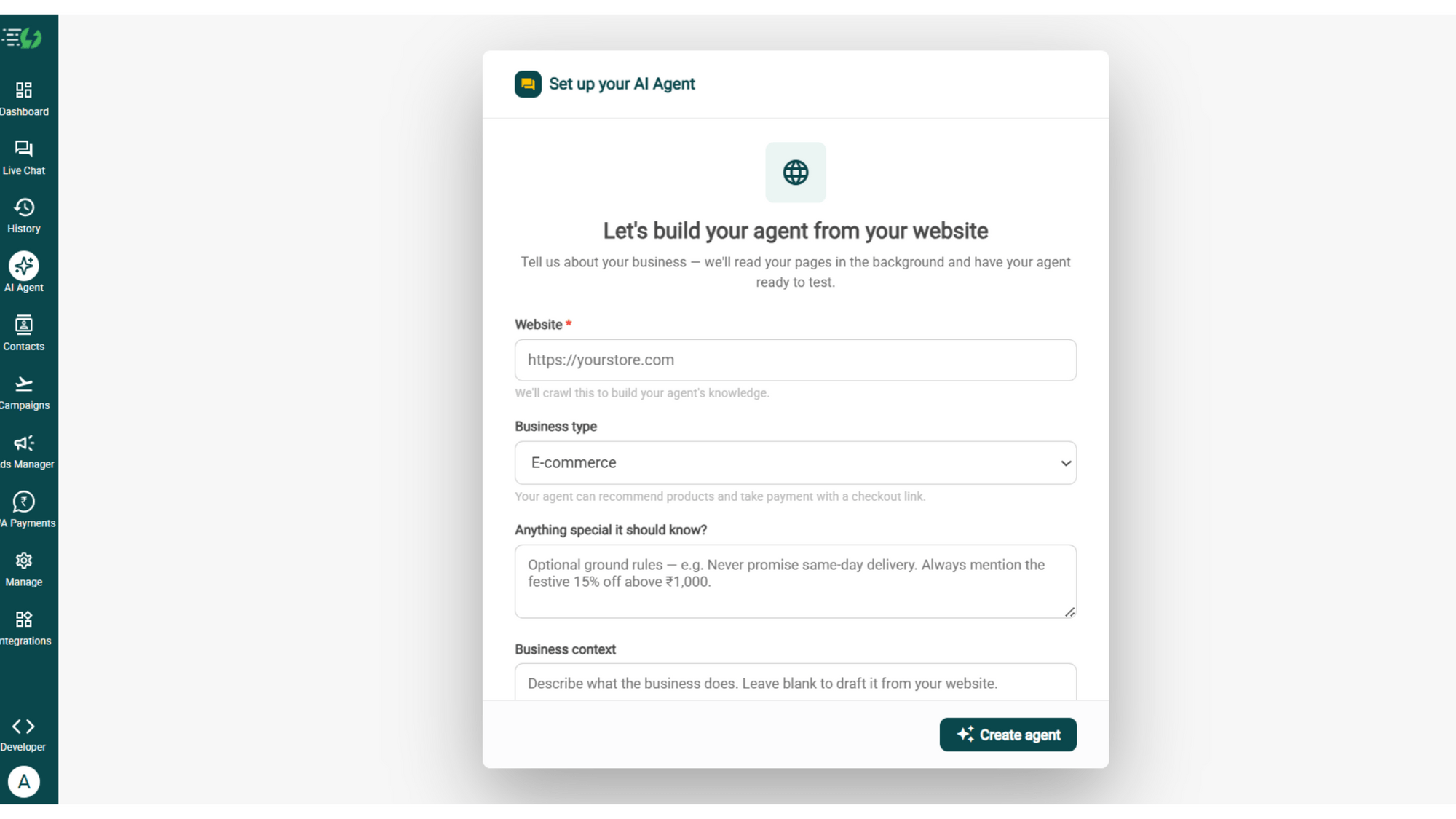
image (4).png

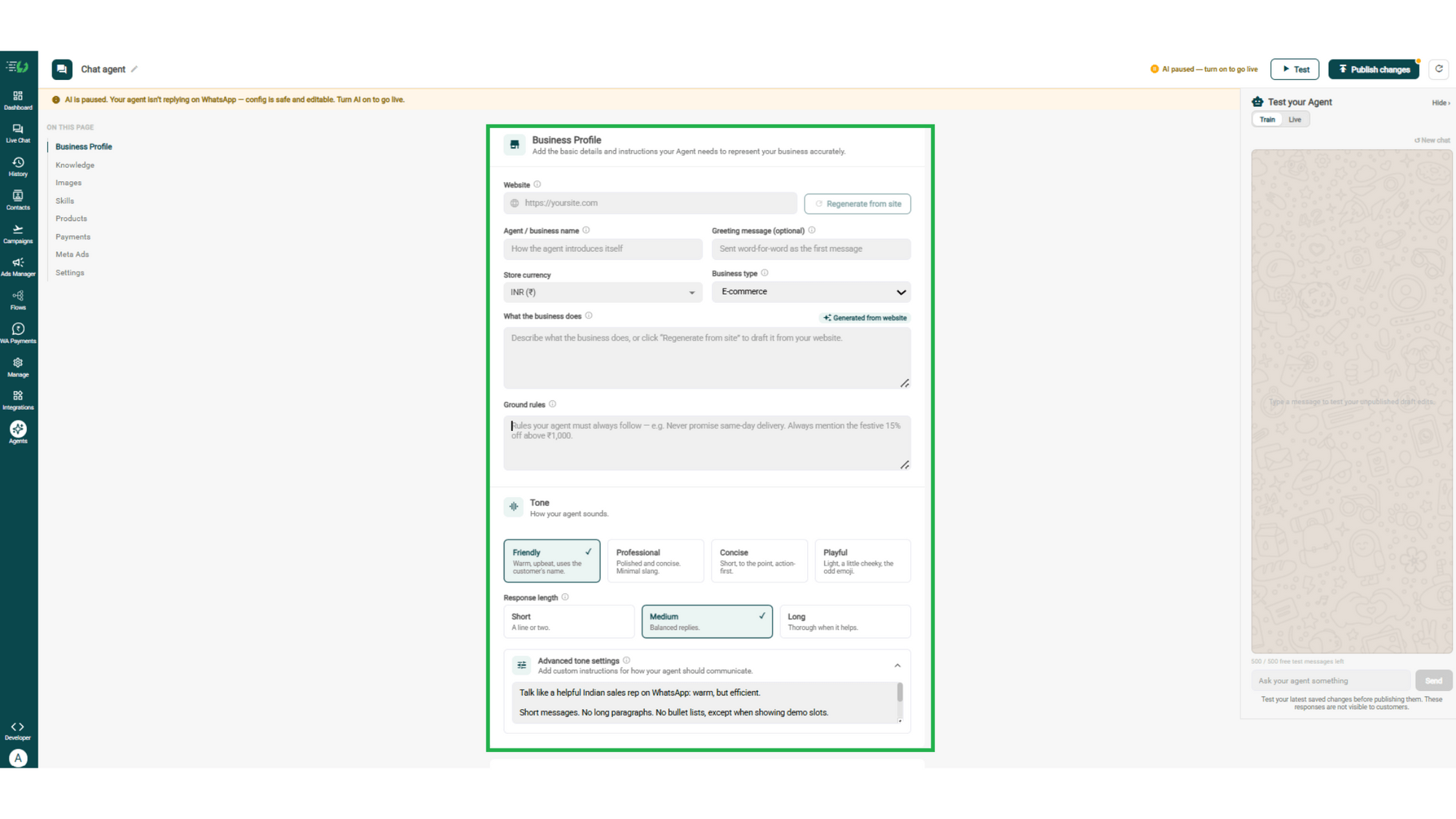
Add Your Business Profile

Add your website & AiSensy auto-generates your business description. Set your agent's name, greeting, and a few ground rules it must always follow.

  • Website

  • Agent/business name

  • Greeting message (optional)

  • Store currency

  • Business type

  • What the business does

  • Ground rules

business profile.png

Train the Agent with Your Knowledge

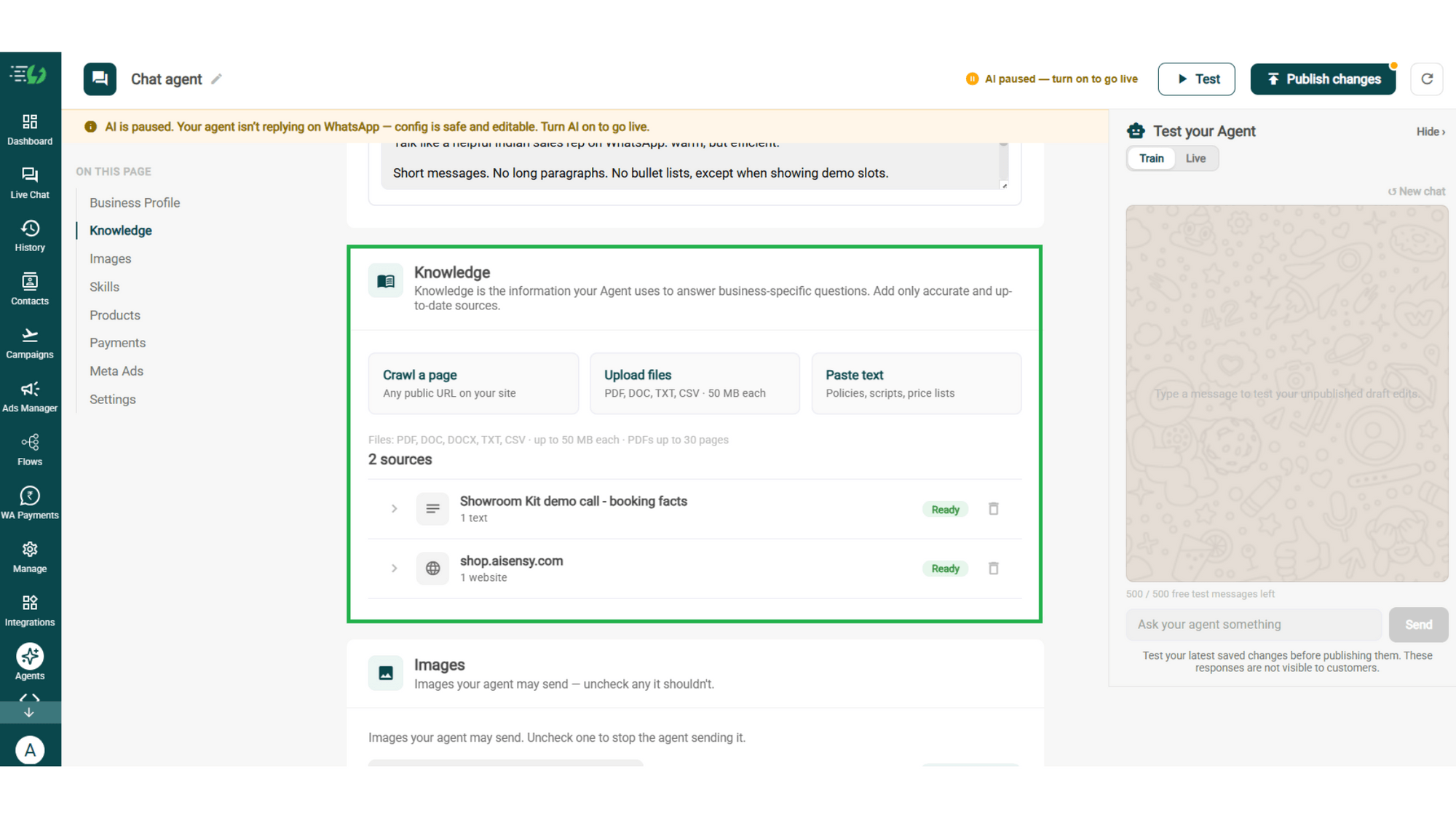
Train the agent on your business - it answers from your information, not generic replies. Every source shows "Ready" once learned.

Details to be filled are:

  • Crawl a page (website URL)

  • Upload files (PDF, DOC, TXT, CSV - up to 50MB each)

  • Paste text (policies, scripts, price lists)
knowledge.png

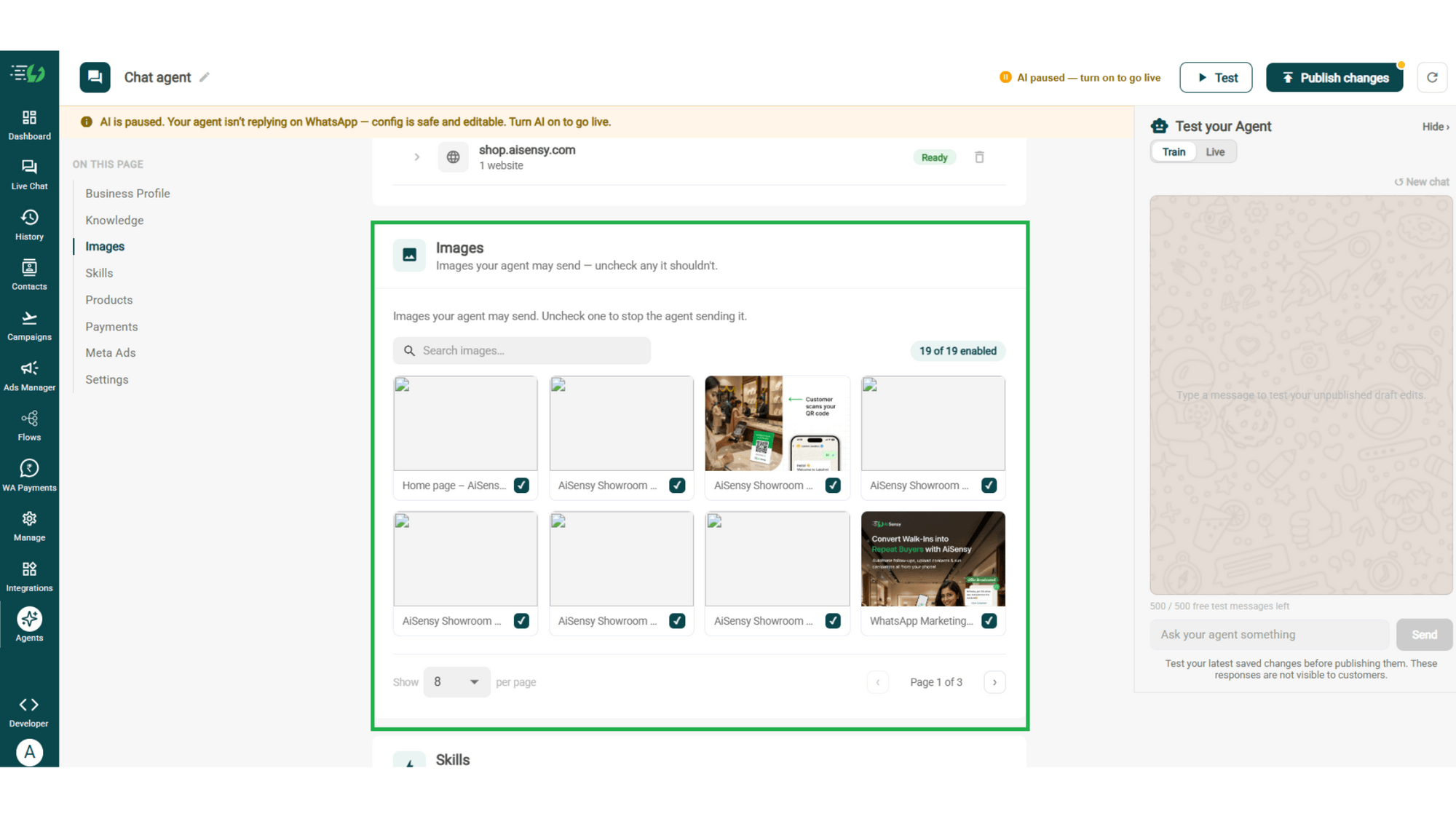
Choose the Images It Can Share

Control the visuals your agent can share in chat - product shots, catalogs, offers. Untick any image it shouldn't send.

  • Image library (enable/disable per image)

  • Search images

images.png

Create the Shopping Skill

Open Add Skills and check the prebuilt list first - if the skill you need isn't there, hit Create custom, name it Shopping, and pick Task skill as the type.

  • What kind of skill is this? (Task skill)

  • Icon & name: Shopping

  • When should the agent use it?

  • Instructions

  • Add skills

Enable It on Your Agent

Your new skill lands in the Skills list. Switch it on, expand it to set your qualifying questions, your cut-off and where a qualified applicant should go, then hit Done.

  • Skills list

  • Enable the shopping skill

  • Expand to configure its variables, templates & ads

  • Skills enabled counter

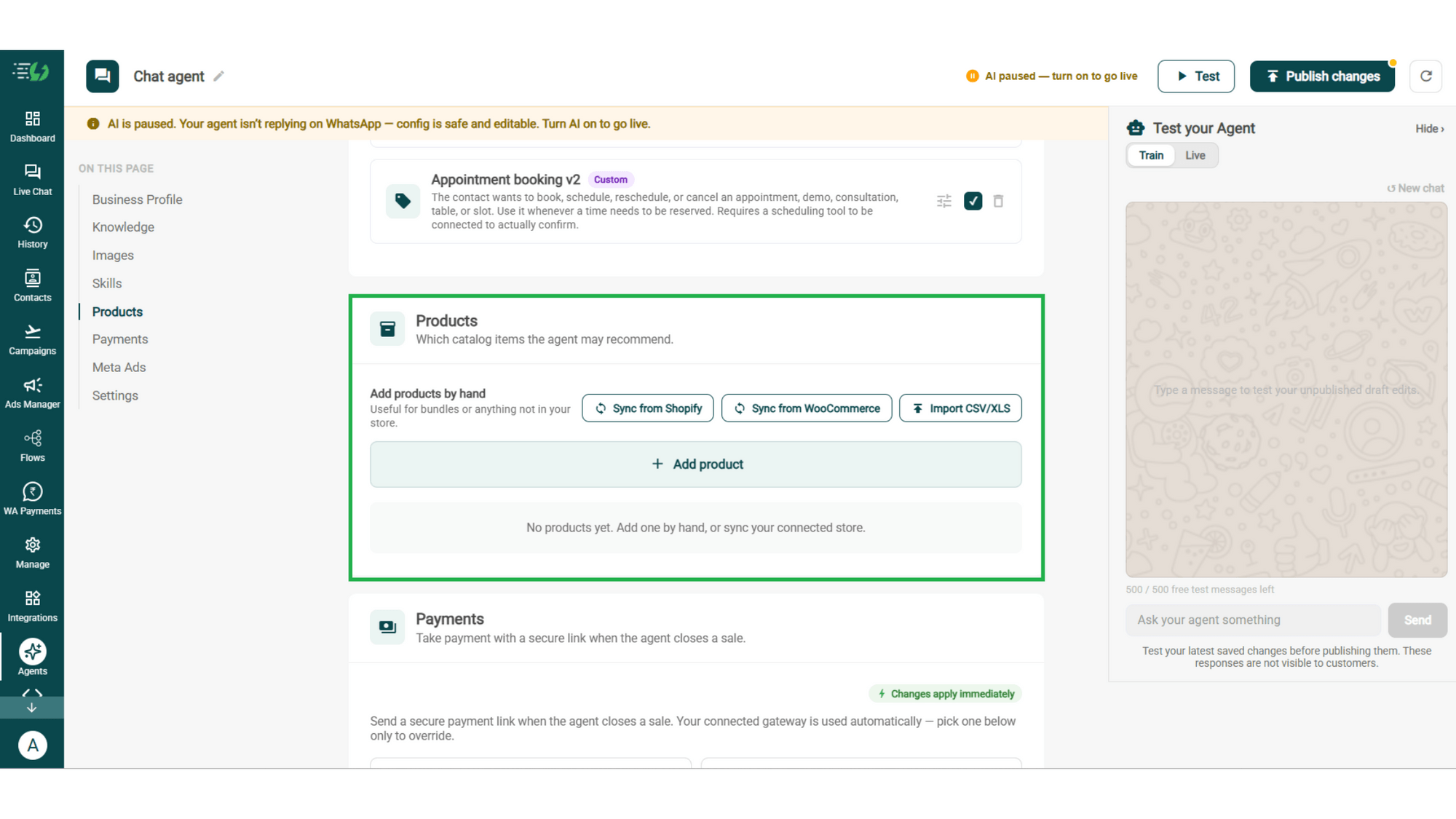
Add Your Products

Choose which catalog items the agent can recommend - so every suggestion comes from your actual range.

  • Catalog products (select what the agent may recommend)

  • Add products by hand (for bundles or items not in your store)

  • Sync from Shopify

  • Sync from WooCommerce

  • Import CSV/XLS

products.png

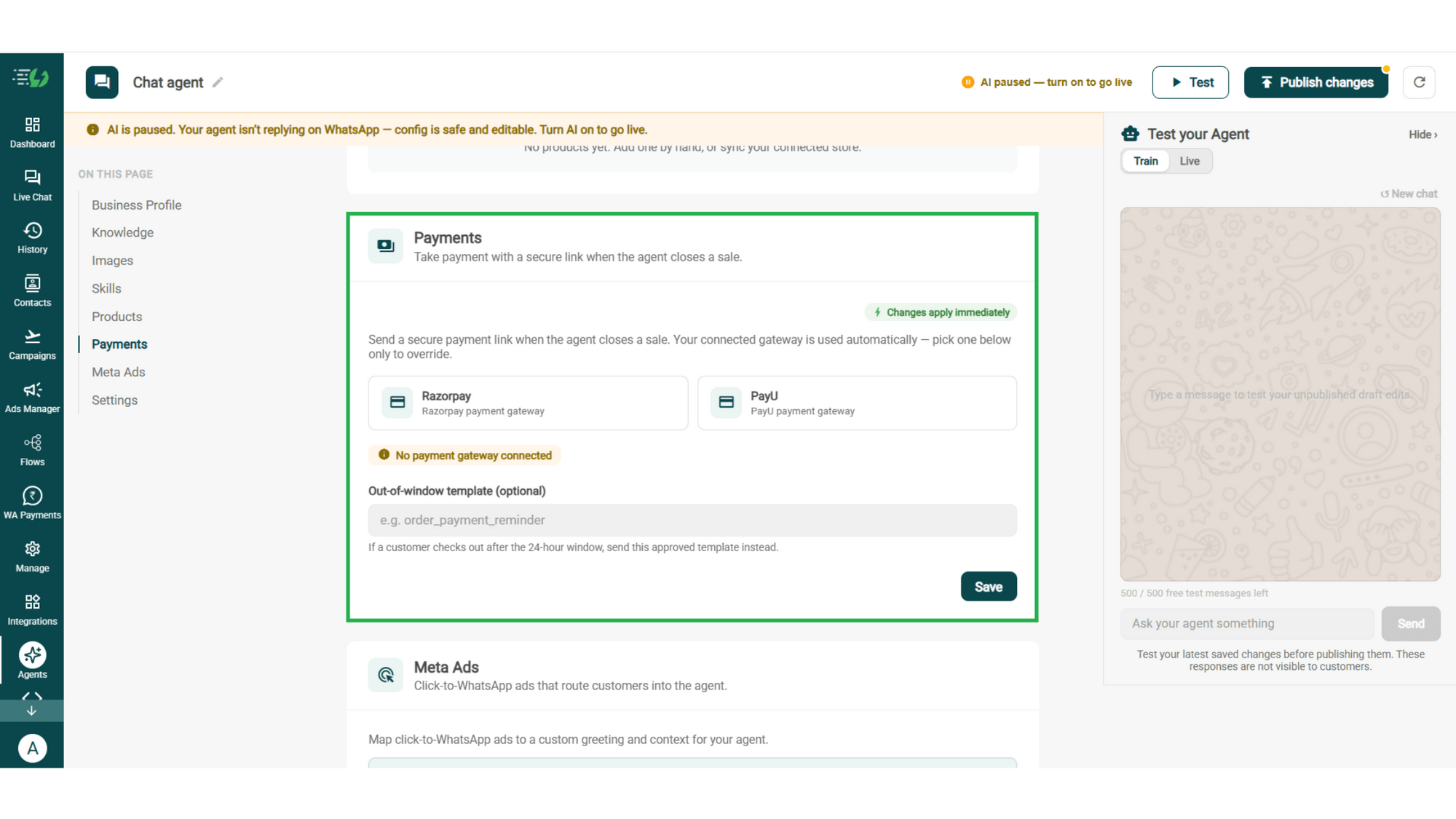
Connect Your Payment Gateway

Connect your payment gateway so the agent closes sales with a secure payment link, right inside the chat.

  • Payment gateway (Razorpay or PayU)

  • Out-of-window template (optional)

payments.png

Link Your Meta Ads (Optional)

Running Click-to-WhatsApp ads?

Map each ad to a custom greeting & context, so the agent knows exactly which ad brought the customer in.

  • Add ad (map ad → custom greeting & context)
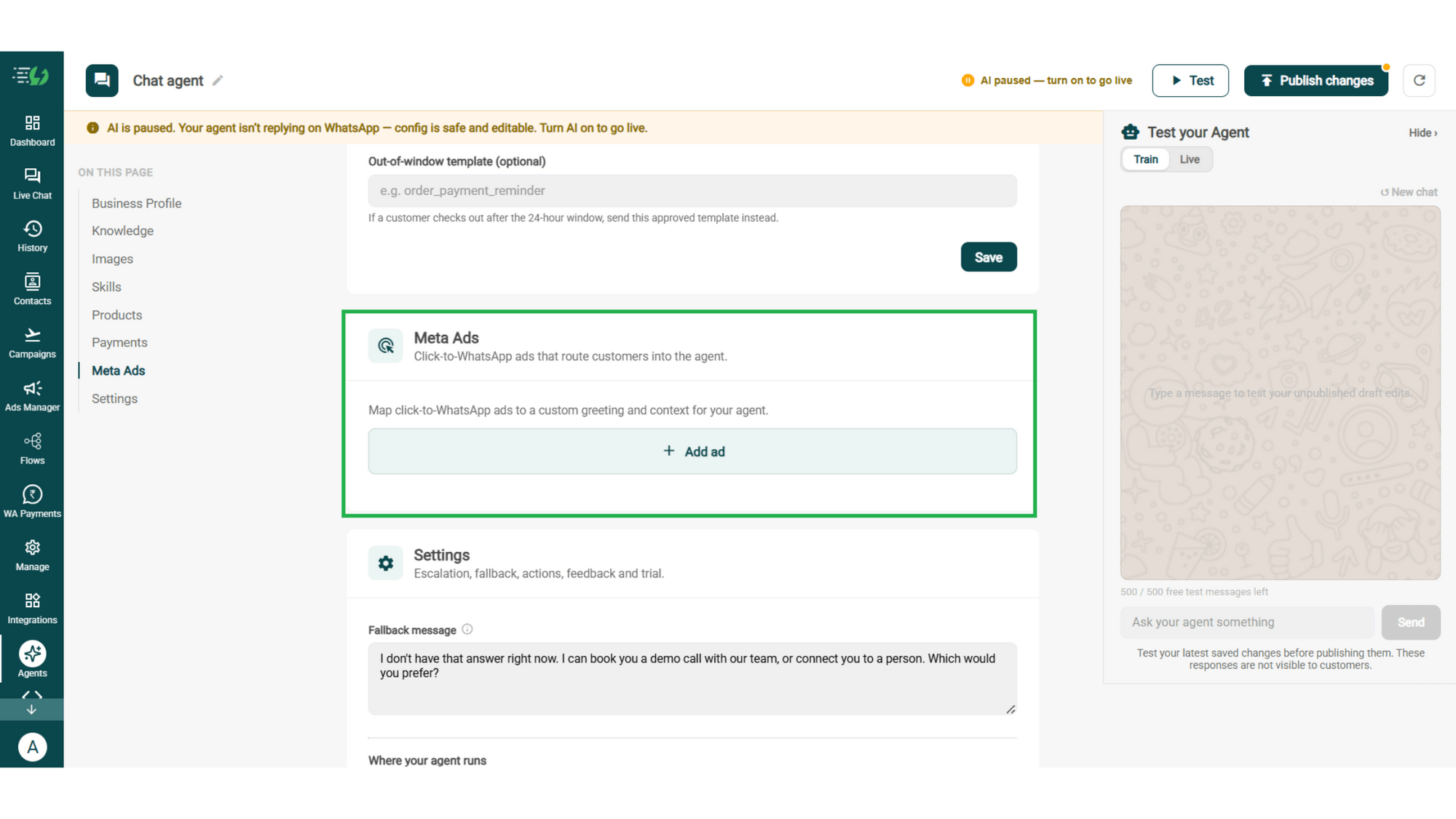
meta ads.png

Connect Tools & APIs

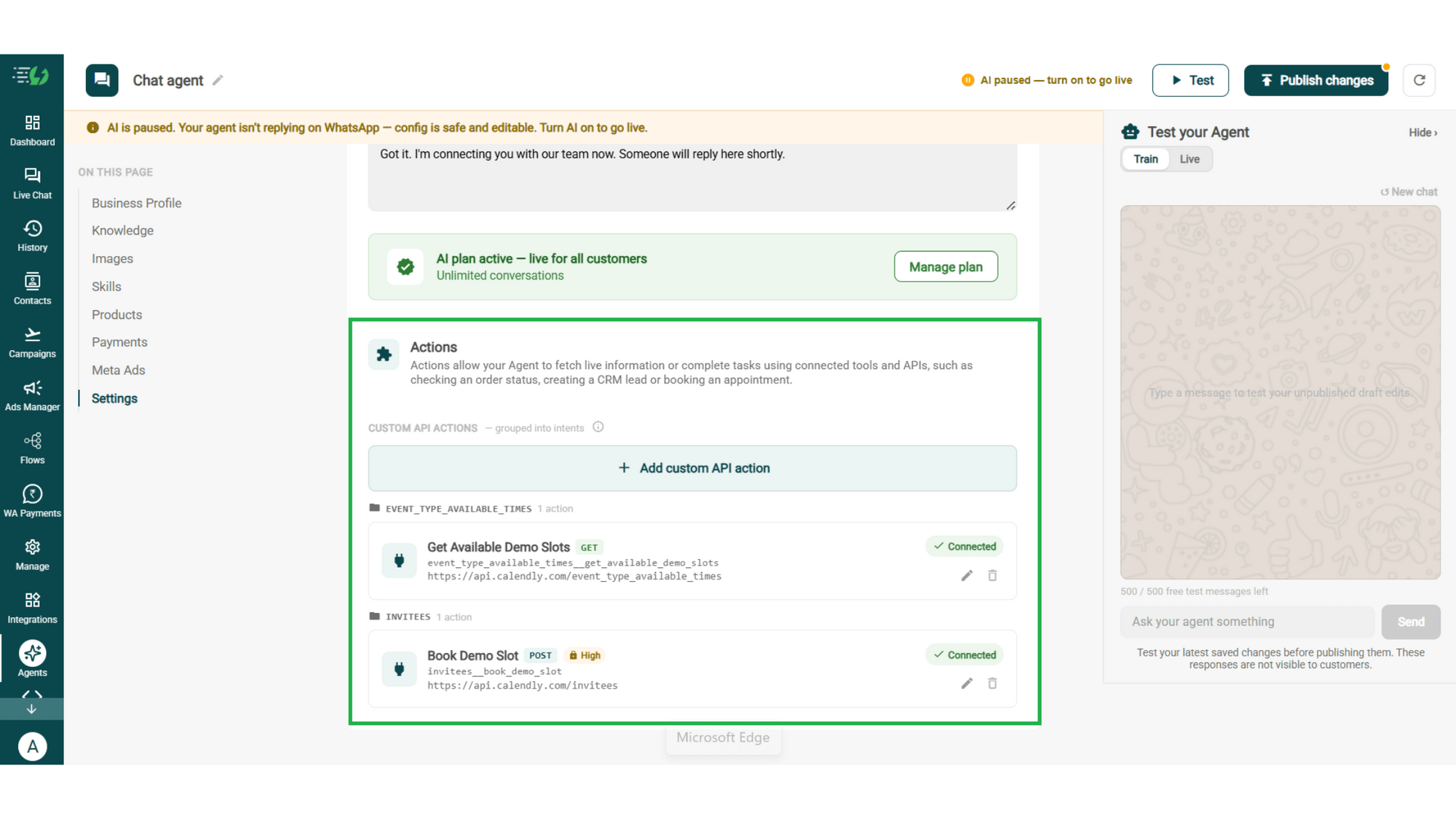
Give your agent superpowers - connect tools & APIs so it can fetch live information or complete tasks like booking appointments.

  • Custom API actions (e.g. check order status, book a slot)

  • AI plan (manage your plan)

Action.png

Test, Publish & Go Live

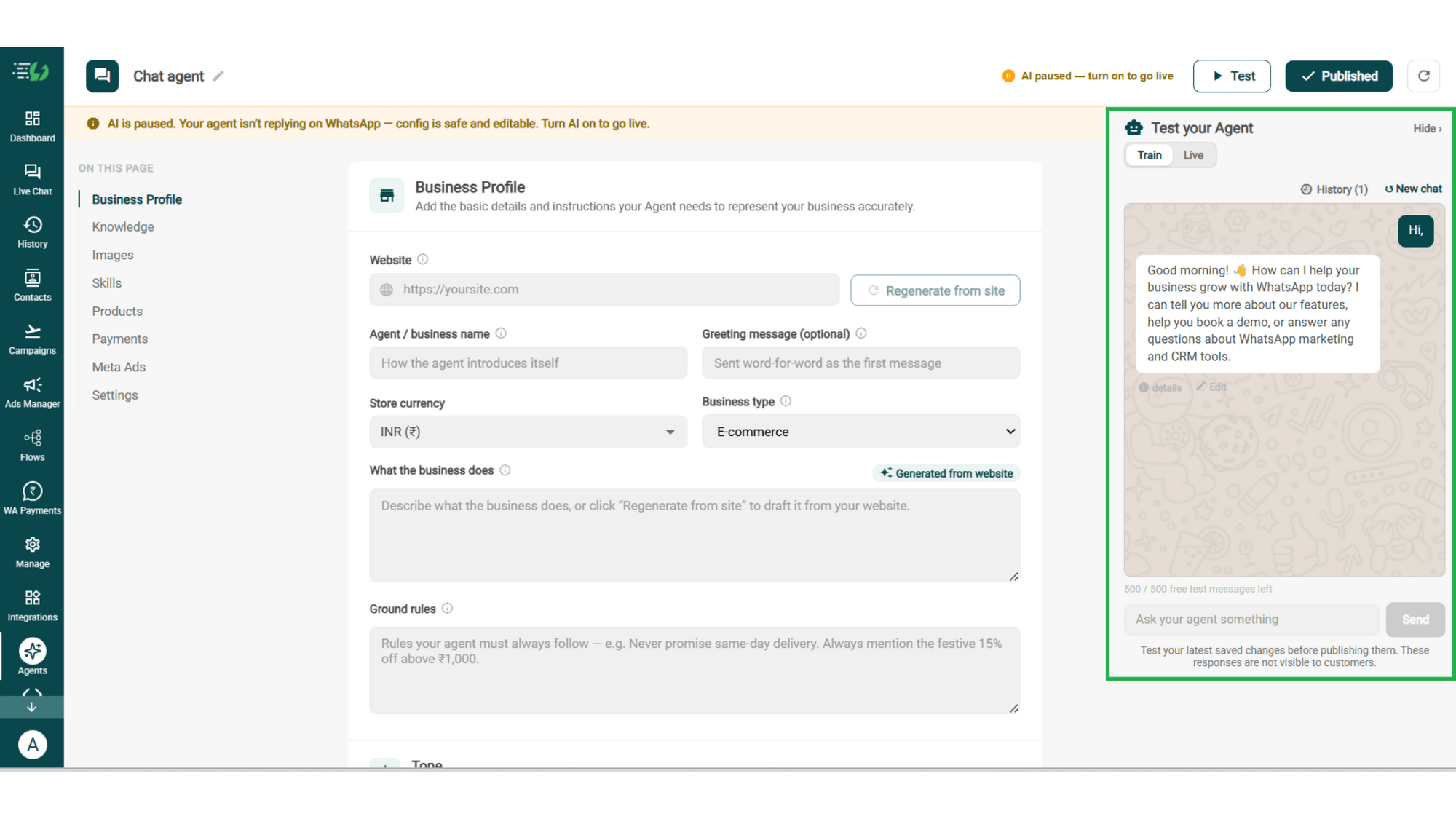
Chat with your agent before your customers do - 500 free AI messages to trial it. Happy?

Publish, switch the AI on & you're live.

  • Test your Agent panel (Train/Live modes)

  • Publish

  • AI on/off toggle

testing.png

How Browsing Turns Into an Order

A real conversation, step by step - starting from a message no search box could answer.

  • The Vague Start

    Customer: "Need a gift for my sister's wedding, no idea what."
    No product, no category, no budget. Exactly the message that gets abandoned on a website.

  • The Two Questions

    Budget, and whether her taste runs traditional or contemporary. That's all the agent needs before it can be useful.

  • The Shortlist

    Three options, with photos and prices, all inside the budget & all actually in your catalog. Not a category link with sixty results.

  • The Pick

    She chooses one, the payment link goes out in the same chat, and the order is placed with a gift-wrap note attached. Total time: 6 minutes. Human involvement: zero.

  • olena-sergienko-dIMJWLx1YbE-unsplash.jpg

    The Shopping AI Agent Works Even Better With…

    One number, one team - agents for before, during & after the sale.

    Product AI Agent

    Once they've narrowed it down, this agent answers the spec and comparison questions.

    Sales AI Agent

    Handles the price objection and the nudge that turns a shortlist into a paid order.

    Status AI Agent

    Answers "where's my order?" once it's placed, without a ticket.

    Simple Pricing. Every Agent Included.

    One plan unlocks the entire library - deploy any AI Agent, or build your own.

    ₹3,500

    Per Month
    Buy Now

    $99

    Per Month, Billed Annually
    Buy Now

    WhatsApp AI Agent Features

    Access every pre-built AI Agent in this library, plus the no-code builder to create your own - trained on your business and live on WhatsApp in minutes.

    • 3,500 AI messages every month

    • 500 FREE AI messages for testing

    • Knowledge Base Q&A - train it on your website & documents

    • Long-term customer memory

    • No-code builder to customize any agent

    • Tool calling, skills & API integrations

    FAQ

    Frequently asked questions answered

    What if the customer doesn't know what they're looking for?

    That's the situation this agent is built for. It asks a couple of questions - occasion, budget, taste - and turns a vague brief into three specific options, which is what a search box can't do.

    Can it shop to a budget?

    Yes, and it respects it. Tell a customer's budget to the agent and it only shows what fits, rather than showing the expensive option and hoping.

    Can it help with gift shopping?

    Yes, and it's one of the strongest uses. Gift shoppers arrive with an occasion and a price range rather than a product name, which is precisely the conversation this agent handles well.

    How many products will it show at once?

    As many or as few as you allow. Three tends to work - enough to feel like a choice, few enough to actually decide. Set the number in your ground rules.

    Can it show new arrivals or seasonal collections?

    Yes. Select which catalog items it may recommend and update that selection whenever your range changes, so the agent surfaces the new season rather than last year's.

    What happens when nothing in the catalog fits?

    It says so, rather than pushing the nearest thing. A customer told honestly that you don't stock what they need comes back; one sold the wrong item doesn't.

    Does the customer have to leave WhatsApp to buy?

    No. Connect Razorpay or PayU and the payment link arrives in the same conversation, so browsing, choosing and paying all happen in one thread.

    How is this different from the Product AI Agent?

    Shopping starts from "show me something"; Product starts from "which one should I get". This agent turns a vague brief into a shortlist. The Product agent takes it from there with specs and comparisons. Most stores run both.

    Will it push products the customer didn't ask about?

    Only if you want it to. Ground rules decide how hard it sells - you can allow a relevant add-on suggestion, or tell it never to suggest anything beyond what was asked for.

    Do we need a Shopify store to use it?

    No. Sync from Shopify or WooCommerce if you have one, import a CSV, or add products by hand - a catalog is what the agent needs, not a particular platform.