WhatsApp AI Agent for Patients
A front desk that never closes.
The Patient AI Agent handles timings, test prep, reports and billing on WhatsApp, and sends clinical queries to your team.
No coding needed!

What Your Patient AI Agent Handles
The questions your front desk answers a hundred times a day, handled inside WhatsApp.
Answers What the Front Desk Answers All Day
OPD timings, which floor, where to park, which department handles what, whether you're open on Sunday. Answered in seconds, at any hour.
Tells Patients Exactly How to Prepare
Fasting hours before a blood test, what to bring, which documents, which counter to report at. The instructions patients always call back to ask about.
Shares Doctor Availability & Timings
Which consultant sits on which day, when the next slot is, what a consultation costs. Straight from your schedule, not from memory.
Handles Report, Billing & Insurance Questions
When a report will be ready, where to collect it, which insurers you're empanelled with, what a procedure costs. The admin half of healthcare, taken off your team.
Knows Exactly What It Must Not Answer
Symptoms, medication, dosages, results. The agent doesn't guess at any of it - it says a doctor needs to see this and routes the patient to your team or the next available slot.
Speaks the Way Your Patients Do
English, Hindi, Hinglish or anything in between - including the patients who'd never fill in a form but will happily send a WhatsApp message.
How to Build Your Patient AI Agent in Minutes
Here's how a real brand goes from zero to a live Patient AI Agent on WhatsApp.
Build Your Agent from Your Website
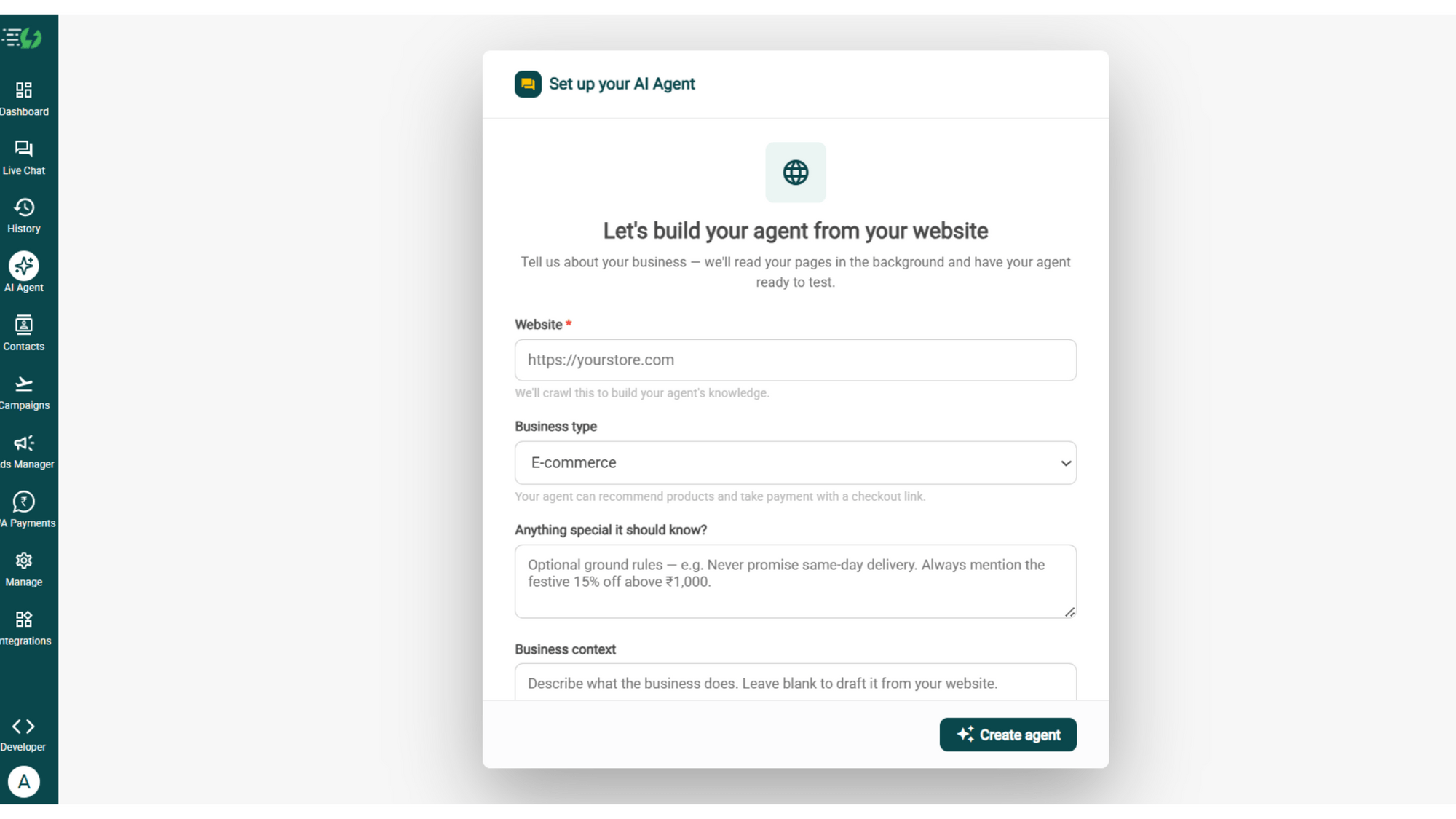
Click AI Agent, add your website, and AiSensy automatically builds an agent trained on your business.
Website (required)
Business type
Anything special it should know? (optional)
Business context (optional)
Then hit ✨ Create agent.
Add Your Business Profile
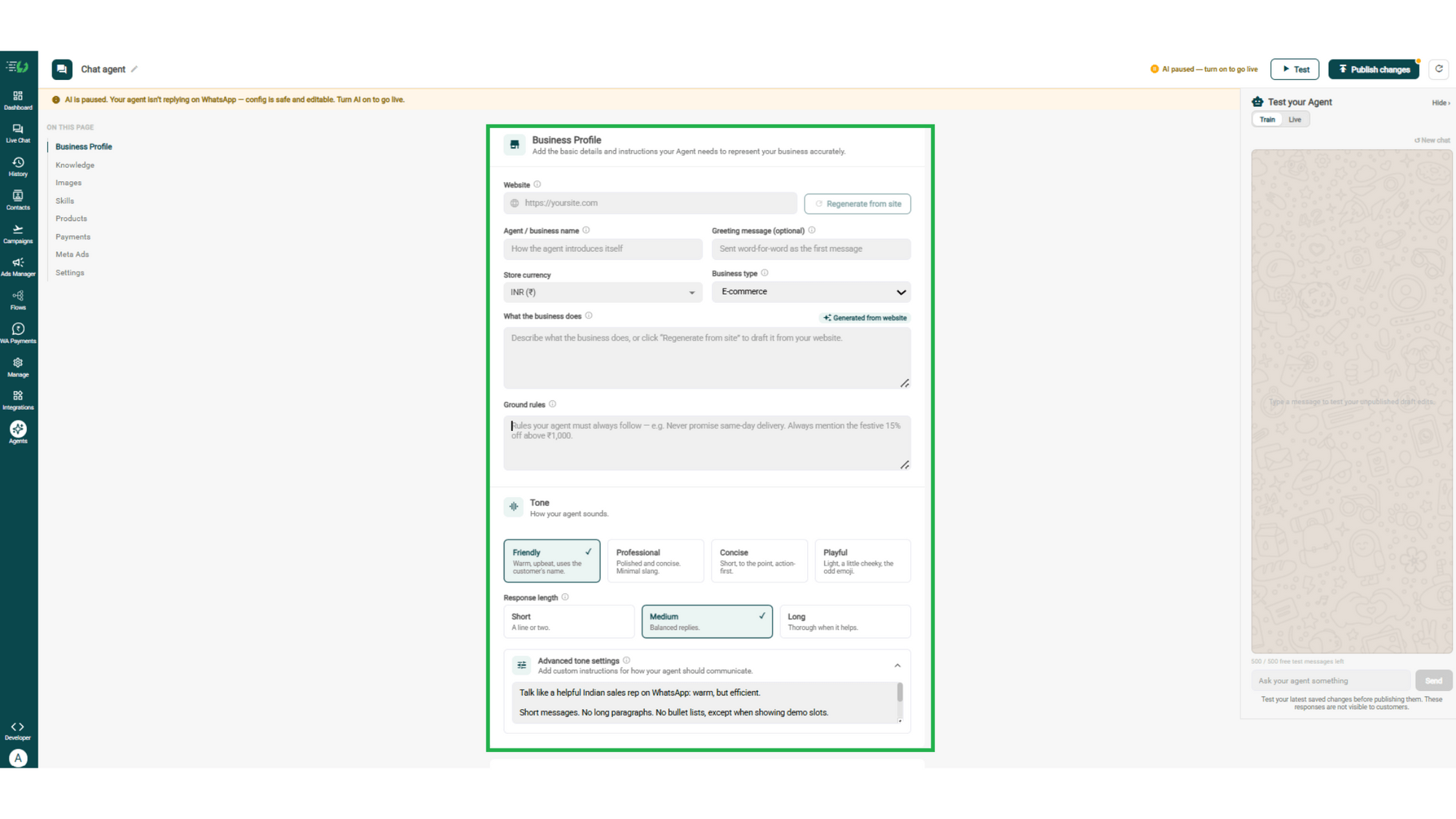
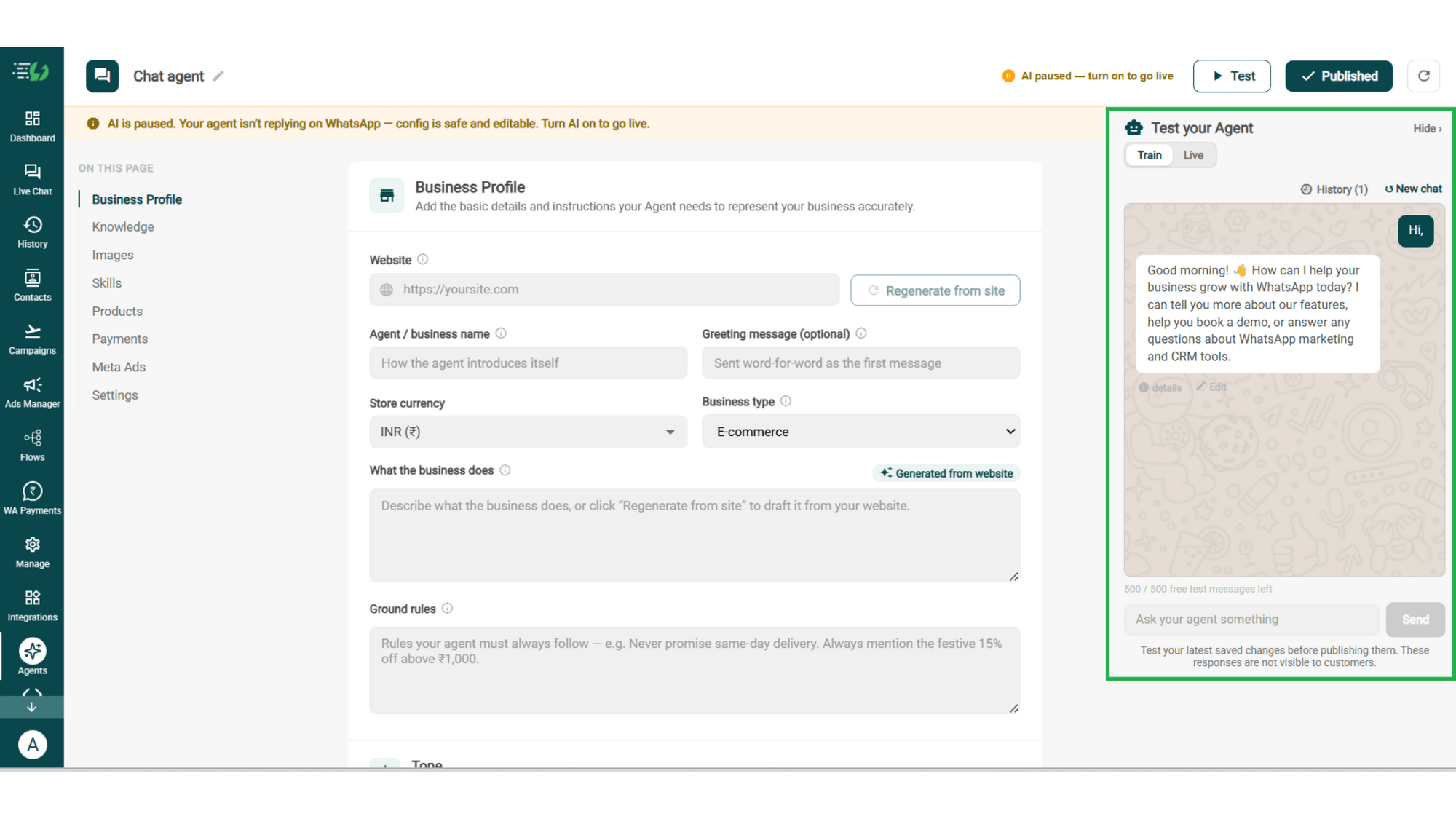
Add your website & AiSensy auto-generates your business description. Set your agent's name, greeting, and a few ground rules it must always follow.
Website
Agent/business name
Greeting message (optional)
Store currency
Business type
What the business does
Ground rules
Train the Agent with Your Knowledge
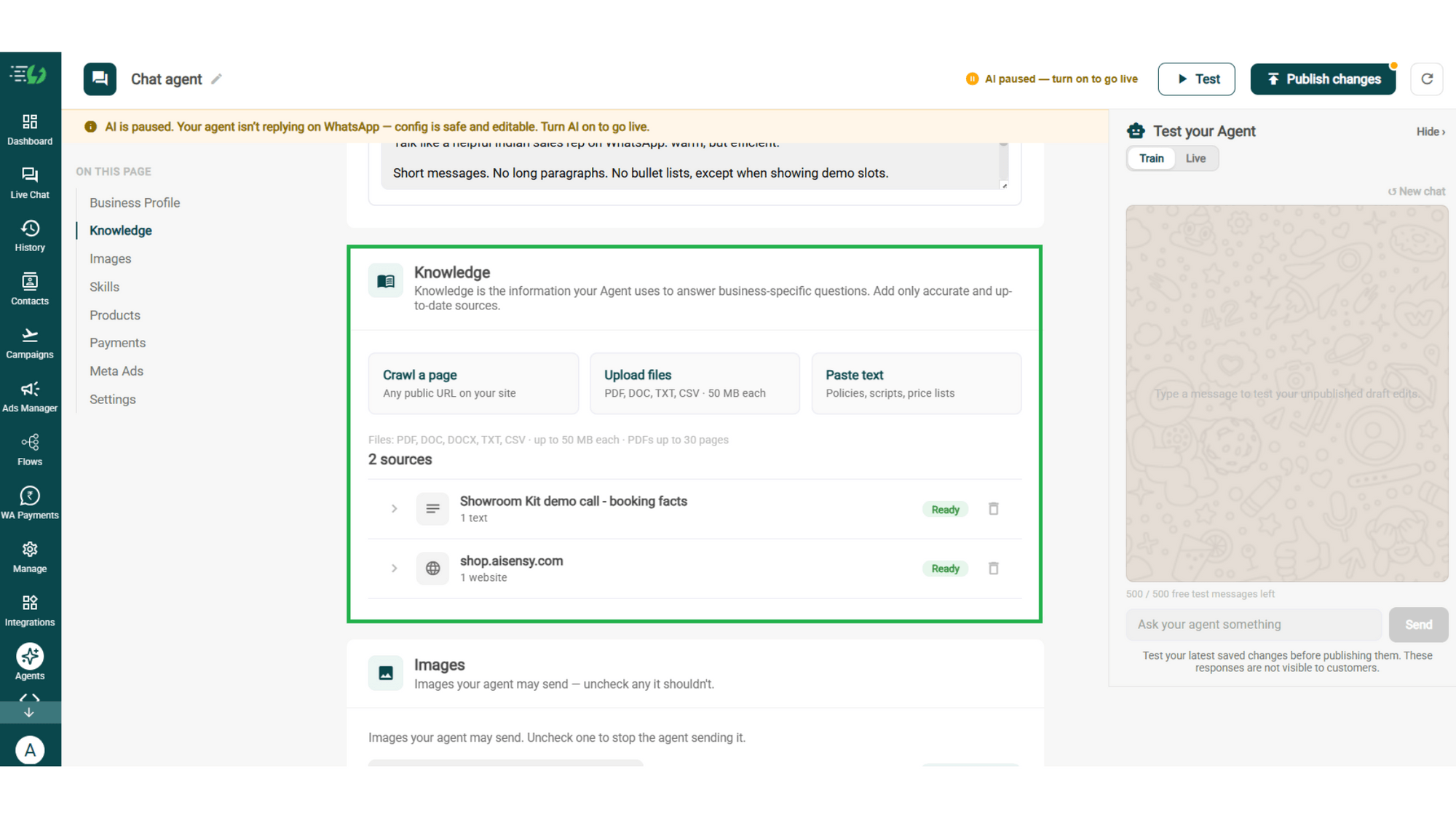
Train the agent on your business - it answers from your information, not generic replies. Every source shows "Ready" once learned.
Details to be filled are:
Crawl a page (website URL)
Upload files (PDF, DOC, TXT, CSV - up to 50MB each)
Paste text (policies, scripts, price lists)
Choose the Images It Can Share
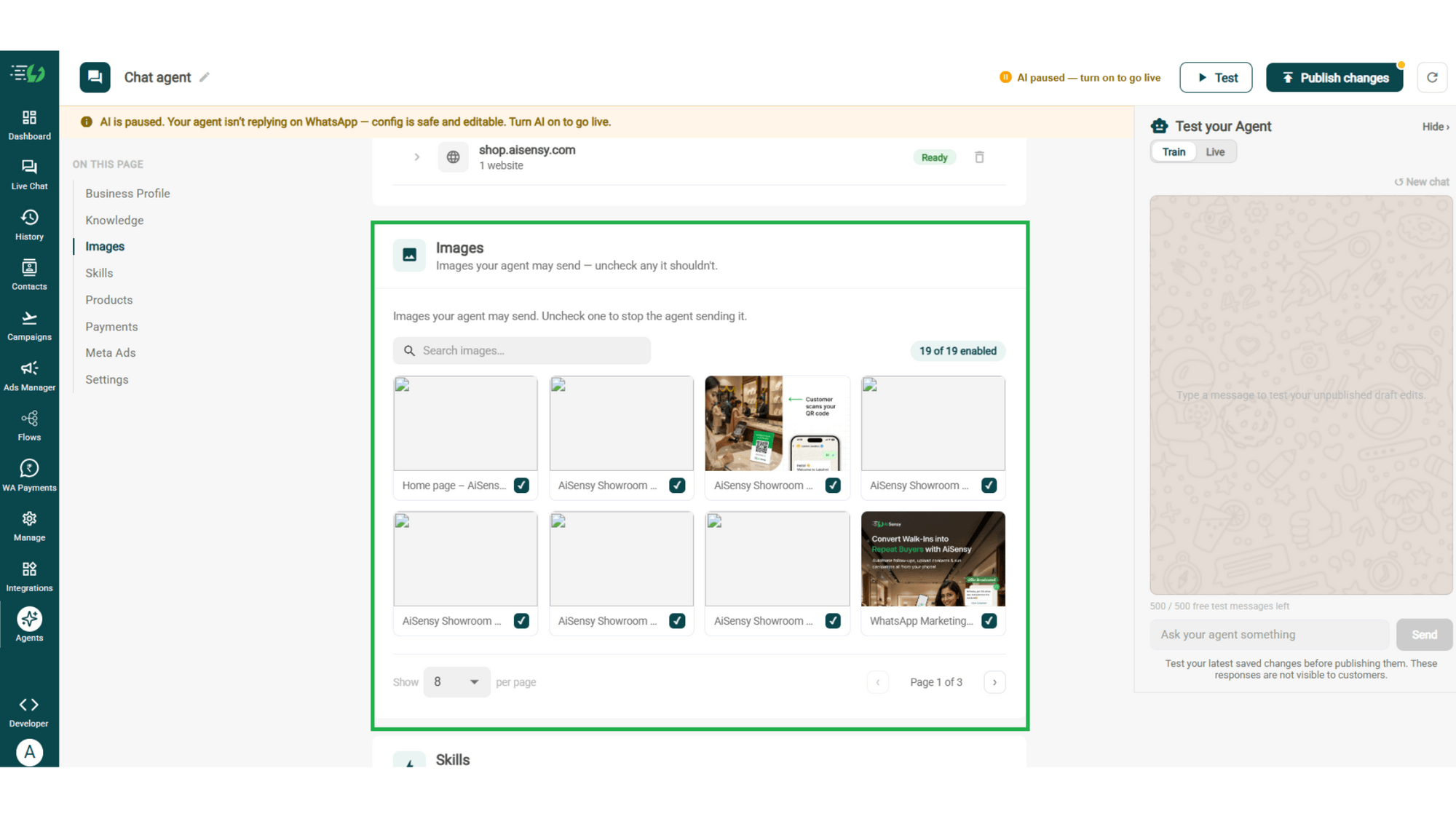
Control the visuals your agent can share in chat - product shots, catalogs, offers. Untick any image it shouldn't send.
Image library (enable/disable per image)
Search images
Create the Patient Queries Skill
Open Add Skills and check the prebuilt list first - if the skill you need isn't there, hit Create custom, name it Status, and pick Task skill as the type.
What kind of skill is this? (Task skill)
Icon & name: Patient
When should the agent use it?
Instructions
Add skills
Enable It on Your Agent
Your new skill lands in the Skills list. Switch it on, expand it to set your qualifying questions, your cut-off and where a qualified applicant should go, then hit Done.
Skills list
Enable the product skill
Expand to configure its variables, templates & ads
Skills enabled counter
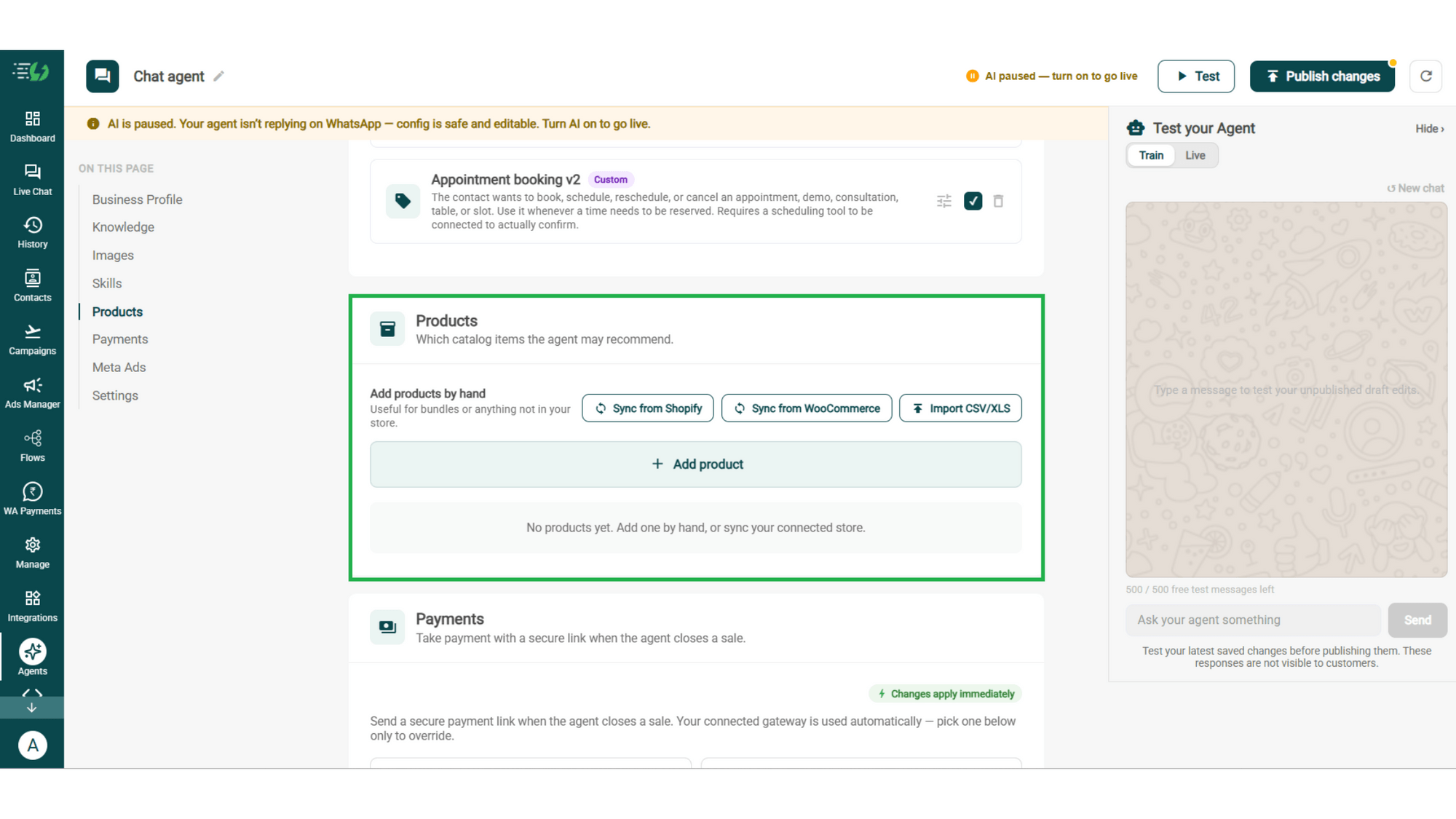
Add Your Products
Choose which catalog items the agent can recommend - so every suggestion comes from your actual range.
Catalog products (select what the agent may recommend)
Add products by hand (for bundles or items not in your store)
Sync from Shopify
Sync from WooCommerce
Import CSV/XLS
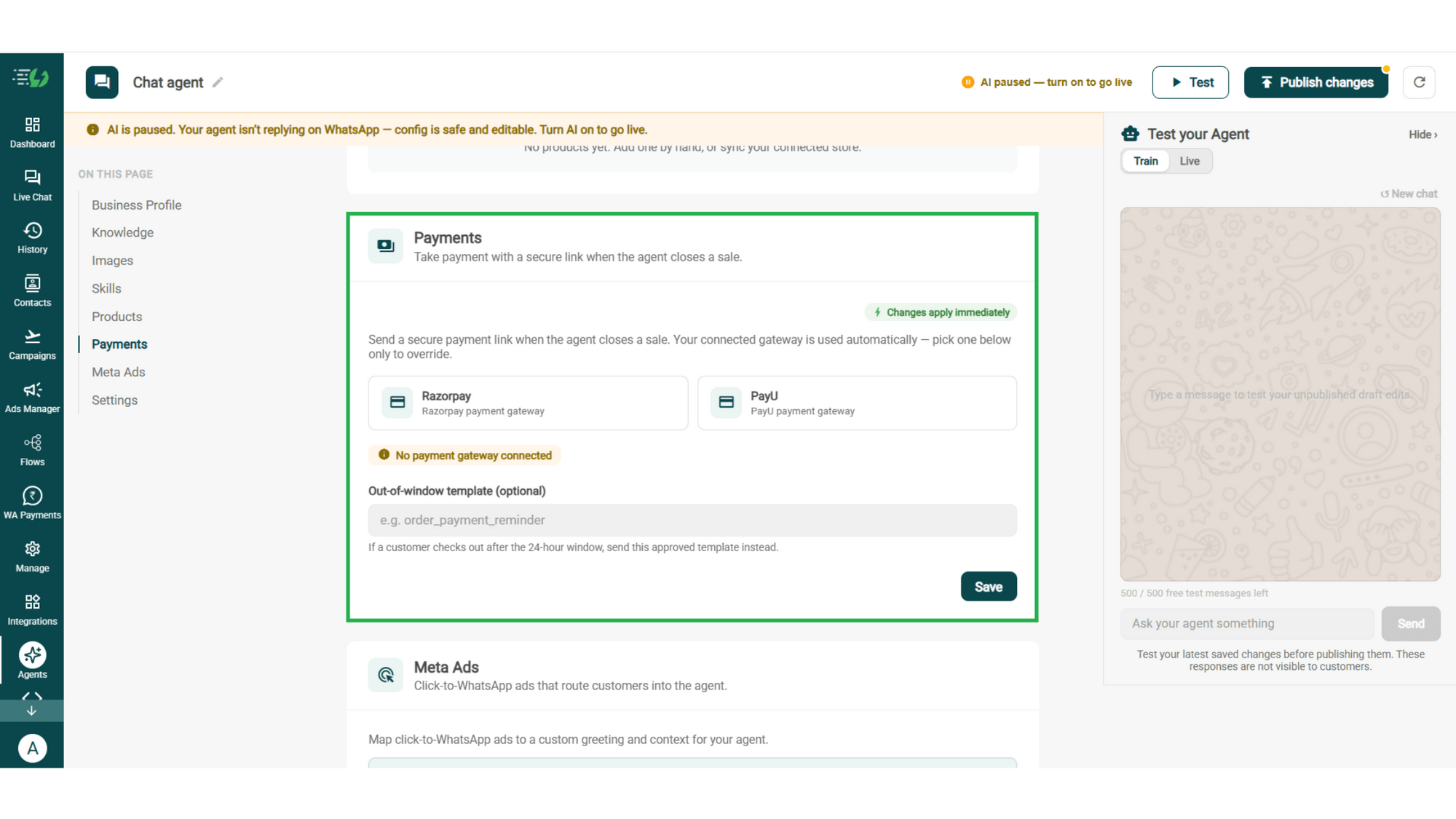
Connect Your Payment Gateway
Connect your payment gateway so the agent closes sales with a secure payment link, right inside the chat.
Payment gateway (Razorpay or PayU)
Out-of-window template (optional)
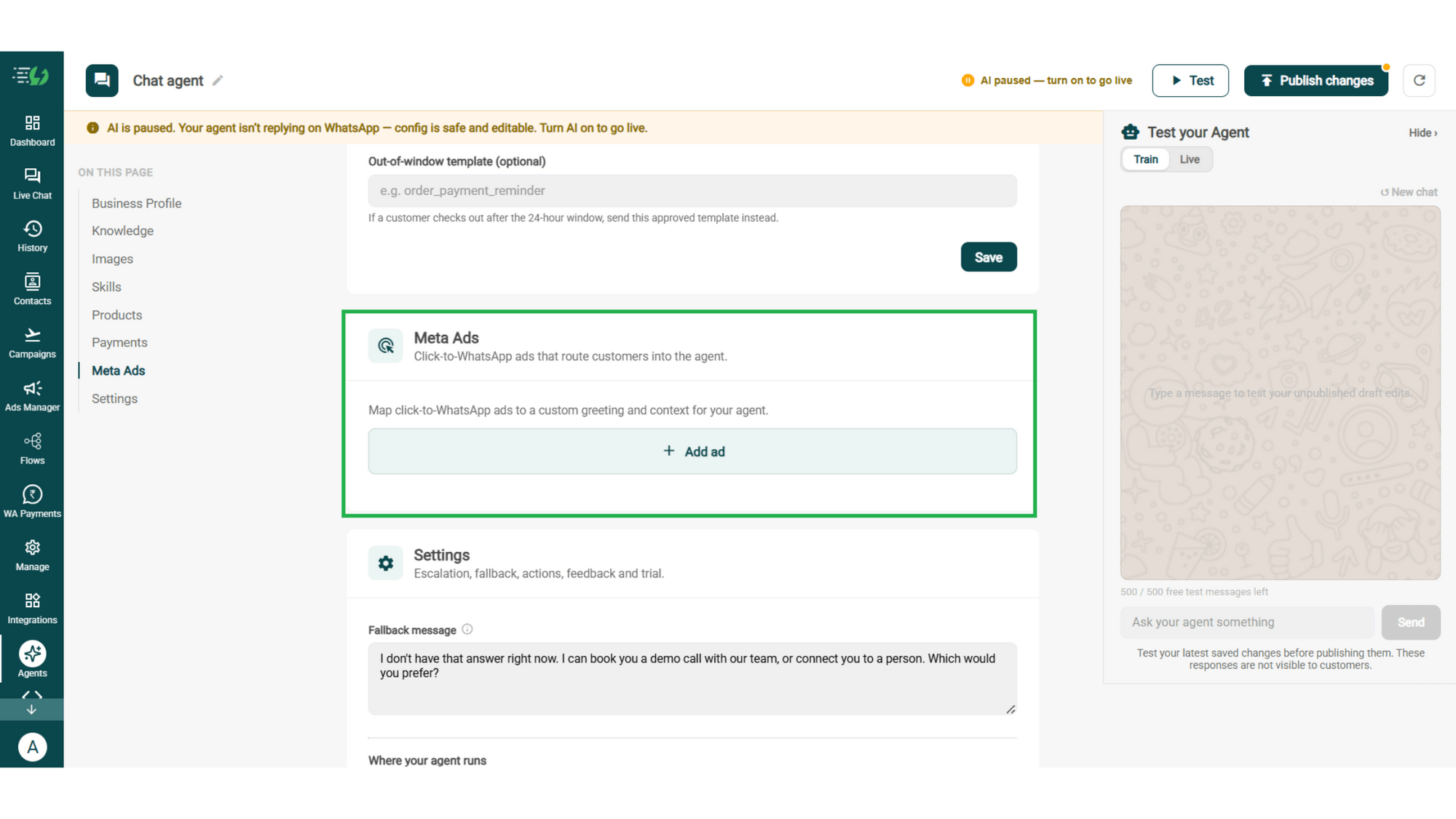
Link Your Meta Ads (Optional)
Running Click-to-WhatsApp ads?
Map each ad to a custom greeting & context, so the agent knows exactly which ad brought the customer in.
Add ad (map ad → custom greeting & context)
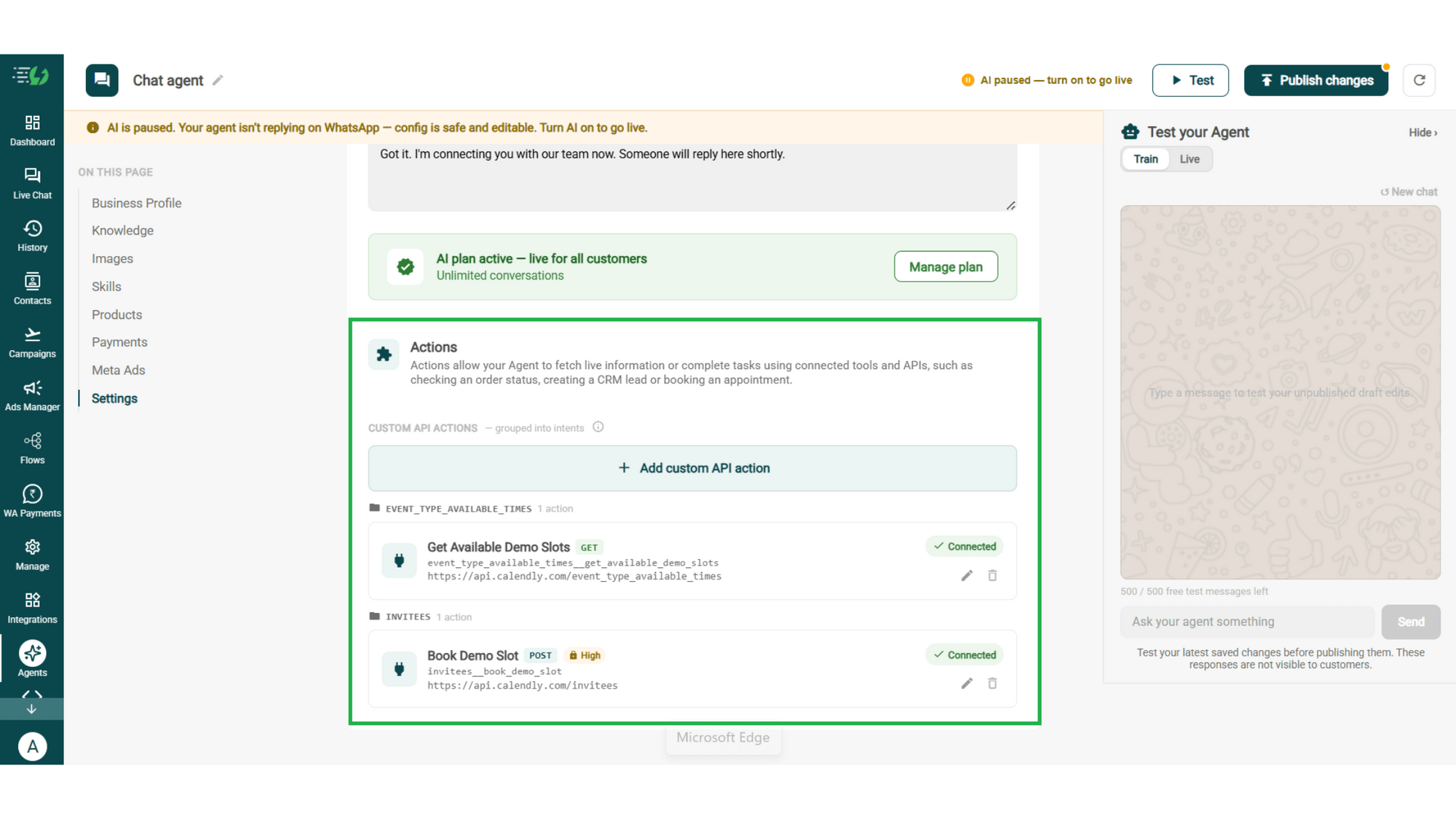
Connect Tools & APIs
Give your agent superpowers - connect tools & APIs so it can fetch live information or complete tasks like booking appointments.
Custom API actions (e.g. check order status, book a slot)
AI plan (manage your plan)
Test, Publish & Go Live
Chat with your agent before your customers do - 500 free AI messages to trial it. Happy?
Publish, switch the AI on & you're live.
Test your Agent panel (Train/Live modes)
Publish
AI on/off toggle
How a Patient Query Gets Answered
A real conversation, step by step - including the two moments the agent knows to stop.
The Question
"Is the OPD open on Saturday?"
Timings, department, floor - answered in seconds, from your own schedule.
The Preparation
"I have a lipid profile on Monday, anything I should do?" Fasting hours, what to bring, which counter to report at - straight from your instructions, so nobody arrives having eaten breakfast.
The Line It Won't Cross
"My father's BP reading is 160 over 100 - is that bad?" The agent doesn't answer that. It says a doctor needs to see the reading, and offers the next available consultation.
The Emergency
"He's having chest pain right now." Everything stops. The agent tells them to get to emergency care immediately & alerts your team in the same moment. No questions, no queue, no waiting for morning.

The Patient AI Agent Works Even Better With…
One number, one team - agents for every stage of a patient's visit.
Appointment Booking AI Agent
Once a patient needs to see someone, this agent finds a real slot and books it in the same chat.
Status AI Agent
"Is my report ready?" - looked up in your system and answered, instead of a call to the lab.
Feedback AI Agent
Asks how the visit went, so you hear about a bad experience before it reaches a review site.
Simple Pricing. Every Agent Included.
One plan unlocks the entire library - deploy any AI Agent, or build your own.
WhatsApp AI Agent Features
Access every pre-built AI Agent in this library, plus the no-code builder to create your own - trained on your business and live on WhatsApp in minutes.
3,500 AI messages every month
500 FREE AI messages for testing
Knowledge Base Q&A - train it on your website & documents
Long-term customer memory
No-code builder to customize any agent
Tool calling, skills & API integrations
What can the Patient AI Agent answer?
Everything your front desk answers - OPD timings, departments, doctor availability, test preparation, report collection, billing and insurance. The administrative half of healthcare, which is also the half that generates most of your calls.
Will it give medical advice?
No, and you should set it up so it can't. You write ground rules telling it never to interpret symptoms, results, medications or dosages. Those questions get routed to your team or turned into an appointment - which is the correct answer to them anyway.
What happens if a patient describes an emergency?
It stops and tells them to seek emergency care immediately, then alerts your team. This is written into the ground rules before the agent goes live, and it's the first thing you should test in Train mode.
Can it tell a patient whether their report is ready?
Yes, if you connect the system that knows. Report status is a Tools & APIs connection - the agent looks it up and answers, rather than the patient calling the lab three times.
Can it book an appointment?
Not on its own - pair it with the Appointment Booking agent and a connected scheduling tool. They're two skills on the same agent, so the patient never notices the handoff.
Is patient data safe on WhatsApp?
Messages flow through your own WhatsApp Business API account and sit in your AiSensy inbox, so you control them as you would any other patient record. Health information is sensitive personal data under the DPDP Act - keep the agent to the minimum it needs, and run this past whoever owns data protection at your organisation before you go live.
Does this count as telemedicine?
No. India's Telemedicine Practice Guidelines require a registered medical practitioner for a consultation. This agent handles administration and hands anything clinical to your people - it doesn't consult, and shouldn't be presented to patients as if it does.
Who decides what the agent is allowed to say?
You do, entirely. Its knowledge comes from documents you upload, and its limits come from ground rules you write. Nothing reaches a patient that you haven't given it or allowed it to say.
Can it replace our front desk?
No, and it isn't meant to. It takes the repeat questions - the eighty percent that don't need a person - so your front desk has time for the patients standing in front of them and the calls that actually need judgement.
How is the Patient AI Agent priced?
The AI Agent plan is ₹3,500 a month and covers every agent in the library, so a clinic running Patient, Appointment Booking and Feedback together pays the same as one running a single agent.