Login
Untitled Agent Running
    Available WCC₹24,860.50
    Campaign Agent · Online

    Namaste, Priya. What would you like to promote?

    Describe your offer in English or Hinglish. I’ll create the broadcasts and follow-ups for you to review.

    Ctrl + Enter
    Try one
    Add your offer, products and dates. You can edit the messages before launch.
    Campaign Agent · Online

    Who should I reach?

    Your whole contact list is here. Filter or search it, then pick who this campaign goes to.

    Filter
    Select at least one contact to continue
    Campaign Agent · Working

    Writing your campaign messages…

      0% builtYou’ll see every message before anything sends.
      Campaign Agent · Ready

      Ready when you are.

      Sending starts after Meta approval.
      Campaign Agent · Live

      It’s live.

      The agent submits your messages to Meta and sends them after approval. Follow-ups run after the wait times you set.

        Campaign Agent · Live · Day 1 of 4

        Agent launched

        0 delivered · 0 sent · 0 replied

        DELIVERED SO FAR0

        What the agent is doing updates as it works0 events

          Delivery so far step 1

          Every step, one line each

          Founders & Marketers Love us

          Trusted by 250,000+ Businesses across 68+ Countries

          Launch your 1st WhatsApp Campaign Agent in 3 Simple Steps

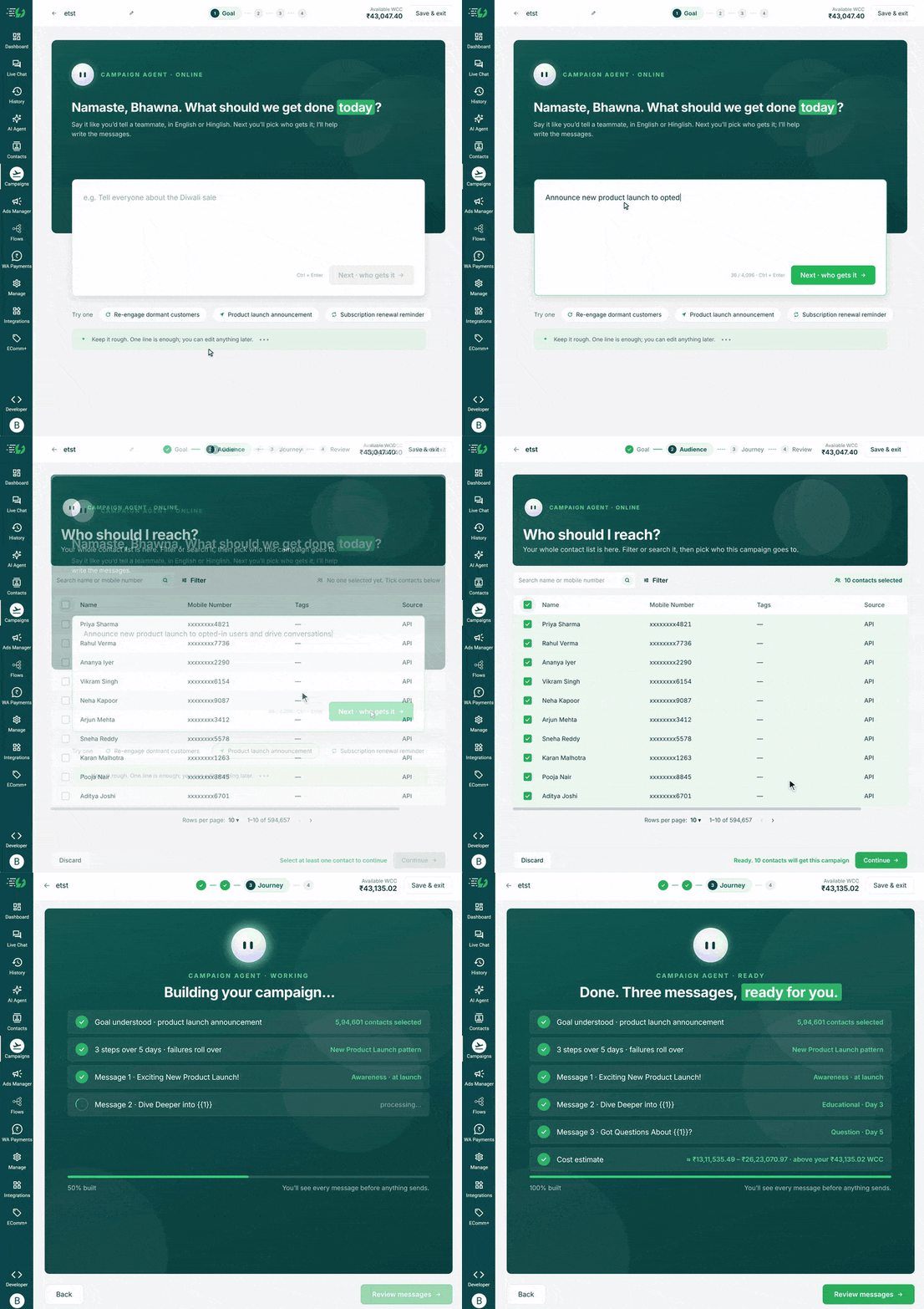
          Describe your goal, choose your contacts, select the steps for your campaign and review the messages. Launch once, and Campaign Agent sends your broadcasts and follow-up steps.

          Tell AI What to Promote

          Share your offer, product details and campaign dates. Then choose the contacts you want to reach.

          set-goal-set-audience.gif

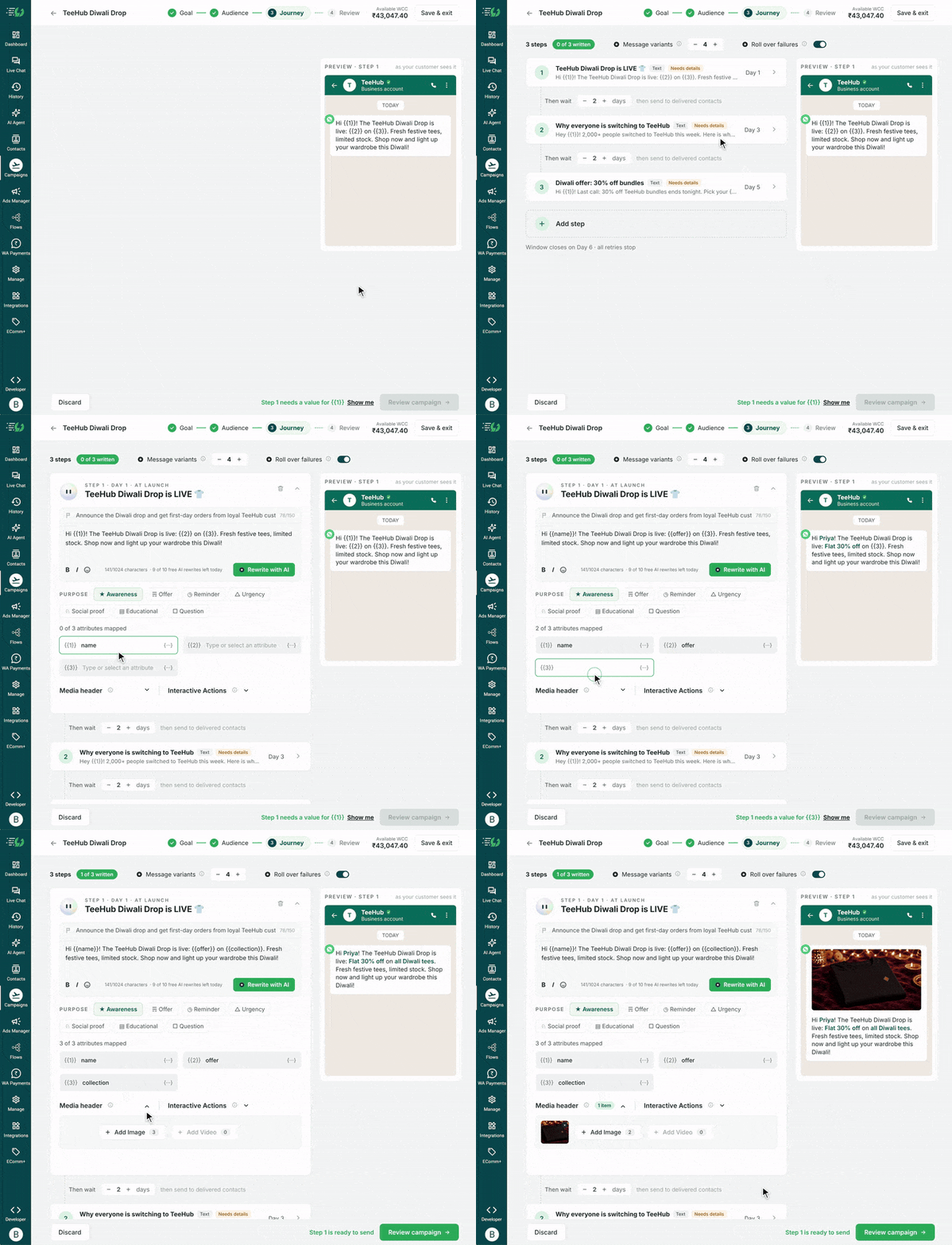
          Review Your Messages and Follow-ups

          AI writes your broadcasts and follow-ups. Personalise the messages, change the images or use Rewrite with AI. Set how long to wait before each follow-up, then check your contacts and estimated cost.

          teehub_journey_edit_720_web.gif

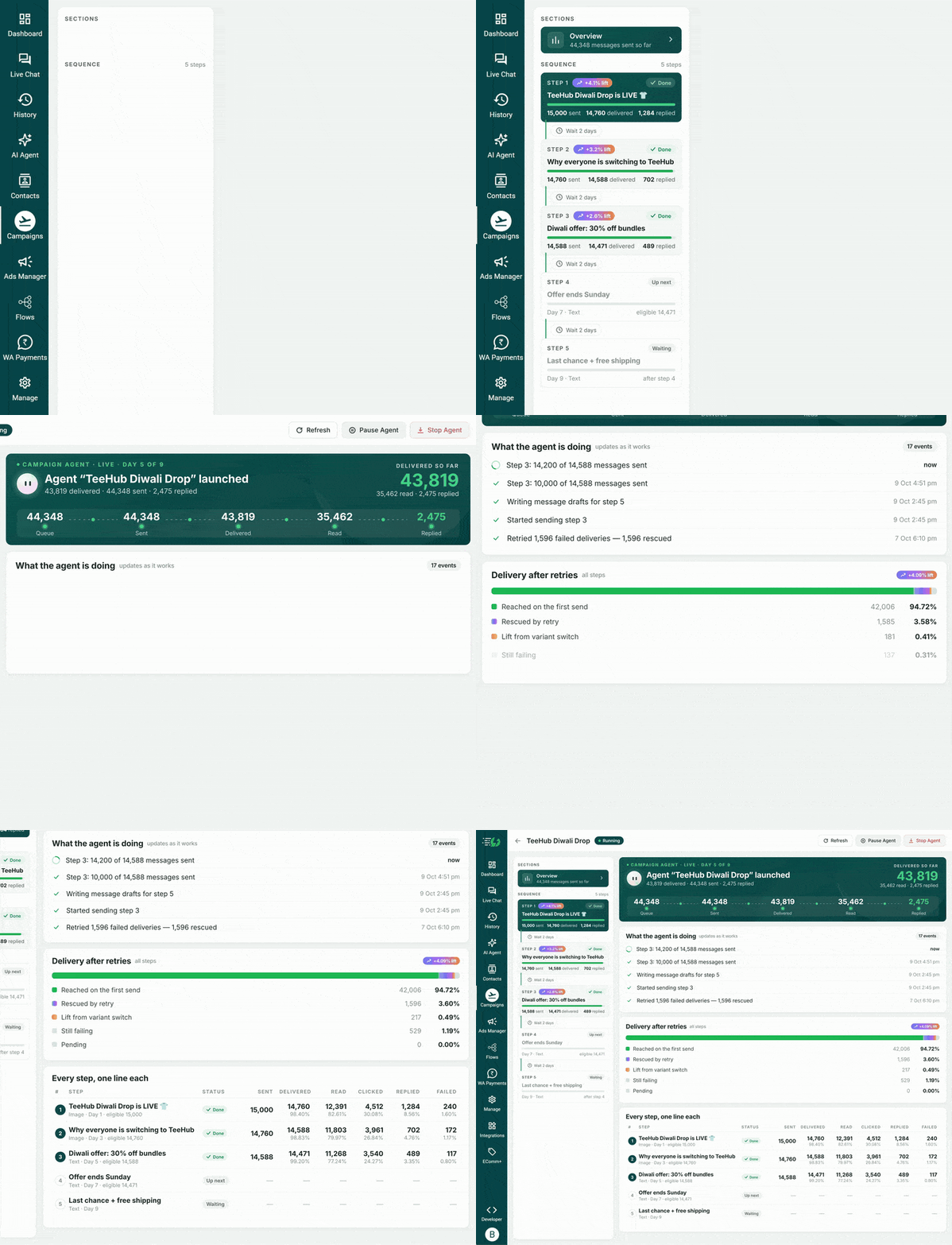
          Launch and Track Results

          Launch when you’re ready. The agent submits your messages to Meta and sends them after approval. It sends follow-ups automatically after the wait time you set. Track results as the campaign runs.

          teehub_agent_dashboard_720_web.gif

          Automate Your WhatsApp Campaigns with AI

          Let AI write your messages, submit them for Meta approval and send broadcasts and follow-ups. Track results and spend in one place. Example campaign data shown.

          Built-in WhatsApp A/B Testing

          AI writes different versions of each message. Each contact gets one approved version on the first send. Compare reads, clicks and replies to see which message works best.

          ad-campaign-management-aisensy.webp

          Automate Broadcasts and Follow-ups

          Campaign Agent submits your messages to Meta for approval and rewrites rejected versions. After approval, it sends your broadcasts and follow-ups with the wait times you set.

          If a message isn’t delivered, it tries again with another approved version. Turn on Roll over failures to include missed contacts in the next campaign step.

          f2_meta_followups.webp

          Track Campaign Results

          See how many messages were sent, delivered, read, clicked and replied to. Compare message versions and check how many messages were delivered after a retry.

          f3_live_analytics.webp

          Keep Track of Campaign Costs

          Check the estimated cost before launch and see what you spend as the campaign runs. Pause or stop the campaign from the same page.

          f4_spend_control.webp

          Automate Your WhatsApp Campaigns with AI

          Let AI write your messages, submit them for Meta approval and send broadcasts and follow-ups. Retry missed deliveries and track results and spend in one place. Example campaign data shown.

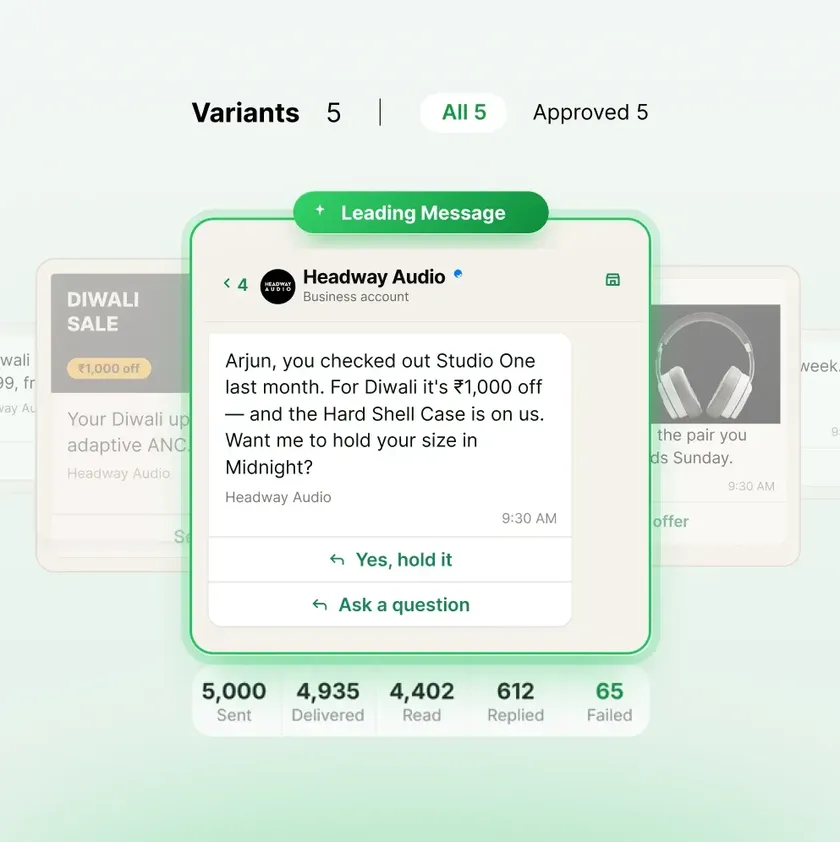
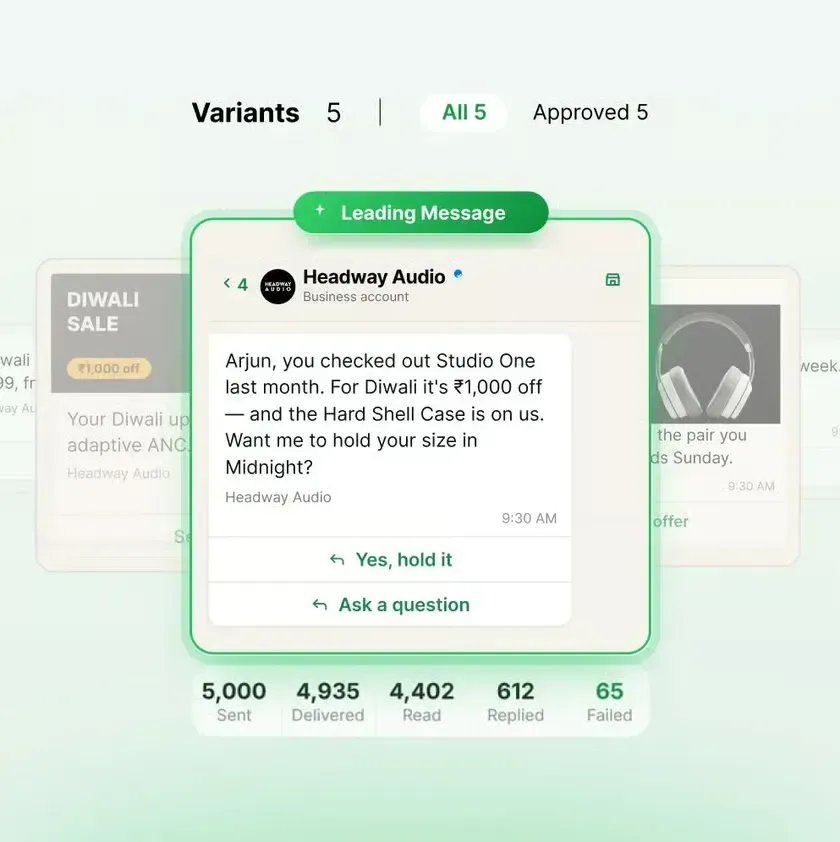
          Built-in WhatsApp A/B Testing

          AI writes different versions of each message. Each contact gets one approved version on the first send. Compare reads, clicks and replies to see which message works best.
          Campaign Agent message variants for WhatsApp A/B testing.

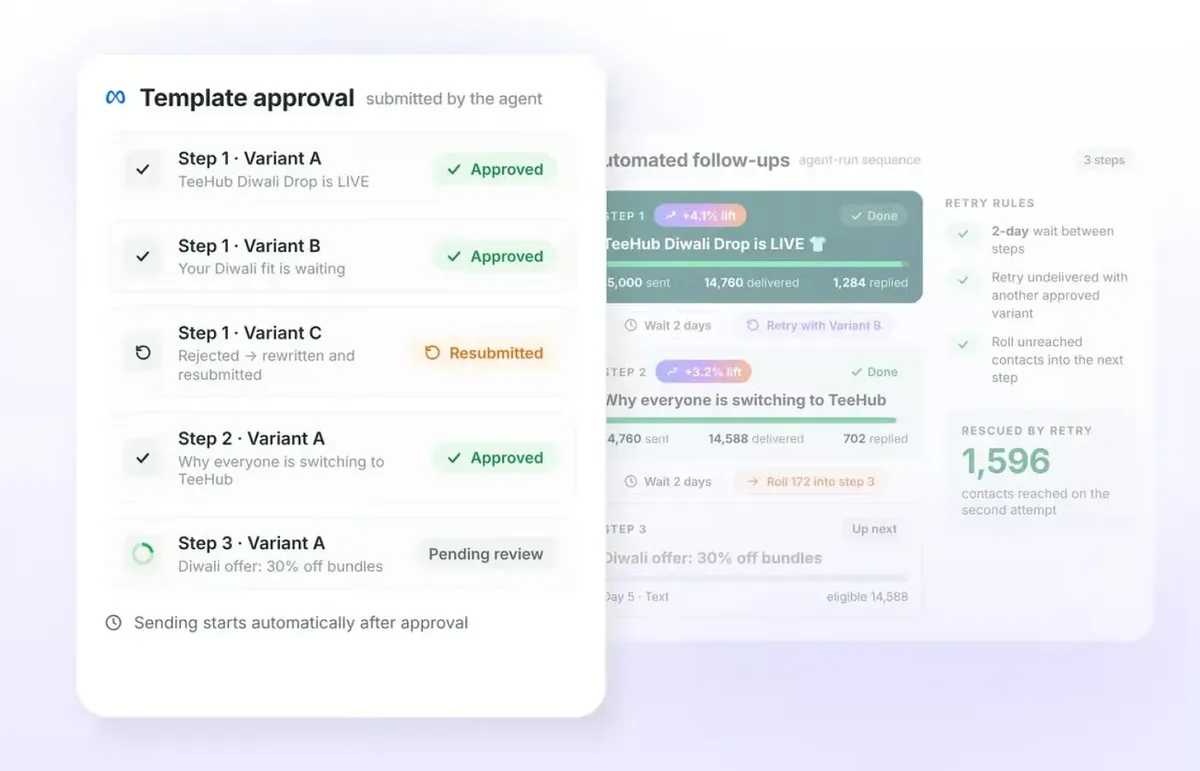
          Automate Broadcasts and Follow-ups

          Campaign Agent submits your messages to Meta for approval and rewrites rejected versions. After approval, it sends your broadcasts and follow-ups with the wait times you set. If a message isn’t delivered, it tries again with another approved version. Turn on Roll over failures to include missed contacts in the next campaign step.

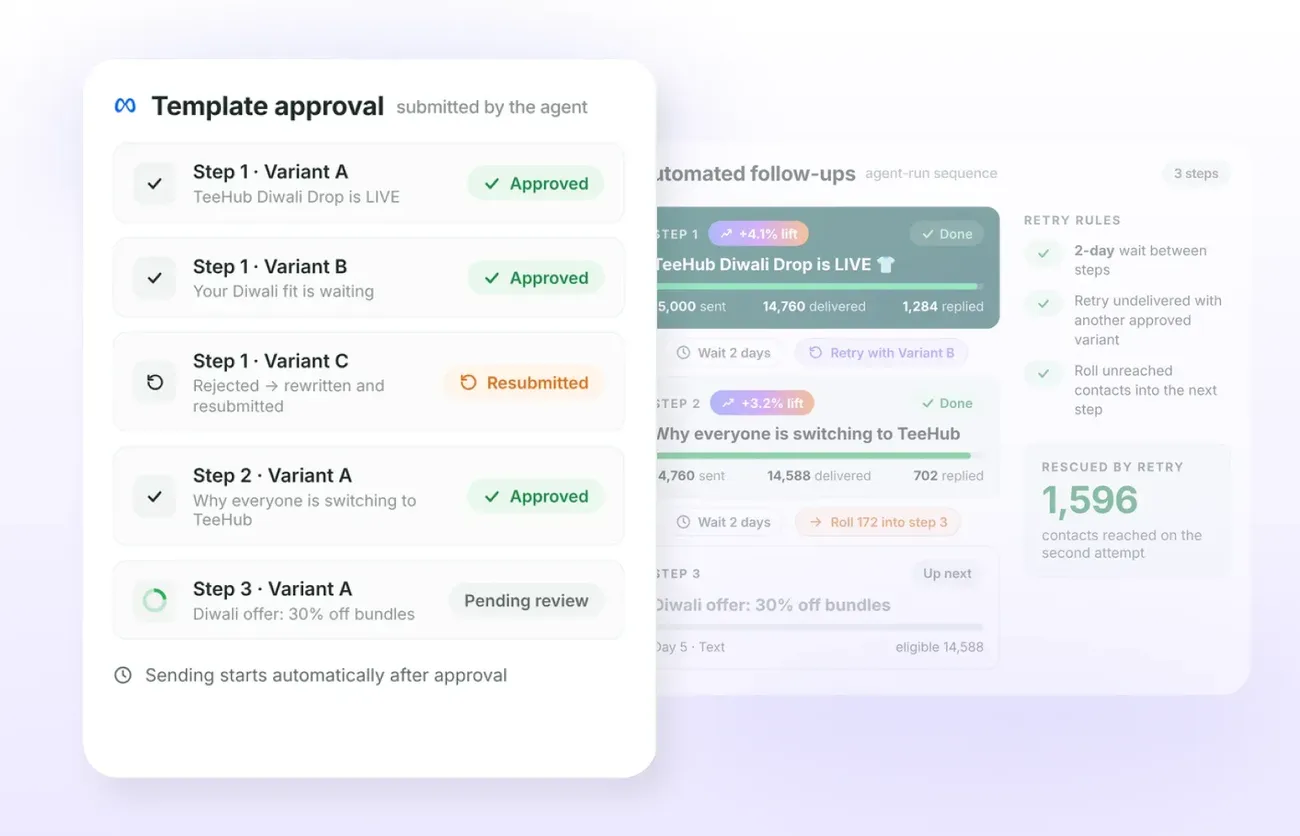
          Campaign Agent template approval and automated WhatsApp follow-up steps.

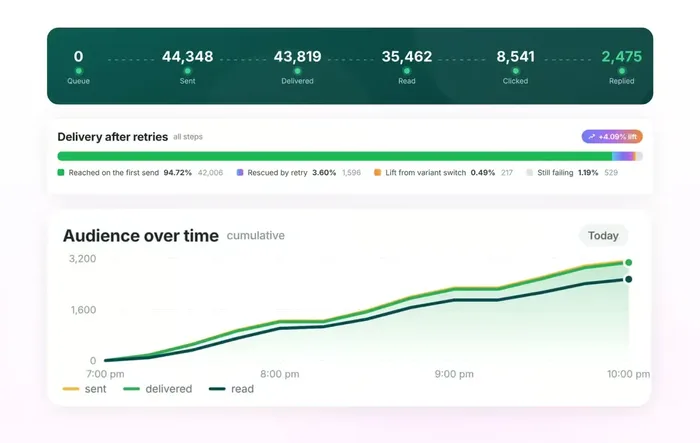
          Track Campaign Results

          See how many messages were sent, delivered, read, clicked and replied to. Compare message versions and check how many messages were delivered after a retry.
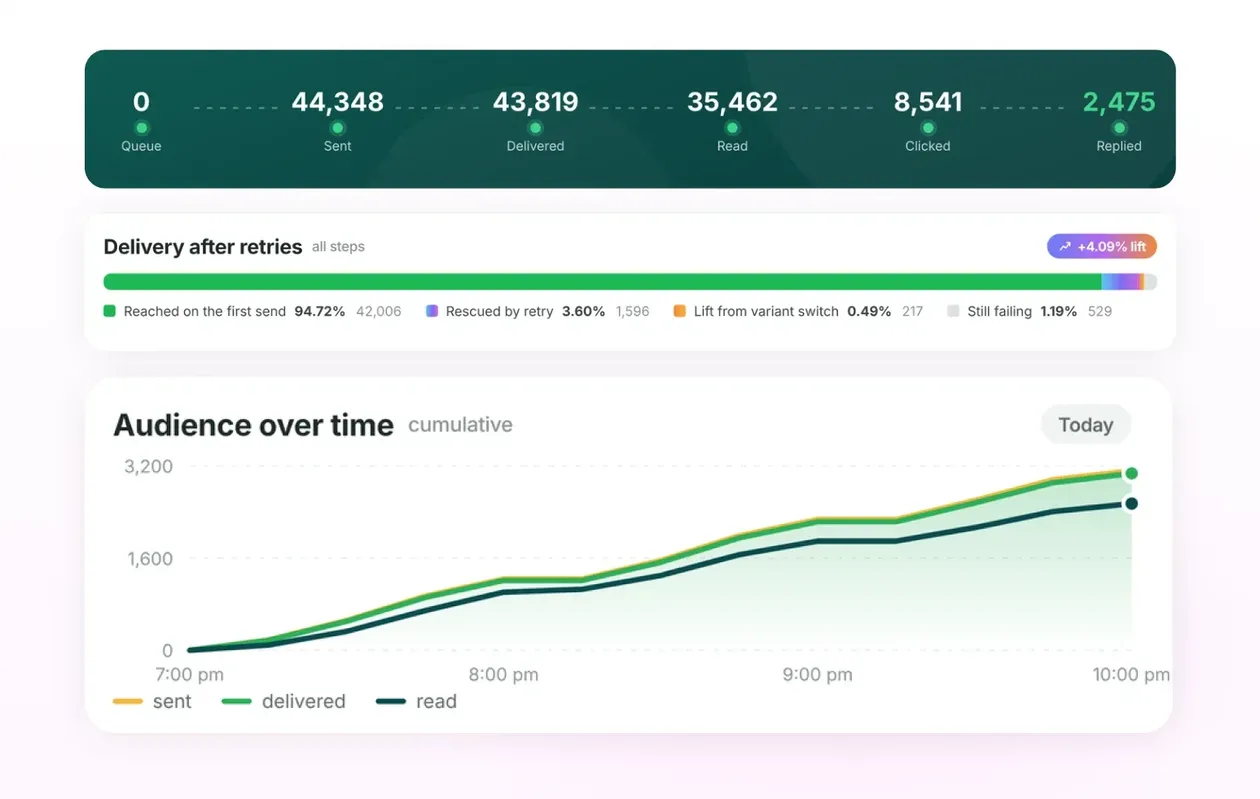
          Campaign Agent delivery, reads, clicks, replies and delivery recovery analytics.

          Keep Track of Campaign Costs

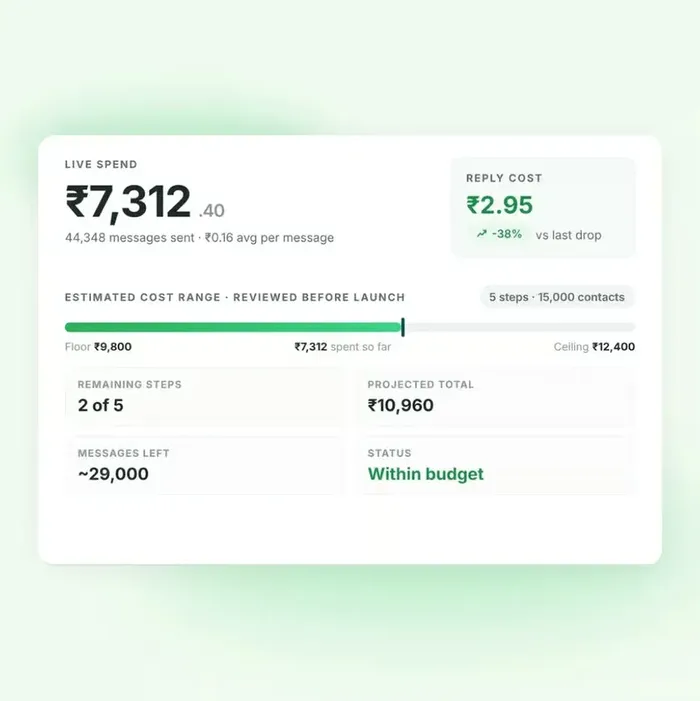
          Check the estimated cost before launch and see what you spend as the campaign runs. Pause or stop the campaign from the same page.
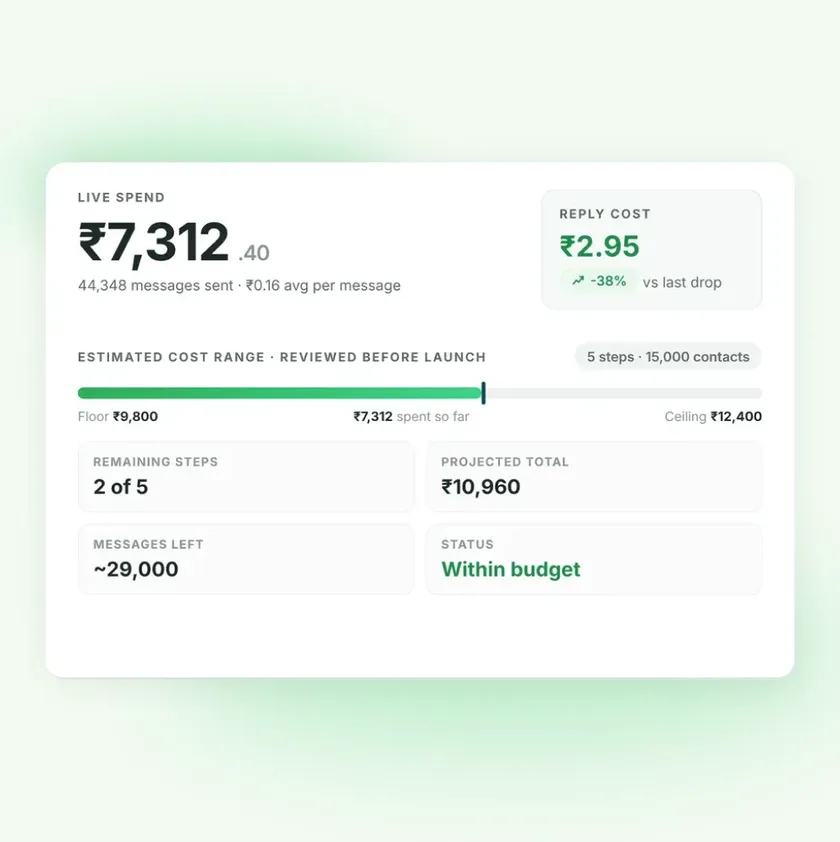
          Campaign Agent spending summary, remaining messages and budget status.

          Retry Failed WhatsApp Deliveries

          Campaign Agent keeps retrying failed message deliveries with other approved versions to help your messages reach the customer’s WhatsApp inbox. Track recovered deliveries and contacts that still need attention in your campaign results.
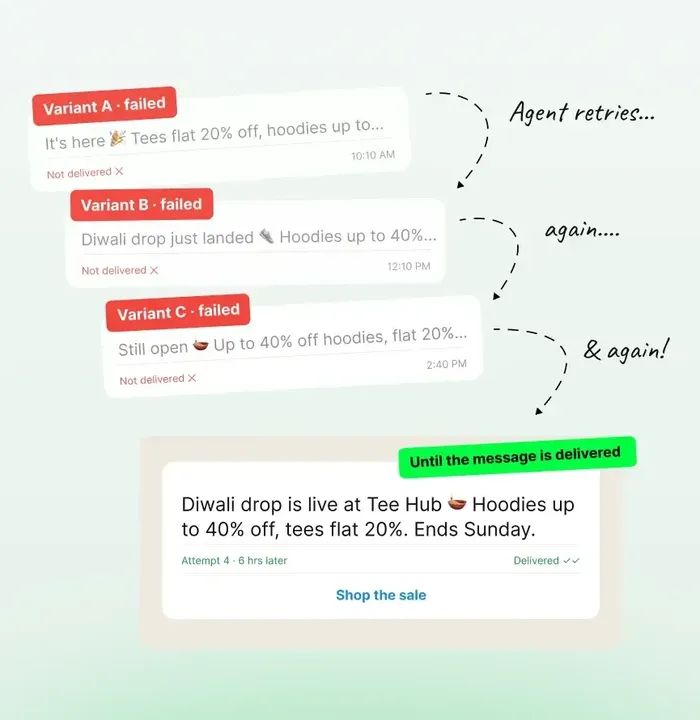
          Illustrative WhatsApp message retry sequence showing approved variants retried after failed delivery.

          WhatsApp Campaigns for Every Goal

          Run offers, launch products and send renewal reminders through WhatsApp broadcasts and follow-ups.

          Seasonal Sales

          Run festive sales and limited-period offers on WhatsApp. Send a sale preview, announce the offer and remind customers before it ends.

          Product Launches

          Introduce new products, share their benefits and invite customers to explore your collection.

          Follow Up with Leads

          Share product or course details with interested leads. Follow up with an offer, a demo link or an enrolment reminder.

          Bring Customers Back

          Share a new collection or a special offer with past customers. Send a follow-up reminder to invite them to shop again.

          Event Promotion

          Invite customers to your event with the details and a registration link. Send reminders before registrations close.

          Subscription Renewals

          Share renewal dates and subscription details. Send reminders to help customers renew before their subscription ends.

          Ready to Launch Your WhatsApp Campaign?

          In AiSensy, go to Campaigns → Launch → Campaign Agent to get started.

          Campaign Agent FAQs

          Your questions about Campaign Agent, answered.

          What is AiSensy Campaign Agent?

          Campaign Agent is your AI WhatsApp campaign manager inside AiSensy. Describe a goal to create a multi-step journey with message variants, Meta approval, delivery retries and follow-ups. Review the plan before launch, then track live results.

          How do I launch a Campaign Agent journey?

          In AiSensy, go to Campaigns → Launch → Campaign Agent. Add your goal, choose the audience, review the journey and cost range, then launch. Include offers, dates and products in your goal to help the agent write relevant messages.

          Who can use Campaign Agent?

          Campaign Agent is available to Managers and Owners on AiSensy. Paid plans have full access. Trial accounts can launch a journey with up to 10 contacts and 2 steps. Free Forever accounts can upgrade to launch.

          How does WhatsApp A/B testing work?

          The agent writes several versions of each message. Approved variants share the initial audience, with one version sent to each contact. You can compare sent, delivered, read, clicked and replied results for each version.

          When will my campaign start sending?

          Launch begins the approval process. Messages start sending after Meta approves the templates. Campaign Agent rewrites rejected versions and submits them again; approval timing is determined by Meta.

          How do follow-ups and delivery retries work?

          Each step follows the wait time you set after the previous step finishes. Undelivered messages can be retried with another approved version. Turn on Roll over failures to include unreached contacts in the next step as well.

          How is Campaign Agent billed?

          Campaign Agent uses your WhatsApp Conversation Credits (WCC). Delivered messages incur Meta marketing charges and the Campaign Agent service fee. AI message drafting may incur charges after free allowances. Review the estimated cost range before launch and follow live spend on the agent page.

          Can I review, pause or stop my campaign?

          Yes. Edit your journey and review the audience, message versions and cost range before launch. Once the campaign is running, you can pause or stop it from the agent page and follow its activity and results.