New Launch | Build AI Agents on WhatsApp that qualify & convert 24/7 · Explore More

Login

Feature

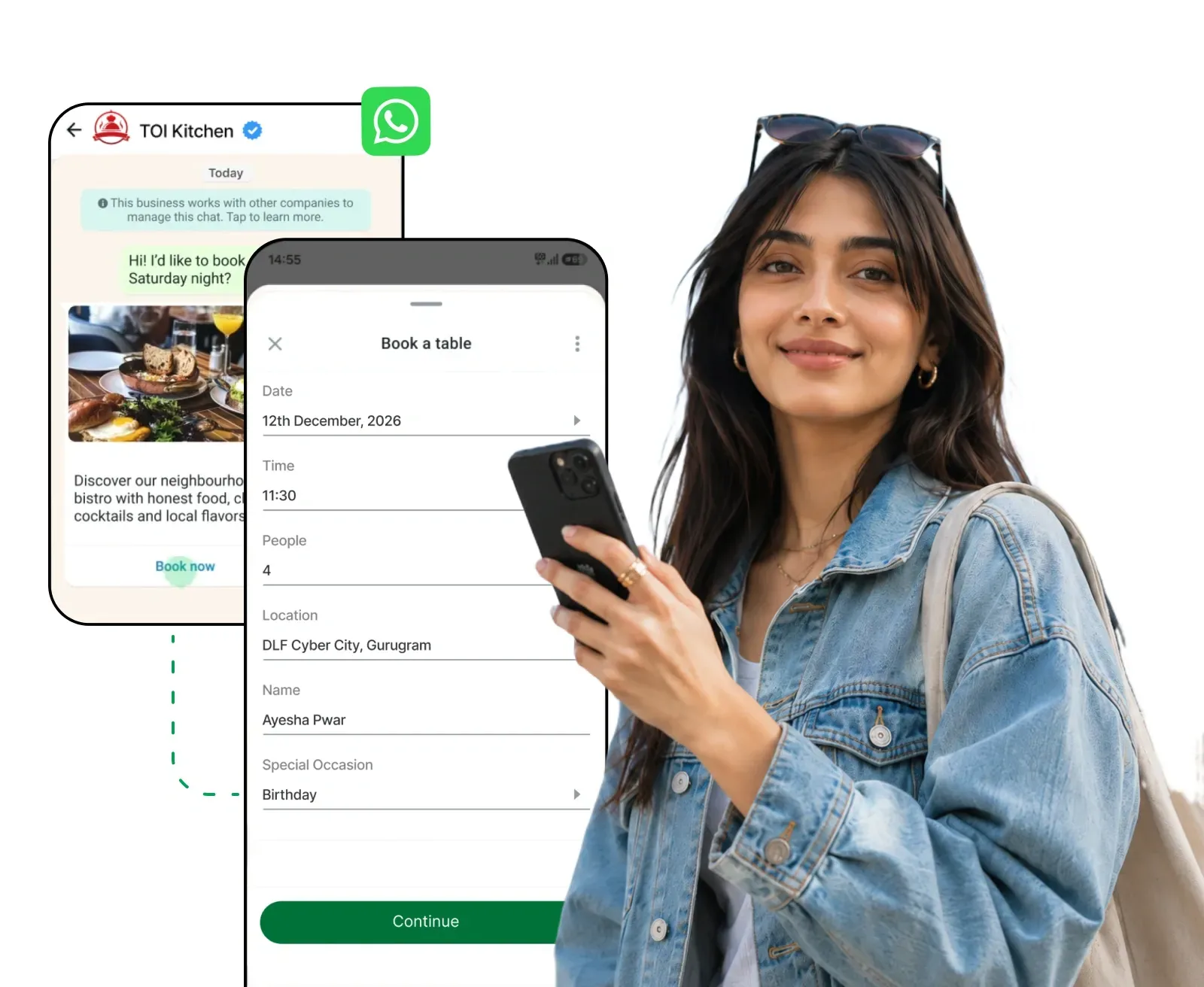
Turn Chats into Journeys with WhatsApp Flows

Build rich, app-like journeys that run entirely inside WhatsApp - no external links, no lost users.


From lead capture to appointment booking to checkout, get it all done in WhatsApp chat.

⚡️Powered by Official WhatsApp Business API
whatsapp-forms-girl-image.webp

Founders & Marketers Love us

Trusted by 210,000+ Businesses across 68+ Countries

What are WhatsApp Flows?

Why send users to another website when they can complete the action inside WhatsApp?

WhatsApp Flows let businesses create app-like journeys within the chat, where users can fill forms, choose options, book slots, confirm details or complete purchases in just a few taps.

No redirects, no drop-offs, just a faster experience inside WhatsApp.

  • Multi-screen Journeys

    Guide users step by step from selection to final confirmation inside WhatsApp.

  • Real-time Data Exchange

    Connect Flows with your backend or CRM to show live data and sync responses instantly.

  • Built-in WhatsApp UI

    Use native WhatsApp fields like dropdowns, dates, checkboxes, text inputs and opt-ins.

  • whatsapp-forms.webp

    WhatsApp Flows vs Traditional Methods

    See why guided, in-chat journeys outperform external pages and back-and-forth chat.

    External Landing Page
    WhatsApp Flows ⚡
    Where it happens
    Outside WhatsApp, in a browser
    Entirely inside WhatsApp
    Redirects required
    Every user leaves the chat
    None, the journey stays in the chat
    Drop-off risk
    High, page loads and form length kill momentum
    Minimal, users finish in a few taps
    Data collected
    !Structured, but siloed on the web
    Structured and synced to your CRM instantly
    Speed to complete
    !Depends on page speed and form length
    A few taps, done in seconds
    User experience
    Feels like leaving the conversation
    App-like screens, native to WhatsApp
    Follow-up ability
    !Needs email or retargeting ads to re-engage
    Continue the conversation right where it ended
    Best for
    Long-form content and browsing
    Bookings, orders, applications and sign-ups

    How WhatsApp Flows Work with AiSensy

    From first message to synced data, here is the complete journey of a WhatsApp Flow.

    User Starts a Conversation

    Customers enter from CTWA Ads, QR codes, campaigns, website widgets or chat links.

    One tap on “Book Demo”, “Get Quote” or “Apply Now” starts the Flow inside WhatsApp.

    The Flow Opens Inside the Chat

    The chatbot understands the query and sends the right Flow instantly.

    Users complete app-like screens with fields, selectors and confirmations inside WhatsApp.

    User Completes the Journey

    Customers select details, and branching logic shows the right next questions based on their answers.

    Data Syncs in Real Time

    Submitted responses sync automatically with your CRM, Sheets, helpdesk, payment tools or internal database, without manual entry or data loss.

    Automated Actions Trigger Instantly

    Based on responses, AiSensy automatically triggers the next step, like confirmations, lead assignment, support tickets, retargeting or follow-ups.

    Track, Learn & Optimize

    Monitor completion rates, drop-off points and lead quality for every Flow.

    Use these insights to refine screens and steadily improve conversions.

    WhatsApp Flows Use Cases

    From first message to synced data, here is the complete journey of a WhatsApp Flow.

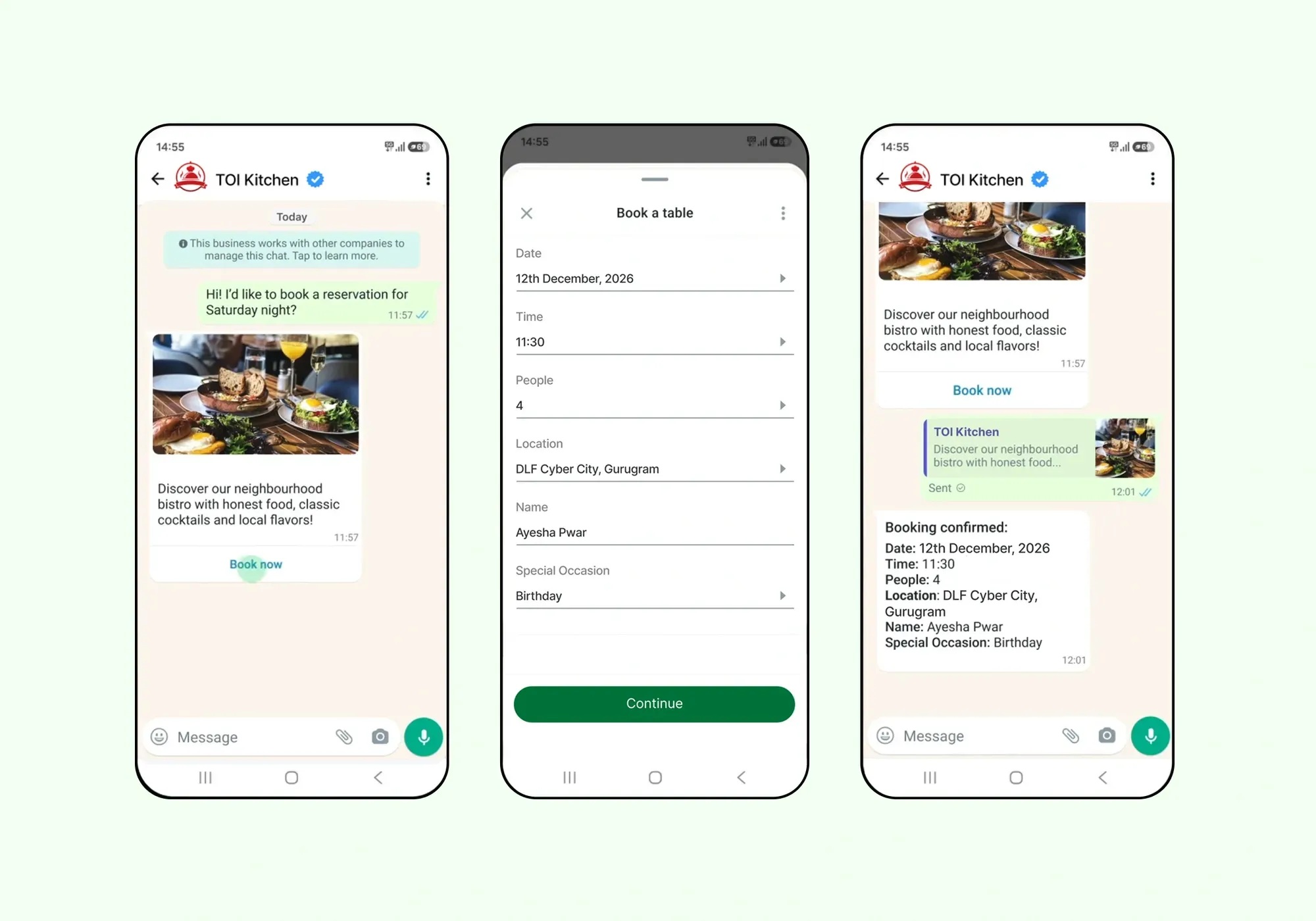
    Book Appointments in a Few Taps

    Let customers book without a single phone call or website visit.

    A typical booking Flow looks like this:

    Select a service → Pick a date & slot → Enter details → Confirm

    Perfect for clinics, salons, real estate site visits, test drives and consultations.

    Sync bookings with your calendar and send automated confirmations and reminders on WhatsApp.

    booking-using-whatsapp-flows.webp

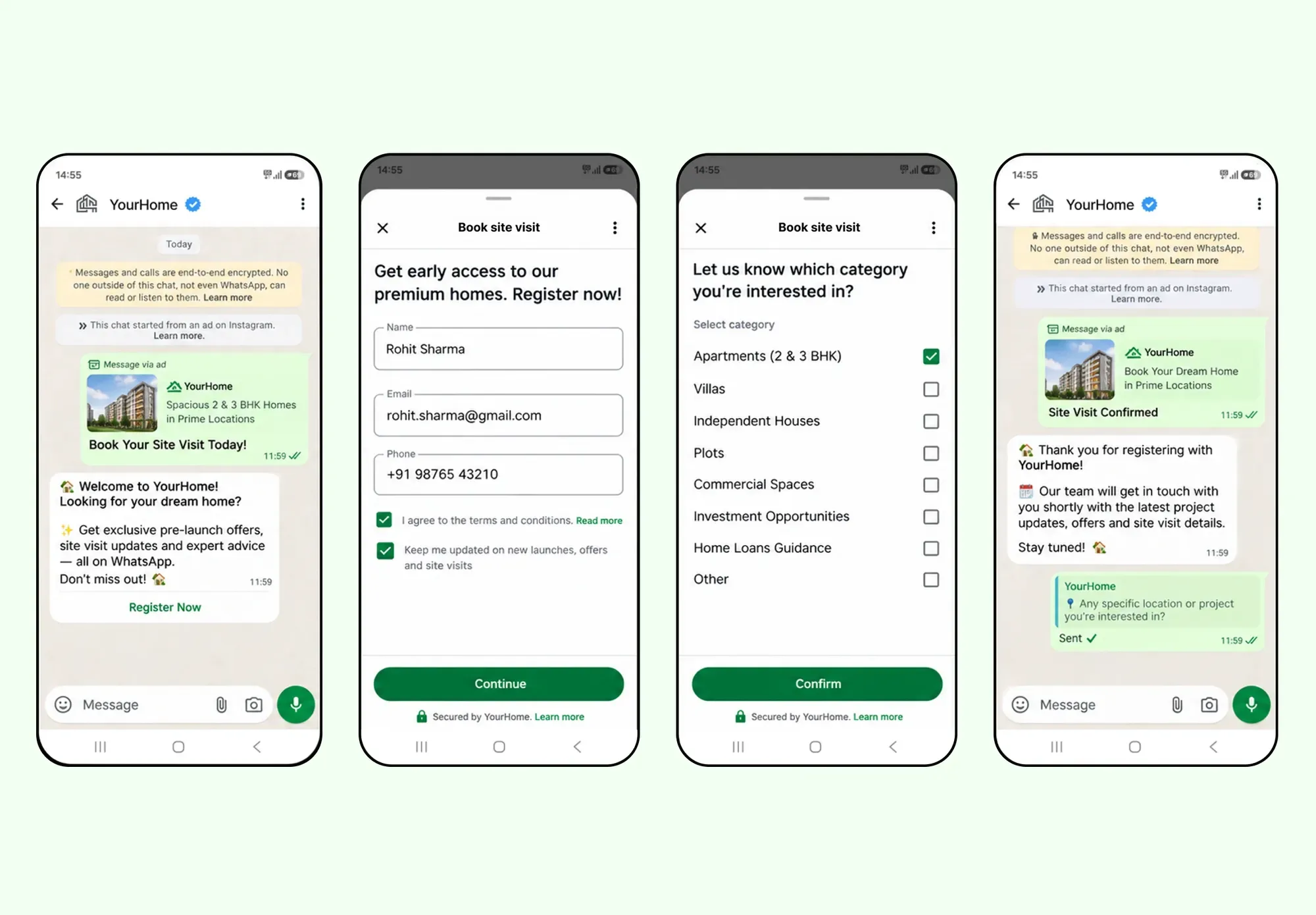
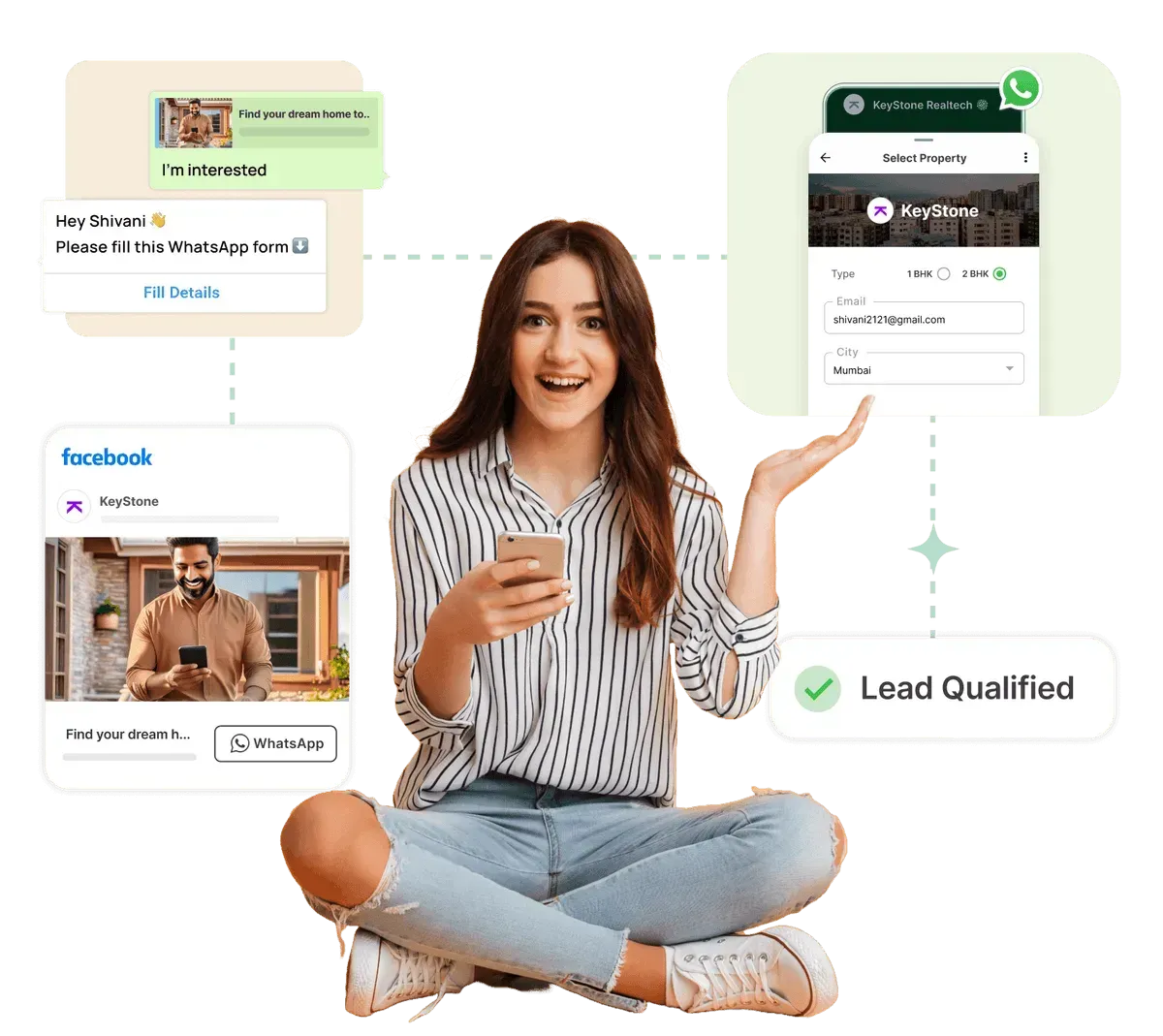
    Capture & Qualify Leads Automatically

    Turn every conversation into a qualified lead, without an agent asking questions one by one.

    Guide users through screens that capture:

    ✅ Name and contact details

    ✅ Requirement and budget

    ✅ Purchase timeline

    Responses sync to your CRM instantly, so your sales team only spends time on leads that are ready to buy.

    Pair it with Click to WhatsApp Ads to qualify ad traffic the moment it lands in your chat.

    capture-leads-suing-whatsapp-flows.webp

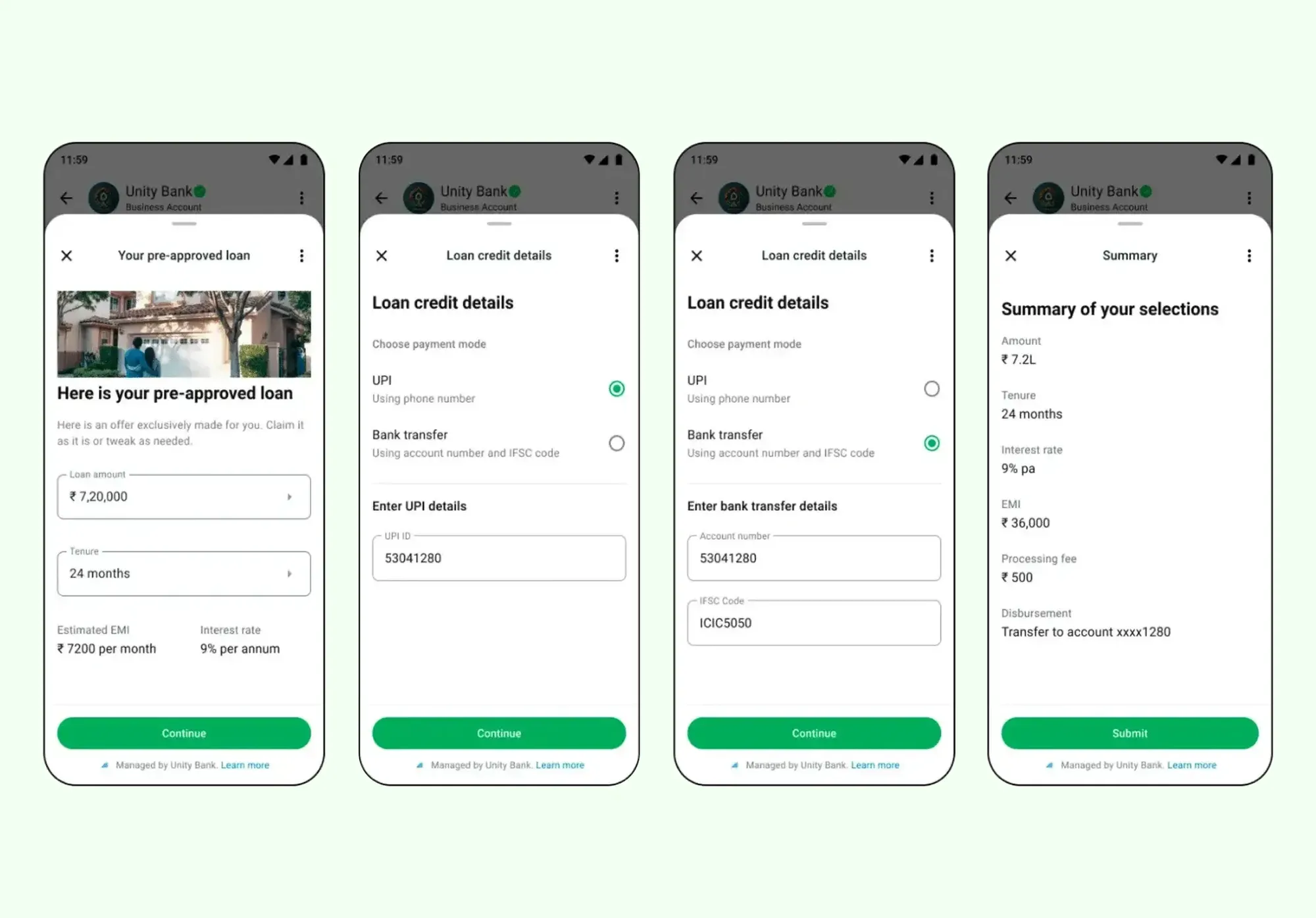
    Process Loan & Insurance Applications

    Make lengthy applications feel effortless.

    Fintech and insurance businesses can build Flows that:

    ✅ Display pre-approved offers with customisable terms

    ✅ Collect applicant details screen by screen

    ✅ Let users compare plans and pick the one that fits

    What used to need a website login and a long form now happens in one WhatsApp conversation.

    loans-using-whatsapp-flows.webp

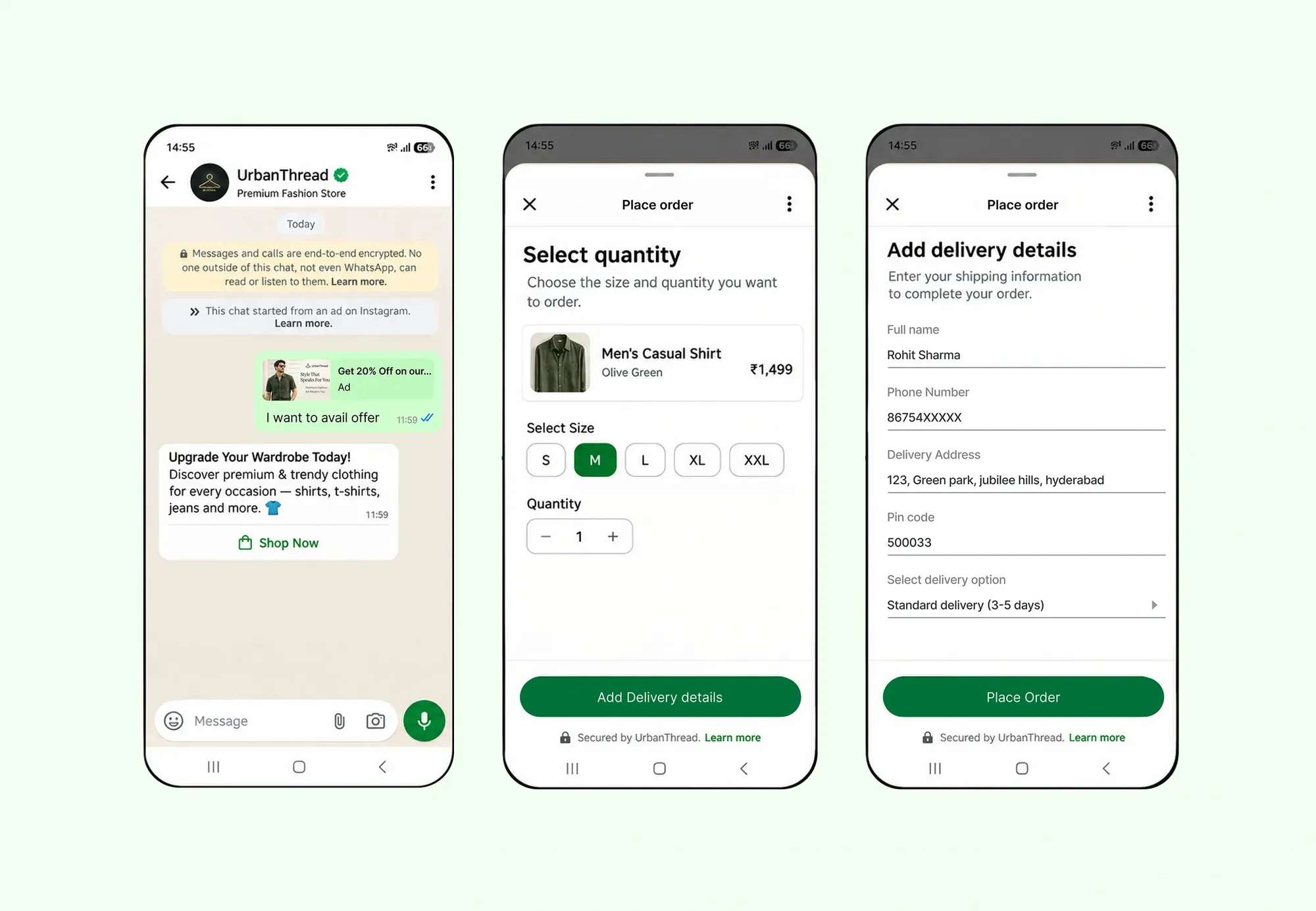
    Take Orders & Complete Checkout

    Turn product interest into a completed order inside the chat.

    A typical order Flow looks like this:

    Browse options → Select quantity → Add delivery details → Confirm order

    Connect WhatsApp Payments and customers can pay right there too, making it a true end-to-end checkout on WhatsApp.

    orders-using-whatsapp-flows.webp

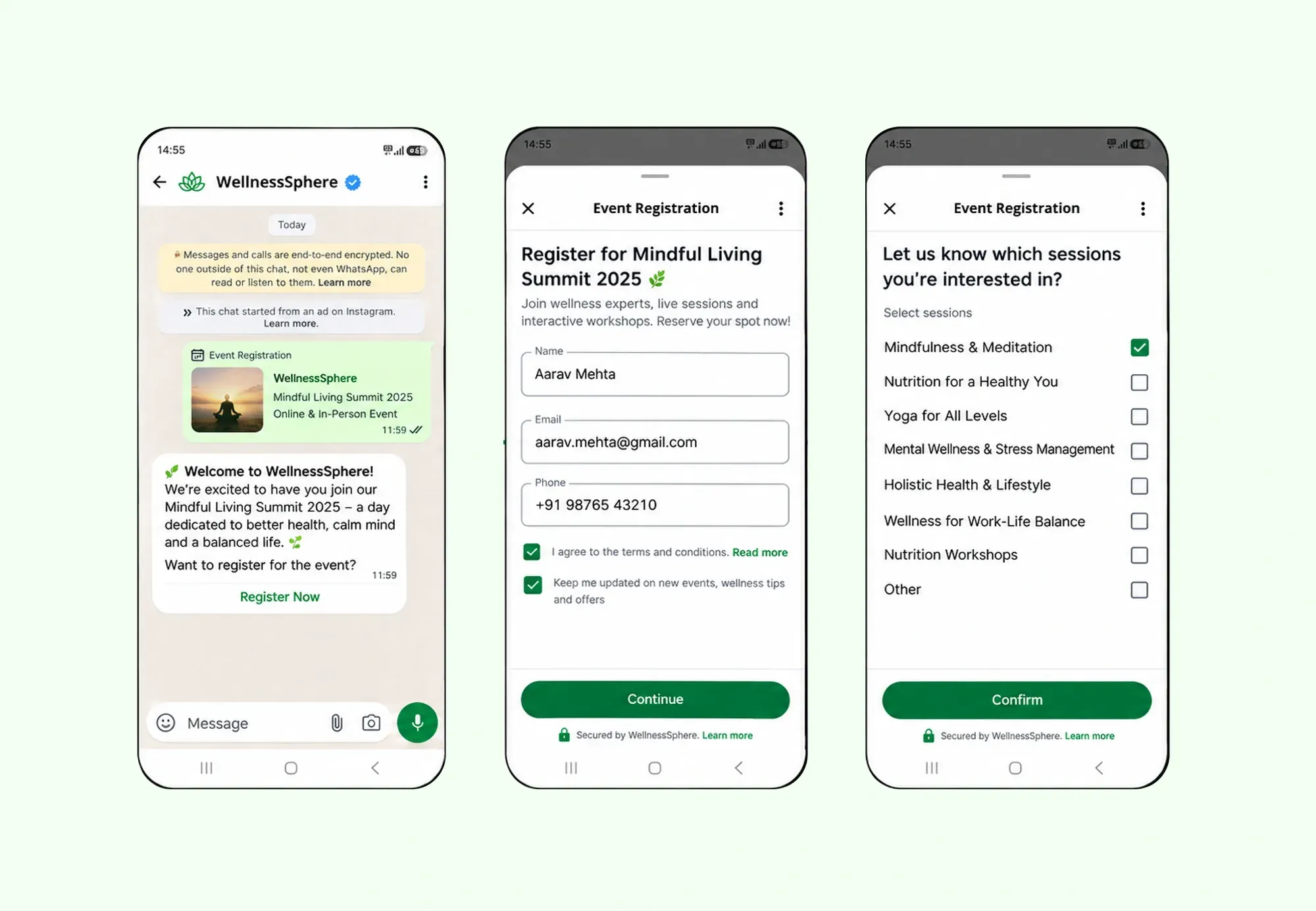
    Register Attendees for Events & Webinars

    Fill your events without registration page drop-offs.

    Collect attendee details, ticket preferences and consent in one smooth journey.

    Confirm the registration instantly on WhatsApp.

    Follow up with automated reminders as the event approaches to boost show-up rates.

    registration-using-whatsapp-flows.webp

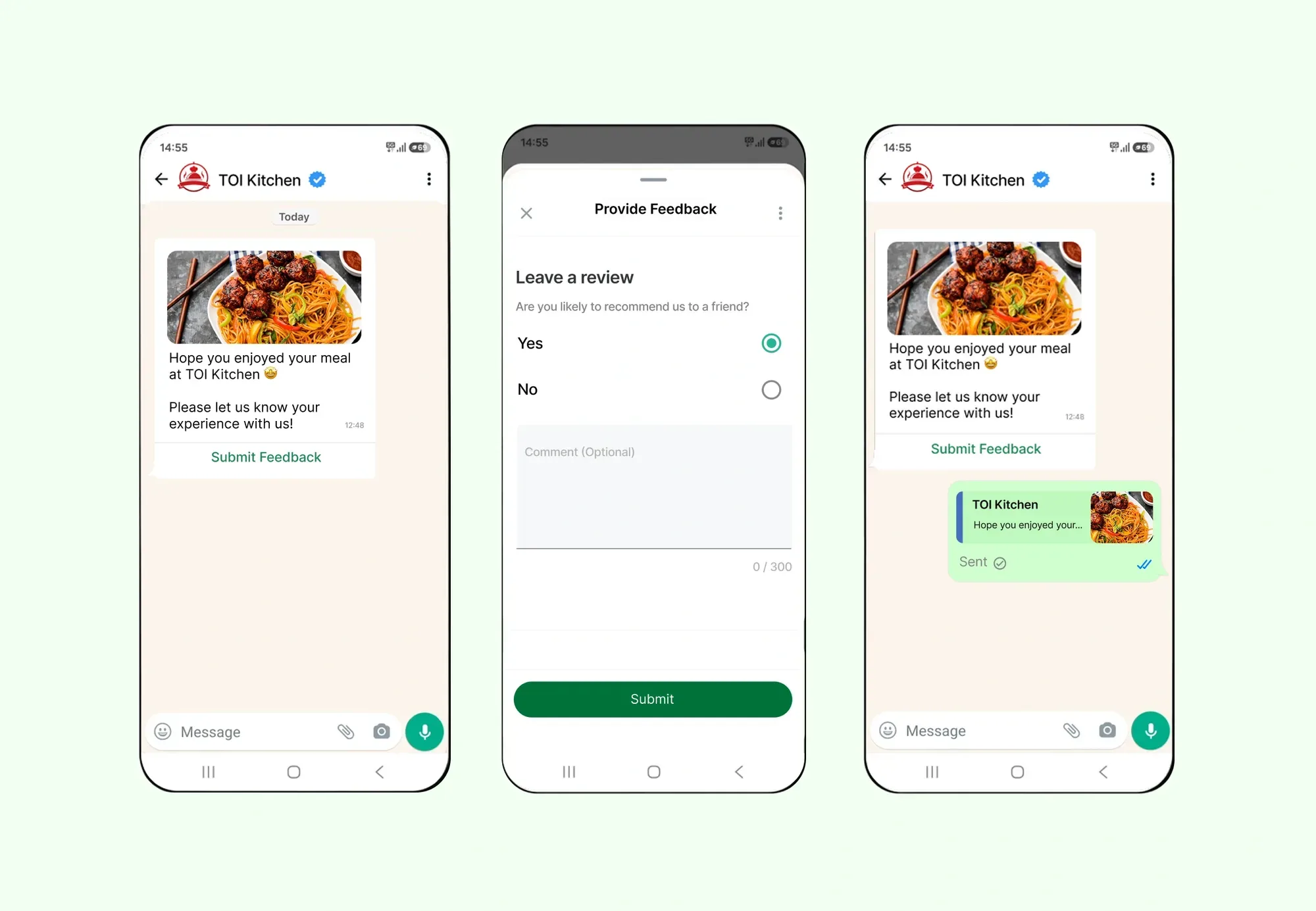
    Collect Feedback & Run Surveys

    Get answers where your customers actually respond.

    Replace ignored email surveys with structured in-chat questionnaires:

    ✅ Star ratings and scores

    ✅ Multiple choice and checkboxes

    ✅ Open text responses

    Higher completion rates, cleaner data, and every response synced to your systems automatically.

    feedback-using-whatsapp-flows.webp

    WhatsApp Flows - Key Features

    With AiSensy, you can build, launch and track WhatsApp Flows end to end, all from one dashboard.

    Automated Actions & Follow-Up

    Trigger the next step the moment a Flow is completed: confirmation messages, lead assignment, support tickets or retargeting campaigns.

    Native Input Components

    Use native WhatsApp inputs like dropdowns, date pickers, checkboxes and opt-ins, so users can complete journeys faster.

    Trigger Flows from Anywhere

    Launch Flows from broadcasts, chatbots, Click-to-WhatsApp Ads or Live Chat, so the journey starts right inside the conversation.

    Sync Responses to Your CRM

    Connect WhatsApp Flows with your CRM or backend, so every submission syncs in real time and your sales or support team can act instantly.

    Live Dynamic Screens

    Show live data like available slots, prices or stock inside your Flows, and validate user inputs instantly so every response is clean, accurate and ready to use.

    Track Completions & Drop-Offs

    Track how users move through each Flow, spot where they complete or drop off, and use those insights to improve completion rates.

    How Brands Use AiSensy for WhatsApp Marketing

    coscologo_280.png

    Sports Equipment Brand

    How Cosco, one of the most renowned Sporting equipment companies used AiSensy to drive 3x more conversions.
    logo.png

    Donation Collection Platform

    Discover how Give, India's most trusted donations collection platform used WhatsApp to achieve a 90% Payment success rate & 15X ROI.
    download-(2).png

    Edtech Platform

    Check out how PhysicsWallah, an Edtech giant used AiSensy to drive 3x more Leads through WhatsApp via AiSensy. 

    Everything You Need for WhatsApp Engagement

    AiSensy Platform covers all aspects of Marketing, CRM & Customer Support in one place.
    people-group.svg

    Multiple Human Live Chat

    Enable Multiple Human-Agent Live Chat Support on the same Whatsapp number.
    robot.svg

    Chatbot Flow Builder

    Build multiple WhatsApp Chatbots easily, thanks to a drag-and-drop interface that requires zero coding expertise.
    recycle.svg

    Retarget Users on WhatsApp

    AiSensy’s WhatsApp Retarget feature allows you to segregate your audience and Re-Broadcast for higher conversions.
    user-clock.svg

    WhatsApp Scheduler

    Schedule Broadcasts up to 2 months ahead of time across varying timezones.
    check-double.svg

    Import, Broadcast & Track

    Track users clicking on your message's CTA buttons with this Pro Feature.
    adversal.svg

    Ads that Click to WhatsApp

    Drive 5x More Leads with Ads that Click to WhatsApp.
    globe.svg

    WhatsApp Webviews

    Load web pages directly within WhatsApp. No more losing customers to external browsers.
    list-check.svg

    WhatsApp Forms

    Create and send forms with this native integration. Capture leads, book appointments, collect feedback, and more.

    WhatsApp Ads Manager

    Run WhatsApp Status Ads, capture leads instantly and track campaign performance from one place with AiSensy.

    Drive 3x Revenue with AiSensy

    Get Started for FREE. No Credit Card needed.
    ⚡️Powered by Official WhatsApp Business API

    FAQ

    What are WhatsApp Flows?

    WhatsApp Flows are interactive, app-like journeys that open inside WhatsApp. Businesses can use them to collect details, book appointments, take orders, qualify leads, run surveys and guide users through step-by-step actions without sending them to another website.

    How do WhatsApp Flows work?

    WhatsApp Flows work through connected screens inside the chat. A user taps a button, opens the Flow, fills in details, selects options and submits the response directly on WhatsApp.

    What’s the difference between WhatsApp Flows and WhatsApp Forms?

    WhatsApp Forms are mainly used to collect basic user details, while WhatsApp Flows help businesses create a more complete journey inside WhatsApp.

    Here’s the simple difference:

    • WhatsApp Forms: Best for collecting simple details like name, phone number, email or enquiry type.

    • WhatsApp Flows: Best for multi-step journeys like booking appointments, selecting products, choosing slots, submitting details or confirming actions.

    • WhatsApp Forms: Usually shorter and more basic.

    • WhatsApp Flows: More interactive with screens, dropdowns, date pickers, checkboxes and dynamic data.

    Do WhatsApp Flows require coding?

    Not always. With platforms like AiSensy, businesses can create WhatsApp Flows visually using a drag-and-drop interface. Developers may be needed only for advanced use cases like backend, CRM or API integrations.

    Can Flows be triggered from broadcasts or Click to WhatsApp Ads?

    Yes. WhatsApp Flows can be launched from broadcast campaigns, chatbot conversations, Click to WhatsApp Ads and Live Chat, so users can start the journey directly inside the WhatsApp chat.

    Can Flow responses be synced with my CRM?

    Yes. Flow responses can be synced with your CRM or backend system using APIs and webhooks. This helps your sales and support teams act on customer data instantly.

    Are WhatsApp Flows free?

    WhatsApp Flows as a feature may be available inside WhatsApp Business API platforms, but the final cost depends on your provider, plan, usage and WhatsApp conversation charges.

    WhatsApp Flows are available inside AiSensy plans, but the final cost depends on your plan, usage and WhatsApp message charges. You can check out the AiSensy Pricing for the required information.

    Which businesses should use WhatsApp Flows?

    Any business that wants to collect information or complete actions inside WhatsApp can use WhatsApp Flows. They are useful for real estate, education, healthcare, eCommerce, finance, events, travel, salons, clinics and local businesses.

    Can I collect payments through a Flow?

    Yes, WhatsApp Flows can be used to guide users toward payment journeys. Depending on your country, payment provider and WhatsApp availability, businesses can collect payments or redirect users to complete payments after collecting details through the Flow.